
Navigation
Install the app
How to install the app on iOS
Follow along with the video below to see how to install our site as a web app on your home screen.
Note: This feature may not be available in some browsers.
More options
You are using an out of date browser. It may not display this or other websites correctly.
You should upgrade or use an alternative browser.
You should upgrade or use an alternative browser.
Playback for music videos
- Thread starter Jet Nine
- Start date
For those of you shooting music videos on the 7D, what are you using for playback?
Will any playback device work or is there a speed issue involved?
thnx
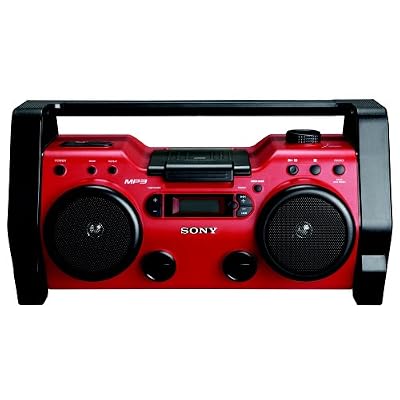
I use a good boom box for all of my playback and it works excellent. Just put it off to the side or on the corner of the artist and everything will be fine.

Jet Nine
Well-known member
I use a good boom box for all of my playback and it works excellent. Just put it off to the side or on the corner of the artist and everything will be fine.
So I'm guessing you simply use a cd master?
So I'm guessing you simply use a cd master?
Cd, ipod, etc. it really doesn't matter.
It just really depends on what and where you are shooting. If you are shooting inside of a professional studio they will have the sound system for you. If you are on the streets with no permit and filming "gorilla" a boom box will have to do. Now if you have the budget and can shot down entire streets then you can have a nice dedicated pa system.
Overall though it's pretty easy ( the music part ) your going to have a lot of other problems you need to worry about :lipsrseal
kevin gallagher
Active member
What I use is an ipod. I bring the cut of music into Final Cut Pro and give it a timecode overlay then render that out as a self contained movie. Bring that movie into compressor and export it for itunes. Transfer that clip to my ipod and now I have my music as well as a timecode slate. Play the ipod through a big boom box so the band can hear and shoot the slate/ipod as reference. It works pretty well.
good luck.
good luck.
The problem with boom box/ipod dock etc etc's is the volume aspect. Once you get a live band including a drummer going, even if no one is plugged in, the drums will still drown out the playback on those devices. You need someone louder or in ear monitoring or something.

David G. Smith
Steak Knife Member
The problem with boom box/ipod dock etc etc's is the volume aspect. Once you get a live band including a drummer going, even if no one is plugged in, the drums will still drown out the playback on those devices. You need someone louder or in ear monitoring or something.
That is something to deal with. I have used to boom box set up for a long time, but mostly for the "Concept" parts where the band is not really performing loud enough to overcome the boom box. If they do... a small PA set up might need to be used.

Michael Carter
Veteran
I've given this a lot of thought, as all my friends are musicians, some of them getting national indy press & airplay - better start shooting videos before one of 'em gets famous, right?
If a band has a drummer, chances are they have a rehearsal PA system. A fairly powerful keyboard amp or bass amp could work as well.
The "timecode quicktime clip on an iPod" sounds useable for a ghetto slate - evolving from that:
An iPad with the same timecode clip - you get a much more useable slate that could be filmed from a distance, etc. Built-in bluetooth means you can send the backing track to a ($30) BT audio receiver at the house sound system, so - no wire from the iPad.
You could also put titles in the clip - chorus, solo, etc.
You could split that clip into shorter clips - "first half guitar solo", "drum break", etc - that would make your slate guy (who's now in charge of playback) have a much easier time of getting clips up.
If you can author basic Flash, you could make an app that launches clips - though I suppose you could just use "icons as buttons" or something n the Pad.
And finally - I've seen somewhere a guy selling audio timecode software for FCP. So, on your QT clip, one track is audio for playback, the other is audio time code.
At the bluetooth receiver/sound system input, the audio goes to the speakers, and the time code goes to an audio input on the camera. (You' likely do BOTH channels to camera as a backup synch - if the timecode deal fails, you have audio for manual synch).
So now you have a wireless slate, and a stereo audio cable going to the camera. You could use a wireless lav setup with adapters to get the timecode into the cam - use once channel of the internal mic to catch sound system audio and now you're untethered. (The DVX can do that, not sure about DSLRs).
Drop your clips into FCP and the timecode plugin places them on the timeline. Haven't tried this yet, as I need a $500 iPad, a Bluetooth receiever, the Timecode Plugin (like $250 I think?) and something like a JLCooper timecode box ($175?) - though there should be a software only way to generate Audio Timeocde (like Midi TimeCode) on that first master clip you make??
Here's the link to the timecode software - whatcha guys think???
If a band has a drummer, chances are they have a rehearsal PA system. A fairly powerful keyboard amp or bass amp could work as well.
The "timecode quicktime clip on an iPod" sounds useable for a ghetto slate - evolving from that:
An iPad with the same timecode clip - you get a much more useable slate that could be filmed from a distance, etc. Built-in bluetooth means you can send the backing track to a ($30) BT audio receiver at the house sound system, so - no wire from the iPad.
You could also put titles in the clip - chorus, solo, etc.
You could split that clip into shorter clips - "first half guitar solo", "drum break", etc - that would make your slate guy (who's now in charge of playback) have a much easier time of getting clips up.
If you can author basic Flash, you could make an app that launches clips - though I suppose you could just use "icons as buttons" or something n the Pad.
And finally - I've seen somewhere a guy selling audio timecode software for FCP. So, on your QT clip, one track is audio for playback, the other is audio time code.
At the bluetooth receiver/sound system input, the audio goes to the speakers, and the time code goes to an audio input on the camera. (You' likely do BOTH channels to camera as a backup synch - if the timecode deal fails, you have audio for manual synch).
So now you have a wireless slate, and a stereo audio cable going to the camera. You could use a wireless lav setup with adapters to get the timecode into the cam - use once channel of the internal mic to catch sound system audio and now you're untethered. (The DVX can do that, not sure about DSLRs).
Drop your clips into FCP and the timecode plugin places them on the timeline. Haven't tried this yet, as I need a $500 iPad, a Bluetooth receiever, the Timecode Plugin (like $250 I think?) and something like a JLCooper timecode box ($175?) - though there should be a software only way to generate Audio Timeocde (like Midi TimeCode) on that first master clip you make??
Here's the link to the timecode software - whatcha guys think???
I whatcha guys think???
I think I will stick with a boom box..........