C100: Pink/Red in Flesh Tones, Need to Adjust White Balance

nedcam

Well-known member
PLEASE DON'T SUGGEST ANY POST SOLUTIONS.

Ever since I had my mother board replaced in my C100, whether I white balance or use the pre-set, my Caucasians' skin tones lean towards a pink/red tone. I realize this is easily correctable in post, but I want it looking good when a client plays back the AVCHD in QuickTime Player on the set or on the plane back home. I don't want them freaking out as they tend to do.

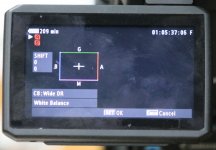
Using Wide DR, I see there's a sub menu that looks dangerous for me to play with but seems to suggest this is where the solution lies. It is under the Custom Picture button, then drill down to Wide DR, then CP, then WB. Anybody have success with adjusting this parameter to get the pink out of the WB in faces?

It always looks good on my Small HD AC7 OLED monitor but when I import into FCP or play in QT they always have a red/pink tinge which I find upsetting after all the work I did to make it look great.

I will post about the green in blond women's hair another time.

Thanks,

Ned
 

Attachments

  • WIDE DR WB.jpg
    WIDE DR WB.jpg
    67.3 KB · Views: 0
Ned,

The Color Matrix controls can be your friend. They really allow you to dial in the colors exactly how you like, and they too are located in the custom picture menu.

All those R-G, R-B, X-Y deals is essentially saying "How saturated do you want color X, which is then going to push color Y's hue."

So for R-G, if you push that positive, you are going to make reds more saturated, and push greens slightly towards yellow. Make it negative, you're reducing Red's saturation, and pushing greens towards blue.

These are all of course VERY subtle adjustments. I suggest getting a friend to sit in front of camera under your normal lighting conditions and tuning these based off a larger production monitor.

The good thing is you can see these adjustments done live as you tweak them, and you can even have the vectorscope up simultaneously.

The White Balance adjustment may get you there as well as a quick fix, but I tend to like to keep that neutral unless I'm going for a specific style.
 
Thanks Macaholic. I was thinking of doing a test but what I am worried about is that since almost every situation we find ourselves in when we are about to WB, excluding a closed room with 100% tungsten or 100% daylight, won't that affect the matrix? So if I do get it looking less pink under one lighting situation, won't that have an unknown effect in another situation? Or can I tweak it to the point that if I get the red out under 100% tungsten, that value will hold in all situations?

I move too fast to have to deal with this in every set up, but it's the interviews I am most concerned with.

Thanks
 
Ned, not sure I understand your last question exactly, but the matrix will hold no matter the white balance, that's why I suggest it over the White Balance adjustment function you were first looking at.

R-G adjustment will apply to any pixel perceived as Red, and in a lesser sense green. So it is independent of the white balance.

Again, these are subtle adjustments, so you're not completely removing any colors here even at their most extreme values.
 
Hmmmm...so you're saying that the menu screen in my first post is not the place to adjust one's WB? If not, where?
Thanks
 
The menu screen in your first post is white balance shift, it's something I usually only choose to do if I'm correcting for a green tint in lower quality LED's, or I'm making a stylistic choice that I want all my whites to have a slight color tinge to them to serve the story (and if I don't have time to do that in post, which of course, is the defacto choice)

When someone says "adjust your white balance" to me, I just think adjusting my kelvin temperature using the WB and little flower button on my camera.

But if you're having an issue with the skintones being too pink, I wouldn't consider that a white balance issue per-say if your whites (like a white card) are showing up fine, I would consider it a skintone issue, and alter it in the color matrix.
 
Thanks. I think I will hire my friend who is a video engineer on Judge Judy and those types of shows to come over. He matches cameras. He tried to tweak my Small HDs but we gave up, he says I need a $3K 17" but chose to buy a new car instead. I will show him your posts and we will do the tests under no time pressure.

BTW, you don't tweak your WB every time you are on location for an interview, correct? I don't have time for that.
 
Ned,

That sounds like a good idea, a lot of this stuff just comes down to having an experienced eye to notice slight shifts in color.

I tweak my White Balance (Just the Kelvin Value) every time I change environments: indoor, outdoor, practical light sources get added, but I rarely tweak my WB Shift (the menu in your first post) because I can usually correct any odd shifts in post. And the last thing I would want is to do a shift for one scene, and then forget I did that and shoot the next scene with that shift still active and mucking up my image.

To me white balance shift is more a correction tool for ugly light sources, and color matrix is more for building a specific look.
 
Back
Top