nedcam
Well-known member
PLEASE DON'T SUGGEST ANY POST SOLUTIONS.
Ever since I had my mother board replaced in my C100, whether I white balance or use the pre-set, my Caucasians' skin tones lean towards a pink/red tone. I realize this is easily correctable in post, but I want it looking good when a client plays back the AVCHD in QuickTime Player on the set or on the plane back home. I don't want them freaking out as they tend to do.
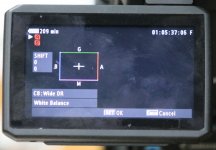
Using Wide DR, I see there's a sub menu that looks dangerous for me to play with but seems to suggest this is where the solution lies. It is under the Custom Picture button, then drill down to Wide DR, then CP, then WB. Anybody have success with adjusting this parameter to get the pink out of the WB in faces?
It always looks good on my Small HD AC7 OLED monitor but when I import into FCP or play in QT they always have a red/pink tinge which I find upsetting after all the work I did to make it look great.
I will post about the green in blond women's hair another time.
Thanks,
Ned
Ever since I had my mother board replaced in my C100, whether I white balance or use the pre-set, my Caucasians' skin tones lean towards a pink/red tone. I realize this is easily correctable in post, but I want it looking good when a client plays back the AVCHD in QuickTime Player on the set or on the plane back home. I don't want them freaking out as they tend to do.
Using Wide DR, I see there's a sub menu that looks dangerous for me to play with but seems to suggest this is where the solution lies. It is under the Custom Picture button, then drill down to Wide DR, then CP, then WB. Anybody have success with adjusting this parameter to get the pink out of the WB in faces?
It always looks good on my Small HD AC7 OLED monitor but when I import into FCP or play in QT they always have a red/pink tinge which I find upsetting after all the work I did to make it look great.
I will post about the green in blond women's hair another time.
Thanks,
Ned