Panning 'mud', reasons why and firmware update

I am slowly getting to the bottom of this.

It occurs in external shots because the light level is higher, and it seems to be worse for fast shutter speed pans than in 1/30 speed pans. It really does seem that my GH1 can't handle pans containing a lot of detail and little motion blur.

On a brighter note, I don't think the problem is with the sensor output, and maybe not even the GH1's CPU, because when recording the video, the live view output on the screen is fine. It is only what ends up recorded to the memory card which is crippled. (See my photos on page 9 RE: playback on GH1's lcd). It is not to do with anything in post or my computer software, etc.

Here is how 1/30 may help reduce the effect.... I am still double checking and testing however.

Here is the pan in 1/30, more motion blur but less evidence of artefacts (apart from top left corner maybe):

slowshutterbad.png


Here is the pan in 1/125, as you can see - this should be much more detailed, as it has less motion blur. But it's artefacted to hell:

fastshutterbad.png


Some evidence of rolling shutter / jello effect there too.

But it's the artefacts that worry me most about my GH1. It's not just pans this occurs on... does it on zooms as well.

Here is the static frame, full detail, for reference. Other than the jello effect this is what the 1/125 shot should look like, with maybe a bit of blur. I prefer motion blur at 1/30 rather than a high detail action pan at a fast shutter. At least motion blur is blur...and the detail is gone anyway.

slowshutterok.png
 
Last edited:
oh im guessing you didnt get what the hell i was talking about

heres the bottomline
the cpu handles the ENCODING of the video.
IMAGE > SENSOR (RAW) > CPU PROCESSOR (COMPRESS & ENCODES TO AVCHD) > MEMORY CARD (Compressed 17mbps AVCHD)

What you see in the live view is the raw output! if it can be outputed live via HDMI, you'll have the uncompressed 4:2:2 footage!

ergo, the gh1 cpu cant encode avchd well. it could be a limitation on the processor unless panny releases an update on the codec to prove me wrong!
 
dccloud, I'd be interested to know how you seem to know for sure that the output on the live view is raw footage, direct from the sensor, untouched by the same processors that output the AVCHD stream to the memory card.

Have you reversed engineered your GH1???

As a work around, for now I will be avoiding pans and shooting with as slow a shutter speed as possible. You get less rolling shutter jello effect at 1/30 too. Downside is that AF is a lot slower than at higher shutter speeds. Fewer frames to compare in the same timeframe = slower AF.
 
If it really is only high shutter speeds that cause this then the workaround would be this:

1. Shoot only at 1/50 in 1080i mode, ( should approximate 180 degree shutter) stopping down with ND filters rather than increasing shutter speed (iris makes no difference)

2. Shoot in 720p 60 if you need a 24p look with the look of a 90 degree shutter. This can be done very easily by dropping the 60p footage into 24p timeline in many NLE's Additionally, you will have room to slow the footage down if need be. There is almost no decipherable difference between 24p shot at 1/120 and 60p shot at 1/120 and dropped into a 24 frame timeline.
 
To me it looks like the mud happens with the auto focus.
Maybe it just goes crazy when its at a set focus and then everything starts spinning on it?
 
yeah AVCHD encoding is very processor intensive which is why you don't see mjpeg break up like that . And the 720p looks better because the processor has less pixels to squeeze into the 17Mbps stream.
that's my non-engineer take on it. Kholi also mentioned that he was seeing a lower average bit-rate on the 1080 compared to the 720 AVCHD.
 
I really hate to admit it but I think dcloud might be right. The processor sucks...I mean can't handle the encoding properly. If this turns out to be true I wonder if the bit rate was increased to let's say 24Mbps would it have the same issues? It does not use B frames....just like the 5D Mark ll. And to be honest when I watch 5D ll videos very closely during pans I see sort of the same thing (but to a very miniscule degree). Someone recently posted info from a Canon site that explained how the 5D ll also does not use these B frames and to compensate they upped the data rate. Maybe that's the fix for the Panasonic.
 
I thought all this was discussed before? 1080 breaks down due to 17Mbps VBR - VBR is the problem from my understanding.
 
Righty-O then.
There's definitely something going on not caused by GH1 being picky about the cards.

GH1 actually don't have one cpu, it had two unless I've totally misunderstood what the Venus Engine is. And it sure looks like that the 1080/24 mode makes the AVCHD encoding choke at quick changes in the image, most clearly manifested when using higher shutter speeds. Now I'd say most of here will end up using a shutter round 1/60 - 1/50 to get that 'filmic' look so it would be great seeing how that looks as that 1/30 frame isn't hopelessly bad.

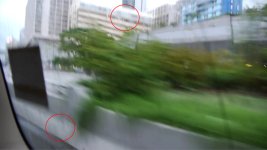
But hang on, this doesn't end with that, I'd say there's something rotten in Denma... no, NTSC-land. OK, might be something rotten as I don't have all facts here. Attached is a frame grab from QTI's testing with his PAL version GH1 done in 1080/25 (I've scaled it to 50% size) This frame has lots of things that should be bad for the encoding; green foliage, a fast side motion (he's in a car) and a very quick vertical change due to a road bump. You see how the buildings in the background are smeared vertically of motion blur. The one thing the clip lacks is high hard contrast since there's no strong sunlight. Before anybody jumps to a incorrect conclusion the smudges I've exemplified inside the red circles are not codec breaks but rain drops on the car window also smeared by motion blur. And for the life of me I can't see any of the severe breakdowns that commanderspike has shown, not in this frame attached or anywhere else in that clip. And since it's handheld inside a moving car it's pretty jerky shaky all the way.

Some speculation then: It could be either that the NTSC version's encoding isn't tweaked properly and that might be a firmware upgrade to fix OR the combination of compressing to AVCHD and stuffing the 24p into a pulldown sequence inside the 60i stream is enough to choke the CPUs as opposed to compressing and getting 25p into 50i. Going up to 24 bps would in all likelihood reduce the artefacts now that card write speed has been ruled out. That quote about not using 'b pictures' is also interesting and is certainly a CPU related decision.

To round off I don't know exacly what settings QTI used to shot this clip but I will get my PAL GH1 on Friday and will try to test it out in the weekend. Maybe I can manage to break the codec in similar fashion and that would indicate that some pointy haired boss has forced the 1080 mode into a 720 cam so he gets a 'Full HD' sticker on the box. This is a consumer product and conventional business wisdom says that features sell better than quality. Not that I agree with that idea. Or simply the engineering team got overzealous and pushed the cam outside it's hardware envelope. Both things have happened before. To flat out say that GH1 can't encode AVCHD well isn't entirely correct, it does a nice job at 720.
 

Attachments

  • QTIold_00017-2.jpg
    QTIold_00017-2.jpg
    235.1 KB · Views: 0
Just a quick reply to say I have a PAL camera and I see the artifacts too. It is not an NTSC/PAL thing.
 
Thanks for clarifying that jshaw300.....that's what i've been trying to explain to folks. I see this behavior in both NTSC and PAL footage.
 
maybe we'll get lucky and Pentax will answer my call for 24p and manual control. That mjpeg looks tasty.
 
Back
Top