commanderspike
Carbonite Member
I am slowly getting to the bottom of this.
It occurs in external shots because the light level is higher, and it seems to be worse for fast shutter speed pans than in 1/30 speed pans. It really does seem that my GH1 can't handle pans containing a lot of detail and little motion blur.
On a brighter note, I don't think the problem is with the sensor output, and maybe not even the GH1's CPU, because when recording the video, the live view output on the screen is fine. It is only what ends up recorded to the memory card which is crippled. (See my photos on page 9 RE: playback on GH1's lcd). It is not to do with anything in post or my computer software, etc.
Here is how 1/30 may help reduce the effect.... I am still double checking and testing however.
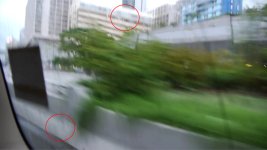
Here is the pan in 1/30, more motion blur but less evidence of artefacts (apart from top left corner maybe):

Here is the pan in 1/125, as you can see - this should be much more detailed, as it has less motion blur. But it's artefacted to hell:

Some evidence of rolling shutter / jello effect there too.
But it's the artefacts that worry me most about my GH1. It's not just pans this occurs on... does it on zooms as well.
Here is the static frame, full detail, for reference. Other than the jello effect this is what the 1/125 shot should look like, with maybe a bit of blur. I prefer motion blur at 1/30 rather than a high detail action pan at a fast shutter. At least motion blur is blur...and the detail is gone anyway.

It occurs in external shots because the light level is higher, and it seems to be worse for fast shutter speed pans than in 1/30 speed pans. It really does seem that my GH1 can't handle pans containing a lot of detail and little motion blur.
On a brighter note, I don't think the problem is with the sensor output, and maybe not even the GH1's CPU, because when recording the video, the live view output on the screen is fine. It is only what ends up recorded to the memory card which is crippled. (See my photos on page 9 RE: playback on GH1's lcd). It is not to do with anything in post or my computer software, etc.
Here is how 1/30 may help reduce the effect.... I am still double checking and testing however.
Here is the pan in 1/30, more motion blur but less evidence of artefacts (apart from top left corner maybe):
Here is the pan in 1/125, as you can see - this should be much more detailed, as it has less motion blur. But it's artefacted to hell:
Some evidence of rolling shutter / jello effect there too.
But it's the artefacts that worry me most about my GH1. It's not just pans this occurs on... does it on zooms as well.
Here is the static frame, full detail, for reference. Other than the jello effect this is what the 1/125 shot should look like, with maybe a bit of blur. I prefer motion blur at 1/30 rather than a high detail action pan at a fast shutter. At least motion blur is blur...and the detail is gone anyway.
Last edited: