GH4 Panasonic GH5 coming in 2017

400mbps All-I is great, but I would prefer an option for 400mbps IPB. Not just because it could potentially net better results, but also because it would open the door for 4K 60p in VFR mode.

I think it all depends on the camera having enough processing power to make use of the higher data-rate, so I would not expect any details to be set in stone until much closer to the actual release date.
 
Never any heat issues with mine and I have never heard any complaints from anyone else. It seems Panasonic engineers know how to deal with heat. I would expect the GH5 to be the same.

One of the interviews dealt with the heat conversation. Basically without time limit they did step up heat sink absorbsion.
 
does anyone know if the external recorder options like Atomos Shogun Inferno will record VFR modes? Not just the big ones like 60p, 120p, etc - but framerates from GH cameras such as 36fps, 72fps, etc.?
 
I'm hopeful - but skeptical - about AVC-Ultra. Panasonic is better than any other manufacturer about letting "pro" features slide down into consumer products, but my guess is that they will want to leave AVC-Ultra as a differentiator.

Also, it's good to remember that the reason an all-i codec needs so much bandwidth is not purely PQ, but rather edit-friendliness. It's less taxing on the editing CPU to not have to reconstruct frames, but it's not necessarily visually better. (Oft times the opposite is true.)

I mention this because it's easy to fall into the simplistic thinking that all-i codecs are always better, as that's how they are usually marketed. A long-gop codec is more capture friendly, more storage friendly, modern CPU's are more likely to be able to decode reasonably fast, and you always have the option to transcode (just what you need) to a native edit-friendly format. NLE's like FCPX make it brain-dead simple to quickly, invisibly used transcoded and proxy footage, which yields the best of both worlds.

Granted, there are some special scenarios where you really do "need" either the quality of a bandwidth heavy codec or the speed of an all-i codec, and in those cases a ProRes recorder does the job nicely. Those scenarios diminish with each camera generation, though. For example, my GH3 used to require a recorder to pull high quality 1080P keys...but now I can easily do so from GH4 4K footage. I expect i'll be able to pull clean 4K keys from the GH5.

So, I was doing some investigation on what the GH5's 400Mbps would give us when I stumbled upon this comment on a Varicam LT review:

"A single 256 GB P2 Express card holds about 90 minutes of AVC-Intra4K 422 at 24fps, or 73 minutes at 30fps; 60fps AVC-Intra4K LT will fill the card after 63 minutes. Very roughly speaking, AVC-Intra4K 422 runs around 400 Mbps while AVC-Intra4K LT is a bit over half that data rate (at normal playback speed)."

http://www.dvinfo.net/article/acqui...aricam-lt-4k-lss-cine-camera.html#prettyPhoto

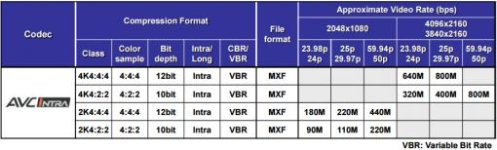
I also ran across this AVC-Ultra PDF on Panasonic's website which shows the bitrate of 400Mbps for AVC-Intra4K 422.
AVC-Ultra.jpg

http://pro-av.panasonic.net/en/sales_o/p2/AVC-ULTRAoverview.pdf
 
Would there be any problems shooting 4k 29.97 10-bit 4:2:2 and then conforming it to 23.98 in Premiere (so basically making it 30p at a 24p timebase) to grant a subtle 4K slow motion to clips? Basically, a super minor VFR? Any gotchas to this process, barring audio sync issues (assuming its just for shots where audio sync doesn't matter).
 
So, I was doing some investigation on what the GH5's 400Mbps would give us when I stumbled upon this comment on a Varicam LT review:

"A single 256 GB P2 Express card holds about 90 minutes of AVC-Intra4K 422 at 24fps, or 73 minutes at 30fps; 60fps AVC-Intra4K LT will fill the card after 63 minutes. Very roughly speaking, AVC-Intra4K 422 runs around 400 Mbps while AVC-Intra4K LT is a bit over half that data rate (at normal playback speed)."

The iApp "AJA DataCalc" is good to have to figure out data storage requirements when using different codecs and framerates. It has been around since the early days of the iPhone and is still jas useful as when it was released. It is free.
 
Would there be any problems shooting 4k 29.97 10-bit 4:2:2 and then conforming it to 23.98 in Premiere (so basically making it 30p at a 24p timebase) to grant a subtle 4K slow motion to clips? Basically, a super minor VFR? Any gotchas to this process, barring audio sync issues (assuming its just for shots where audio sync doesn't matter).

I mean, you could do this in Premiere Pro CC, but the speed difference is very minimal.
 
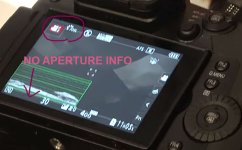
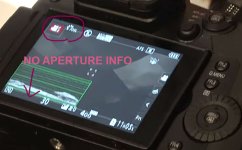
No exposure info in automatic video modes or auto iso. The new auto iso in M and iso range will be difficult to use if the user cant see what iso the camera wants to use. I hope they fix it for final FW.

EXPO-INFO.jpg
 
Last edited:
philiplipetz
I wish I had a job in ENG or cinema, but then this camera would not work.
--
Or would it? Use a B4/3 adapter for servo zoom lens...maybe a shoulder rig. Main hardware issue limitation is lack of SDI for truck feed..use HDMI to SDI adapter?
I see F5s in the news pools.
 
In case this wasn't mentioned previously, the new revised Lumix lenses ( 12-35mm, 35-100mm, 45-200mm, 100-300mm ) that support Dual IS 2 will smoothly change their aperture instead of instantly jumping from one F-stop to another. I would love to see a comparison between the old and the new lenses to see how different this is when shooting video.
 
No exposure info in automatic video modes or auto iso. The new auto iso in M and iso range will be difficult to use if the user cant see what iso the camera wants to use. I hope they fix it for final FW.

You have brought this up before, numerous times in this thread. People have responded with potential solutions, like using Manual Mode instead of Auto, or using a manual lens so you can set aperture. I'm not sure why these solutions won't work for you, but it's clear that you're convinced they won't.

IMO I doubt they will include this in a future firmware update. But if they do then please let us know.
 
You have brought this up before, numerous times in this thread. People have responded with potential solutions, like using Manual Mode instead of Auto, or using a manual lens so you can set aperture. I'm not sure why these solutions won't work for you, but it's clear that you're convinced they won't.

IMO I doubt they will include this in a future firmware update. But if they do then please let us know.

My post was the answer. No one knew it before.

I dont have manual lenses. I must use auto exposure quite often.

Am I the only one who wants to see what aperture, shutter speed and iso the camera is using? What harm it could do? Why the GH5 shows exposure info when taking photos? What is the logic?

gh5.jpg
 
Last edited:
My post was the answer. No one knew it before.

I dont have manual lenses. I must use auto exposure quite often.

Am I the only one who wants to see what aperture, shutter speed and iso the camera is using? What harm it could do? Why the GH5 shows exposure info when taking photos? What is the logic?

View attachment 119994

I think you're one of the few who needs this honestly. Most video shooters either manually control aperture, iso and shutter speed, or go fully automatic if they do at all. And you do know ANY lens can be put in manual mode, even ones with electronic focus and aperture controls.
 
I think you're one of the few who needs this honestly. Most video shooters either manually control aperture, iso and shutter speed, or go fully automatic if they do at all.

Even with full auto I would like to see what the camera chooses to use. Why we can see photo exp values but no video. What is the difference? In fact it works very well when shooting video with 4k photo. Why not in video mode? Panasonic auto exposure and auto WB works very well and Panasonic courages to use auto when they added auto iso in M with EV comp and iso range. They also made good job by improving auto aperture in new lenses. Why make then auto exposure guessing?
 
Last edited:
Am I the only one who wants to see what aperture, shutter speed and iso the camera is using? What harm it could do? Why the GH5 shows exposure info when taking photos? What is the logic?

Yes you are because most of us use the camera in manual mode so it just isn't really an issue for us. It's hard for us to relate to your situation because 99% of the GH4 users just do not shoot that way. Video is different than shooting stills and typically you don't want to have the camera just randomly change the shutter and aperture. Even if you can see it you really can't do much with it so why bother. If you watch the aperture change what exactly is that going to do for you? What can you do with that information that would help you? If you are concerned about what the camera selects for aperture then shoot manual and you can choose what to use. If you are ok with it automatically shifting the aperture then why care what value it uses? It is what it is and you can't do much about it as it is changing except see the numbers change. Honestly I would be more concerned about what was going on in the scene then I was what aperture numbers the camera chooses which again I can't really do anything about anyway.
 
Back
Top