GH5 Panasonic equivalent to Sonys Catalyst Browse

Doug Jensen

Carbonite Member
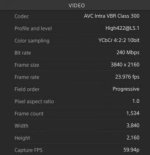
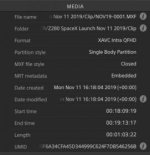
Does Panasonic have a free stand-alone utility program that will allow me to quickly view clip metadata (codec, f-stop, gamma, shutter, etc.) like I can do with Sony footage via Catalyst Browse? If so, can you post a link.

Edit: For a Mac running Mojave.
 
Last edited:
PhotofunStudio? Surely that must be a joke, right? We're talking about professional equipment being used by professionals. How could Panasonic not have an equivalent of Catalyst, especially when they have Sony to copy from? And to not have a version for Mac? 9 out 10 professionals I know are all on Macs. There must be a better answer that this.
 
Resolve is the best bet but from what I have seen from GH5/GH5s the Panasonic shooting data is about as close to pathetically absent as it gets, i.e. timecode in/out, date and time. Zilch for shooting data. Hopefully Panasonic is more supportive with their other cams. In Resolve metadata, you select “all groups” and there are hundreds of metadata fields that will be populated by cameras that save the metadata. You just click on a file in the media manager bin.
 
Some people use the command-line tool below, but the last time I checked it was only able to obtain information/settings for when the clip started recording. Meaning it wouldn't know a change - like aperture - occurred during recording unless the camera - like a GH5 - was being used in the photo mode for video recording.

https://exiftool.org/

___

https://mediaarea.net/en/MediaInfo is pretty popular as a fairly straightforward GUI that provides a simple breakdown of various video information one might like to see (codec, resolution, bit depth, color space, audio, etc).

___

A Codex workflow (via VariCam Pure) would provide you its own options, but I'm assuming you're not interested in viewing those types of files.
 
Resolve is the best bet....

My experience with the free version of Resolve is it won't even recognize 10-bit 4:2:2 files from the GH5... it's like the files are not there. When I inquired about this on the Resolve forum, I was told that the *paid* version of Resolve will work with 10-bit 4:2:2 files but the files will not work with the free version of Resolve. And they acted like I was an idiot for even asking the question.

It's been more than a year since I tried to use the GH5's 10-bit 4:2:2 files with Resolve, so possibly version 16 is different.
 
PhotofunStudio? Surely that must be a joke, right? We're talking about professional equipment being used by professionals. How could Panasonic not have an equivalent of Catalyst, especially when they have Sony to copy from? And to not have a version for Mac? 9 out 10 professionals I know are all on Macs. There must be a better answer that this.

You can criticize them for an unfortunate name however this is the software recommended in the manual for the GH series and I do believe now the S1H too. Serial number of the camera has to be used to download the specific software. It gives the information I think you asked for such as camera used, camera setup such as picture profile used, mode such as shutter priority etc, lens used and the lens settings for that file, so a zoom like the 12-60 I use would show the setting ( like 25mm ) that the file recorded for that clip etc. I am not a Mac user, in fact have no Apple products at all. Android phones and several PC`s Win 10. Sony too was originally all windows. I am always amused by the response of Mac users as if they do not know what else is available. May be surprised to find more capable and lower cost alternatives.
 
Doug, try CB itself - that’s what I use for previewing GH5 clips.

Dunno if it pulls out the meta data, but it would be worth trying.

Ben.
 
Folks, none of your software solutions matter because the camera GH5s/GH5 is not saving the metadata (shot data). That goes for the 12-60 too. About Resolve free version not reading GH5 10 bit files; a really good new year’s resolution would be to know what you are posting about, that has been answered many times over.
 
Doug, try CB itself - that’s what I use for previewing GH5 clips.
Dunno if it pulls out the meta data, but it would be worth trying.
Ben.

Yeah, I've already been using CB as a viewer but I thought Panasonic might actually provide something of their own.

@Tom, I've already tried resolve and there is no information there either beyond the basic information about codec, resolution, etc. I think you are correct that the information is never being captured in the first place so it will never be visible anywhere.

For those of you who want to make this a Windows vs. Mac thing, enjoy your PC.

Thanks for the answers everyone, clearly there is no Catalyst Browse equivalent in the Panasonic world so I can stop wasting time looking.
 
The information is recorded and reported by the software I referenced. I have a GH5 and GH5S and the information is recorded and reported in the software. Since the latest update referenced inclusion of the S1H I assume it will report for that too. But you are correct there is no equivalent to CB for the Panasonic for the Mac. I was not trying to make this a PC difference but just use the tools available whatever the PC required. You were the one inferring that people who do not use a Mac are not professional. It is the output that matters not the tool. You could try the software on your Mac with the available windows software for the Mac. If you are stuck with one tool that is a limitation I do not think a true professional should put up with. Get a cheap PC to try things that are just PC based. There are a lot of things that are just PC.
 
You were the one inferring that people who do not use a Mac are not professional.

Please don't put words in my mouth. I said "9 out 10 professionals I know are all on Macs. " That is 100% true. But I never said people who do not use Macs are not professionals. I think you are looking to be offended when no offense was meant. For Panasonic to ignore it's base of Mac users, whether it is 10% or 90% is a mistake. Perhaps you disagree, but plenty of other companies manage to create software for both platforms.

Anyway, I do appreciate your taking the time to answer my question. If I decide it is worth it to jump through that many hoops just to get a fraction of Catalyst's functionality, I now have a road map. Thanks.
 
I certainly did not intend to offend you Doug. I use Catalyst to transfer the file from my GH5`s. I tried the Panasonic app when I got the cameras and have not used since. But it does show the information on the file for both camera and lens used. Panasonic is not very consistent in supporting applications. For some for instance the app is only iOS for others just Android. I agree not good marketing.
 
Folks, none of your software solutions matter because the camera GH5s/GH5 is not saving the metadata (shot data). That goes for the 12-60 too. About Resolve free version not reading GH5 10 bit files; a really good new year’s resolution would be to know what you are posting about, that has been answered many times over.

Yes, a really good New Year's resolution would be to know what you are posting about. I just tried opening 4:2:2 10-bit files in the free version of Resolve and get nothing. The files seemingly move into the program, but no image or sound plays. Looking at the clip's attributes shows nothing.

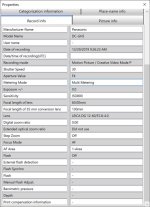
And I just shot a 4K 4:2:0 8-bit video using Panasonic's 12-60 lens and opened the video's properties in PhotoFunStudio. It shows the aperture, focal length, ISO and a variety of other data. (I was zoomed all the way in.) Here's a screen grab:

PhotoFunStudio properties screen grab 2019-12-29.jpg
 
Thanks, BobKo it's good to learn that at least some information is being recorded but that software seems mostly geared towards photography and not video.

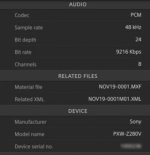
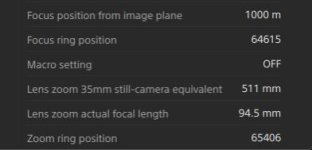
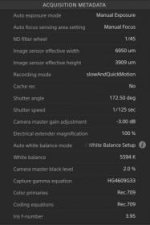
I never intended to make this thread a Mac vs. PC or Sony vs. Panasonic debate, but just for the benefit of those who do not use Sony cameras, this is the kind of metadata they record and that can easily be viewed in Catalyst Browse by a Mac or PC. I was just hoping that Panasonic offered something similar.


CatalystBrowse3.jpgCatalystBrowse5.jpgCatalystBrowse4.jpgCatalystBrowse2.jpgCatalystBrowse1.jpg
 
How could Panasonic not have an equivalent of Catalyst, especially when they have Sony to copy from?

For many years Sony had NOTHING, until the day they decided to dump the Vegas NLE they bought from Sonic Foundry and replace it with their own NLE system that includes Catalyst. I tried out the Sony software but found that it in no way replaced Vegas Pro, so I stayed with Vegas Pro when MAGIX bought it. I still use it for most of my work.
 
Yes, a really good New Year's resolution would be to know what you are posting about. I just tried opening 4:2:2 10-bit files in the free version of Resolve and get nothing. The files seemingly move into the program, but no image or sound plays. Looking at the clip's attributes shows nothing.

And I just shot a 4K 4:2:0 8-bit video using Panasonic's 12-60 lens and opened the video's properties in PhotoFunStudio. It shows the aperture, focal length, ISO and a variety of other data. (I was zoomed all the way in.) Here's a screen grab:

View attachment 137826
Sorry this is off subject but does the Focal length shown of 35mm conversion lens 130mm meen micro four thirds cropp is 2.17 as near as damn,i always assumed it was 2x.
Checking again micro four thirds is 2x so i dont understand the 130mm equivalent.
 
Last edited:
Thank you for the suggestion. I experimented with the trial version of Kyno last spring and didn't find it offered any features worth justifying the cost for working with Sony footage. My trial has expired so I can't test it with Panasonic files. But, even if it proved to do everything CB can do, the cost would not be worth it for what I would use it for. I'm not saying it might not suit someone else's needs, I'm just saying its more than I want to pay for a utility program that I might use once or twice a month.
 
Back
Top