AC90: Over Exposure or Scene Setting?

jimith

Active member
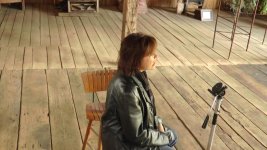
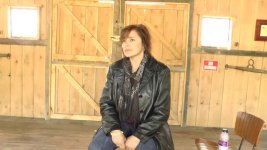
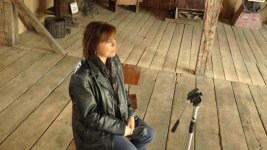
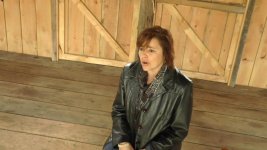
I use the AC90 and mostly run and gun. I am doing a favor for someone and trying a simple music video. I am filming in a barn. The problem is I get a yellow golden color in the shots. I have filmed inside the barn before and have had the same problem. I am attaching some screen shots. In most of them she has a yellow look to her skin, but again I have filmed in here without people and get the same look, a golden yellow. I white balance and use the meter for the exposure. I did not use the zebras, but will next time. I know I should use the histogram, but I don't quite understand how to use it and the time there is limited. I will blacken out the windows in the back, but included the shot to give you an idea of the set. (this was an extreme example I did on purpose) Is my primary problem over exposure? Should I custom a scene setting? If so, could I have some suggestions, I suffer from a degree of color blindness and have trouble with shades blending into one another. Any suggestions would be helpful. Thanks, this is always the place to ask questions and get the right answers.Metro 1.jpgMerto 9.jpgMetro 6.jpgMetro 4.jpgMetro 3.jpg
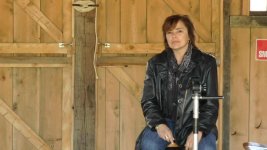
 
You could try adjusting the white balance toward magenta in the menu. Or adjust it in post. I don't think it is unusual particularly, but it is yellow, green. Exposure is fine, a little hot on the grab with the backlighting through the windows, but I don't think exposure is causing the problem. I think my ac90 would behave the same way.
 
That third picture is grossly, grossly overexposed. The skin tones are at 95 IRE, which is way way way too high and why that picture looks much more yellow than the others. On the bottom picture, the exposure is still way high, not as bad as on the 3rd picture but still very high. The average is about 75 IRE, and the highest is over 85. That's simply too high and will be contributing a little to your issue. The very highest exposure on the very hottest highlights on the skin should rarely exceed 75 IRE. Set your zebras on 70, and set exposure so that the zebras are barely showing at all anywhere on the skin.

How are you lighting this? That entire barn is a giant yellow room, and any light you bring in is going to bounce off those yellow walls and yellow-ish floor and color everything you shoot yellow. Unless you're saying that the barn isn't actually yellow-ish at all in real life?
 
That was my immediate response - "dude, you're shooting in a yellow room!"

In situations like that, WB only helps a little... skin tones go south, etc. You can bring in lots of white fabric and stands, and try tenting off everything not in-frame. You can close off some windows and doors, use some broad fill light, and try to light the subject specifically to override the bounce. Get as much white close to the subject as you can, sides, overhead, even throw a sheet on the floor (black vs. white for the floor may be best)... wider shots (where you have less control) won't be as jarring as the tighter stuff.

My experience with every panasonic I've owned for years is to dial down the saturation a bit (in post is fine, but knock down a hair in camera if you find that's true). Sometimes the cameras can be very red & orange happy. But going with a somewhat sepia look for this location might work well. You may be able to mask facial shots and work the skin tones around, too. I also lift the low end a bit, black balance, and push the shadows up in post.
 
Thanks a lot everybody. Yeah I know the inside is all yellow, but I wasn't sure if it was me or not. I'll tone down the exposure some and try to light with a whiter light, but the barn is 30x60 with 19 windows I can't get to. Just wasn't sure if I was seeing color correctly. Like I said, always the best place to come for answers. Thanks a lot.
jim
 
What if he put color temp blue gels over the windows he does have access to? Would that neutralize some of the yellow bounce light?
 
Have your talent hold a white card at the beginning of each shot. Then, in post, use a color correction filter with a white 'eyedropper'. It should clean up the problem. If it doesn't, a little manual work with the color correction filter should bring the footage back to true color.
 
Back
Top