
Navigation
Install the app
How to install the app on iOS
Follow along with the video below to see how to install our site as a web app on your home screen.
Note: This feature may not be available in some browsers.
More options
You are using an out of date browser. It may not display this or other websites correctly.
You should upgrade or use an alternative browser.
You should upgrade or use an alternative browser.
OFFICIAL A1 Custom Presets thread
- Thread starter Jay Rodriguez
- Start date

BlueCotton
New member
Hello everyone!
This is my first post, so sorry if I ask anything stupid!
I will be shooting some interviews outdoors this weekend for a documentary I'm working on. I haven't shot any footage yet, so I'm starting from scratch and was wondering if I could get some recommendations on the best preset to use. This documentary will be shot over the course of a few years, so obviously I want to keep the same look for the whole project.
Also, are there any issues I need to know about such as white balance, ND filters, etc.?
If it makes any difference, the forecast for the location I'll be shooting is scattered thunderstorms. Obviously, I won't be shooting if it's raining, but I do figure it will be pretty cloudy. I'm assuming I'll need a reflector, but is there anything else I will need. I have no power where I'll be, so I can't bring any additional lighting.
Sorry for the random questions...
I appreciate your responses!
Daniel
This is my first post, so sorry if I ask anything stupid!
I will be shooting some interviews outdoors this weekend for a documentary I'm working on. I haven't shot any footage yet, so I'm starting from scratch and was wondering if I could get some recommendations on the best preset to use. This documentary will be shot over the course of a few years, so obviously I want to keep the same look for the whole project.
Also, are there any issues I need to know about such as white balance, ND filters, etc.?
If it makes any difference, the forecast for the location I'll be shooting is scattered thunderstorms. Obviously, I won't be shooting if it's raining, but I do figure it will be pretty cloudy. I'm assuming I'll need a reflector, but is there anything else I will need. I have no power where I'll be, so I can't bring any additional lighting.
Sorry for the random questions...
I appreciate your responses!
Daniel
Last edited:
First time, not a pro. Just stands for production
First time, not a pro. Just stands for production
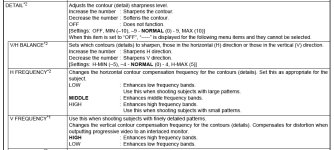
I have a question. What does DHV (H/V Detail balance) actually do in the XHA1 presets.
I have noticed if there is jagged edges, tuning it makes it go away. How does this affect overall image quality?
First time, not a pro. Just stands for production
I have a question. What does DHV (H/V Detail balance) actually do in the XHA1 presets.
I have noticed if there is jagged edges, tuning it makes it go away. How does this affect overall image quality?
[DHV] Horizontal/Vertical Detail Balance [–9...+9]. Together with HDF, controls the
balance between horizontal and vertical details on the picture. Human vision and nervous
system is organized in the way which, ceteris paribus, attracts more attention to horizontal
details (along vertical axis) than to vertical details (along horizontal axis).
Increasing will give advantage to horizontal details and vice versa. Note that with fewer details
less noise is visible.
From Presets Motivated (for Canon XH A1)
Lev Naumov. CAMEL Studio
balance between horizontal and vertical details on the picture. Human vision and nervous
system is organized in the way which, ceteris paribus, attracts more attention to horizontal
details (along vertical axis) than to vertical details (along horizontal axis).
Increasing will give advantage to horizontal details and vice versa. Note that with fewer details
less noise is visible.
From Presets Motivated (for Canon XH A1)
Lev Naumov. CAMEL Studio
Kelly Olsen
Well-known member
Steven Dempsey indicated on most of his recent footage he uses EOSPHOTO. I like the look of this one, but it was really designed for a 35mm adapter or the Canon that does not have a fixed lens. The settings are to make up for the loss of light, contrast and sharpness and "Look" more like a Canon stock lens.
Anybody use EOSPHOTO on an A1 or A1s with the fixed lens and what is the result?
Anybody use EOSPHOTO on an A1 or A1s with the fixed lens and what is the result?
Kelly Olsen
Well-known member
I'm confused about Vision 7. There are 23 parameters that can be set but there only 17 listed in the post above.
The missing settings are:
RGM
RBM
GRM
GBM
BRM
BGM
I considered that every thing that was not listed would be set to zero, but in the settings above there are some setting set at zero, so that can't be it.
I'm certain that I'm just missing something obvious here because nobody else has questioned this, so could somebody explain the obvious to the blind?
The missing settings are:
RGM
RBM
GRM
GBM
BRM
BGM
I considered that every thing that was not listed would be set to zero, but in the settings above there are some setting set at zero, so that can't be it.
I'm certain that I'm just missing something obvious here because nobody else has questioned this, so could somebody explain the obvious to the blind?

Chris Light
Veteran
all parameters not listed are to be set to zero. it's possible that mentioned parameters that are set to zero are not typical, and are unique to this particular setup. that's why they are mentioned. i use, and love this preset...just set up exactly as stated, and you're good!
Chris
www.vimeo.com/chrislight
Chris
www.vimeo.com/chrislight
Kelly Olsen
Well-known member
all parameters not listed are to be set to zero. it's possible that mentioned parameters that are set to zero are not typical, and are unique to this particular setup. that's why they are mentioned. i use, and love this preset...just set up exactly as stated, and you're good!l]
Thanks for the info.
Ray Charles
Kelly Olsen
Well-known member
Visison 7 by Someday or Panavision 1 by PaPa?
These two are my favorite looks from the footage and screen grabs. Really great work by both people.
I'm shooting a doc with A1s. mostly talking heads with Kino 4 banks (actually 2 CoolLights by Richard) in 24F. I have both 3200k and 5600k bulbs so I can use either, but most lighting will be controlled. Hopefully will go to film out eventually but will be going to Digibeta for festivals.
I know this is all subjective and personal taste, but of the two presets mentioned, which would you suggest for an even, not too anything, but still nice film like look that will be good for skin tones, easy to deal with in post and make a good film transfer?
Suggestions and help greatly appreciated.
These two are my favorite looks from the footage and screen grabs. Really great work by both people.
I'm shooting a doc with A1s. mostly talking heads with Kino 4 banks (actually 2 CoolLights by Richard) in 24F. I have both 3200k and 5600k bulbs so I can use either, but most lighting will be controlled. Hopefully will go to film out eventually but will be going to Digibeta for festivals.
I know this is all subjective and personal taste, but of the two presets mentioned, which would you suggest for an even, not too anything, but still nice film like look that will be good for skin tones, easy to deal with in post and make a good film transfer?
Suggestions and help greatly appreciated.
bentramer81
Well-known member
I planned on using True Color for my short film, but once I got on set and did one last run through of my presets, I just couldn't use it. Instead I used what is in my opinion the best all purpose preset there is Panalook2, I know it's been around for a long time but it still holds up. Here's a link to take a look, I am very pleased with the look, indoors and outdoors.
Important Note: Used color correct 3-Way in FCP to up the white and mids just a bit and lower the blacks just a litte too, uped the contrast a little too to make colors more vivid.
Here's the link:
http://www.youtube.com/watch?v=fFbUNCuRY2I
Important Note: Used color correct 3-Way in FCP to up the white and mids just a bit and lower the blacks just a litte too, uped the contrast a little too to make colors more vivid.
Here's the link:
http://www.youtube.com/watch?v=fFbUNCuRY2I
HEY! Where is everyone! This thread is clearly the BEST preset thread on the internet! Haha I just want to revive it I was trying out the VISION 7 preset and I think it's really the best I've seen. I'll post some grabs and a link to the HD video on youtube soon. Also I know this isn't an encoding thread but does anyone know proper h.264 Adobe Media Encoder settings for 1080p?
Kelly Olsen
Well-known member
I ended up going with EOSPHOTO and changed the sharp setting to -3.
Here is what it looks like with no color correction.
http://www.facebook.com/photo.php?pid=2030461&l=2cb4a4662b&id=645759207
Here is what it looks like with no color correction.
http://www.facebook.com/photo.php?pid=2030461&l=2cb4a4662b&id=645759207
I ended up going with EOSPHOTO and changed the sharp setting to -3.
Here is what it looks like with no color correction.
http://www.facebook.com/photo.php?pid=2030461&l=2cb4a4662b&id=645759207
Do you have the settings for EOSPHOTO? Nice grabs btw, preset looks great! The blue light bothers me though. :thumbup:
Kelly Olsen
Well-known member
Do you have the settings for EOSPHOTO? Nice grabs btw, preset looks great! The blue light bothers me though. :thumbup:
Thanks. The Blue light bothers me too. It's not blue enough! This is about singers in a night club and I wanted to reference the tone of a dark cool jazz club. This is not dark enough, but it was the very first time I used this new Canon A1s camera and CoolLights, so not bad on the first attempt.
I'm very pleased with the preset, though. There are a ton of presets on DVinfo.net. Just do a Google on Canon A1 presets and you'll get the threads complete with download files.
But here is the preset for EOSPHOTO with the change of the Sharp setting to minus 3.
GAM N
KNE L
BLK P
PED -1
SET -3
SHP -3
HDF M
DHV 0
COR 0
NR1 0
NR2 0
CMX N
Color GN 8
CPH 0
RGN 0
GGN 0
BGN 0
RGM 0
RBM 0
GRM 0
GBM -4
BRM 0
BGM -4
I'm very pleased with the preset, though. There are a ton of presets on DVinfo.net. Just do a Google on Canon A1 presets and you'll get the threads complete with download files.
Thanks! I'll post some grabs when I get the time. :dankk2::grin::thumbup: