Odyssey7Q February 2014 Firmware Update

- Clean SDI/HDMI output.
Option to remove image analysis tools from SDI & HDMI outputs.


Hi Mitch,


no visual overlays sounds good, but can we expect a debayer improvement (even a little) from the 4k stream on the next fw update if we record with an external recorder (without the red lines and some colorbleeding on contrast parts of the image)? So we could bypass the time by getting a good looking 422 10bit HD slog2 image.
thanks for your reply!
 
I'm hoping for weeks, not months. But if I tell you dates then I'm sure to be wrong somewhere and disappoint. They are coming. The first one is always the hardest; after than one builds upon what came before.

We are not putting our focus elsewhere. What we have done is expand our team to expedite the process.

You have not offended. You got news that was not what you wanted.

Appreciated Mitch! :) It might sound stupid but sometime you feel like a sheep in a herd, all you need is some guidance and reassurance.
Weeks I can def do!
 
You have never seen the name of the "popular codec" publicly from Convergent Design, as we are not formally allowed to say it until we are certified by the manufacturer. The vast majority of our clients have clearly stated to us that they want this codec first, so we will complete it and several of its variations before completing DNxHD.

well, that certainly says a lot. I stand corrected, as I thought DNxHD was listed as first. Thanx for making that clear.:beer: Ya gotta go where the $$ is....no argument from me. maybe DNxHD users need to speak up, more....:-)
 
Last edited:
What can I say? It's all about instant gratification in today's society!

Cool feature - as it should be.

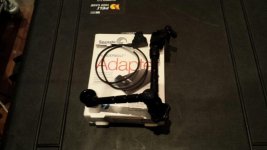
Now, there's just something I'm missing. Come on Symbiosis, pull your finger out!View attachment 81721

Hey Sunnyjimfilms, I saw that you got the Seagate Thunderbolt adapter. I have the same model and I have to warn you a bit. I would NOT leave the adapter plugged in or have your SSD card sitting in it for a long period. Basically, I just copy my files then disconnect the Seagate adapter, which it does well and very fast.

Why? Because I noticed it gets really hot, as in potential electrical fire hot. In fact, if I put un-plug the Thunderbolt cable after it's been sitting in the adapter, I cannot keep my finger on the metal tip for more than a few seconds before it starts to burn my finger. It runs very, very hot.

So yeah, be careful with that thing. Works great, I just wouldn't want my house to burn down over it.
 
Hey Sunnyjimfilms, I saw that you got the Seagate Thunderbolt adapter. I have the same model and I have to warn you a bit. I would NOT leave the adapter plugged in or have your SSD card sitting in it for a long period. Basically, I just copy my files then disconnect the Seagate adapter, which it does well and very fast.

Why? Because I noticed it gets really hot, as in potential electrical fire hot. In fact, if I put un-plug the Thunderbolt cable after it's been sitting in the adapter, I cannot keep my finger on the metal tip for more than a few seconds before it starts to burn my finger. It runs very, very hot.

So yeah, be careful with that thing. Works great, I just wouldn't want my house to burn down over it.

Er that sounds like a bit of a design flaw!

Cheers for the heads up.
 
maybe DNxHD users need to speak up, more....:-)

Well, I use DNxHD constantly in my VFX and compositing workflows, especially as an intermediary codec. I've honestly never even used pro res before being firmly in the PC user camp. As long as it edits fine and runs well on my PC then I'm sure we can be friends.

The argument negates itself for me, because when I'm getting specific shots for VFX, its always going to be 2k Raw from now on anyway. If I have an event to film (which I'm getting sick of doing these days) then pro-res will be a definite improvement over the avchd I'm used to and probably won't make a lick of visual difference to DNxHD in the timeline anyway.

I'm not at all savvy on the technical pros and cons between these two codecs, but is there a reason one is significantly better than the other?
 
There's two considerations, one for PC users and one for PC and Mac users.
For PC users, you'll always have to transcode to DNxHD because you can read Prores on a PC but you can't encode to it. So, if you've recorded to Prores because that's the only choice you have, then, at some point, you're gonna have to do a transcode to another codec like DNxHD. Transcode means rendering time lost(which can be hours and hours for a long recording session) and some small resolution sacrifice. On Media Composer, for example, you can read a ProRes file as AMA, but, if you want to work with FX and render out, you'll have to transcode to DNxHD.

Now, for both PC and Mac users, there's a question in my mind if Prores is any better than DNxHD. Prores is a variable bitrate codec while DNxHD is a fixed bitrate codec. This has implications for resolution in high motion frames like a pan. At this point, I don't know which codec wins out.

In the end, strictly for PC users, there's a distinct disadvantage in turn around time, alone, when injesting ProRes.

Then, there's the non technical issues around the fact that Prores is a rather proprietary codec, originally only for FCP users, while DNxHD is essentially an open source codec. It was only recently that Apple allowed PC users to read Prores.
 
Last edited:
Thanks for the clarification cuervo. When you say there's a distinct disadvantage in time when injesting ProRes, does it not play and edit natively in Premiere? Or is it just a pain for Avid users?
 
sorry, I know nothing about premiere...perhaps someone who uses premiere on a PC can chime in. I know that both Vegas and Edius won't render out to Prores. To the best of my knowledge, the only app that will render to prores in a PC is Cinemartin Cinec.
 
- Clean SDI/HDMI output.
Option to remove image analysis tools from SDI & HDMI outputs.


Hi Mitch,


no visual overlays sounds good, but can we expect a debayer improvement (even a little) from the 4k stream on the next fw update if we record with an external recorder (without the red lines and some colorbleeding on contrast parts of the image)? So we could bypass the time by getting a good looking 422 10bit HD slog2 image.
thanks for your reply!
"Expect" is a mighty word. We are working on many things, and what is listed in the firmware announcement is what we are confident will be done in time, at least as of right now. We keep plugging away on everything. If we get something done earlier than previously thought, we'll include it.

We are endeavoring to make more conservative forecasts moving forward so as not to disappoint.
 
Hey Sunnyjimfilms, I saw that you got the Seagate Thunderbolt adapter. I have the same model and I have to warn you a bit. I would NOT leave the adapter plugged in or have your SSD card sitting in it for a long period. Basically, I just copy my files then disconnect the Seagate adapter, which it does well and very fast.

Why? Because I noticed it gets really hot, as in potential electrical fire hot. In fact, if I put un-plug the Thunderbolt cable after it's been sitting in the adapter, I cannot keep my finger on the metal tip for more than a few seconds before it starts to burn my finger. It runs very, very hot.

So yeah, be careful with that thing. Works great, I just wouldn't want my house to burn down over it.
We also use the seagate adapter, I can't say I've noticed any heat issues... I'll test on Monday and let you know (in case there's something else amiss at your end)
 
There's two considerations, one for PC users and one for PC and Mac users.
Then, there's the non technical issues around the fact that Prores is a rather proprietary codec, originally only for FCP users, while DNxHD is essentially an open source codec. It was only recently that Apple allowed PC users to read Prores.

Not sure if this is the place for a Rant but anyway...

There is no decent mezzanine codec out there for VFX or Post work. Everything is half measures and almosts.

DNxHD is littered with rendering bugs in superbrights in certain environments (Nuke/After Effects). I was forced to transcode terabytes of footage because of this. There is little interest from Avid in pushing DNxHD as the versions inside their own products are better than the public ones. Not least the fact that the public DNxHD is limited to 1080p and 10bit.

ProRes is obviously not cross platform. Pointless. (I have used cinec to transcode to ProRes 4444 on windows with the ffmpeg libraries and actually the results of this copycat codec are very good - but very unwieldily to use), but it is 12 bit 4444 at various resolutions.

Cineform is also 12 bit 4444 at various resolutions but it's implementation is sometimes very hit and miss. Now that it's absorbed by go pro i think they're having more fun with cameras than codecs so i don't know the roadmap.

What's needed is something like 16 bit float EXR with wavelet compression within a movie container. Containers are better than files in most indie setups because a single file is handled better than 10,000s of frames on most systems. Plus you can edit with them. I'm running a 10gbe network but even so, large movie containers are faster to transport and use.

If people are interested in hiving off a separate discussion than i'm more than happy. There's such a glaring hole in the market...

cheers
Paul
 
Not sure if this is the place for a Rant but anyway...

There is no decent mezzanine codec out there for VFX or Post work. Everything is half measures and almosts.

DNxHD is littered with rendering bugs in superbrights in certain environments (Nuke/After Effects). I was forced to transcode terabytes of footage because of this. There is little interest from Avid in pushing DNxHD as the versions inside their own products are better than the public ones. Not least the fact that the public DNxHD is limited to 1080p and 10bit.

ProRes is obviously not cross platform. Pointless. (I have used cinec to transcode to ProRes 4444 on windows with the ffmpeg libraries and actually the results of this copycat codec are very good - but very unwieldily to use), but it is 12 bit 4444 at various resolutions.

Cineform is also 12 bit 4444 at various resolutions but it's implementation is sometimes very hit and miss. Now that it's absorbed by go pro i think they're having more fun with cameras than codecs so i don't know the roadmap.

What's needed is something like 16 bit float EXR with wavelet compression within a movie container. Containers are better than files in most indie setups because a single file is handled better than 10,000s of frames on most systems. Plus you can edit with them. I'm running a 10gbe network but even so, large movie containers are faster to transport and use.

If people are interested in hiving off a separate discussion than i'm more than happy. There's such a glaring hole in the market...

cheers
Paul

EXCELLENT post! Since I have the Avid internal DNxHD, I never realized the limitations to the public versions. It would seem DNxHD 10-bit 4444 is frought with the same licensing issues for all non Avid users. So, you're quite right, Paul. It would seem my "opinions" are full of holes...LOL.....well, I like your suggestion. And while we're at it, can we do it inside a container that isn't Quicktime, but still cross-platform....JPEG2000? At one time, I had high hopes for Cineform, but, as you said, they seem to have lost their initiative.
 
Last edited:
Gene...
I have a Thunderbolt port on my ASUS based PC. These Thunderbolt ports tend to all run hot. Even the USB3 to SSD adapter runs pretty warm.
 
Not sure if this is the place for a Rant but anyway...

There is no decent mezzanine codec out there for VFX or Post work. Everything is half measures and almosts.

DNxHD is littered with rendering bugs in superbrights in certain environments (Nuke/After Effects). I was forced to transcode terabytes of footage because of this. There is little interest from Avid in pushing DNxHD as the versions inside their own products are better than the public ones. Not least the fact that the public DNxHD is limited to 1080p and 10bit.

ProRes is obviously not cross platform. Pointless. (I have used cinec to transcode to ProRes 4444 on windows with the ffmpeg libraries and actually the results of this copycat codec are very good - but very unwieldily to use), but it is 12 bit 4444 at various resolutions.

Cineform is also 12 bit 4444 at various resolutions but it's implementation is sometimes very hit and miss. Now that it's absorbed by go pro i think they're having more fun with cameras than codecs so i don't know the roadmap.

What's needed is something like 16 bit float EXR with wavelet compression within a movie container. Containers are better than files in most indie setups because a single file is handled better than 10,000s of frames on most systems. Plus you can edit with them. I'm running a 10gbe network but even so, large movie containers are faster to transport and use.

If people are interested in hiving off a separate discussion than i'm more than happy. There's such a glaring hole in the market...

cheers
Paul

I agree codecs are a mess. But these problems are pretty standard in this industry (just think of NTSC mess with 1% slowdown etc. etc...). Or rather a there are no standards. I must say over the years codecs have improved a lot both in quality and size, I would expect this to keep happening. I use to love the M100 LOSSLESS and I still have hundreds if not thousands of hrs of this on various backup media. It is now extinct and I have to convert all that footage on an old computer to work on legacy projects.

Still we are spoiled now with 3-4 x real time transfers instead of tape capture.

I work pretty much exclusively on the Mac side and I must say things are really very easy here. I still ingest 3 or four current types of files but they all get converted to ProRes for final master, this is just me. FCPX works natively with pretty much whatever I throw at it and renders are in ProRes, I don't even think about it.

The way I see it you have acquisition formats, editing formats and delivery formats. Kind of like we used to have tape-digital file-tape in the beginning of NLEs. You just have to work out your own workflow that works for you.

I think CD is trying their best to be as generic as possible in these times of hundred of formats and codecs. You can't please everyone. Maybe at some point in the distant future there will be a single universal video file wrapper, but I would not hold my breath for that one.

So I am afraid everyone is stuck just finding a workflow that works for them. For me it is a fast Macs FCPX Resolve and the CC suite from Adobe. With those tools there really is not anything I have come up against I can't handle. I just digitized some BetaSP and DVCpro tapes last week for a project, they still work even the analog tape was in good shape.

I am rambling, OK time for another cup of coffee and maybe I should go for a ski next, yes I will. Have a great weekend everyone...
 
I think what we all would like, Olof, is a platform agnostic Digital Intermediate (DI), what Paul refers to as a mezzanine codec. Sadly, every application has its own axe to grind, so, this reality will not likely happen. There's always hope that someone like Avery Lee (Virtualdub) would write an open source codec and post it on SOURCEFORGE....LOL...more wishful thinking. So, it's not unrealistic to understand why a company like CD would pick the most popular codec available....same thing happened with the CADCAM vendors.......and it was the users that suffered.
 
Yes, please check this for me. I'm hoping mine is just a defect.

I am still testing therefore it's not absolutely reliable. It was very very warm yesterday and I would have confirmed your statement. Today I left it attached after copying and up to now after one hour it's just lukewarm. Hope that helps
 
Back
Top