Odyssey7 & Odyssey7Q Status Update

Can you be more specific as to what you mean by that?

Like the 4k to 2k (or Full HD) ProRes option just with RAW. Therfore you can use the full 4k signal and get better sharpness and lower noise but downscaled to 2k (less space, easier in post).
 
To do this properly you would need to deBayer the mage first. SlimRAW offers this but I would not want to use that as a master, unless there's some computation going into the process I'm unaware of.
 
Hi, I just ran into a problem.
My setup first:
- 7Q+ with raw license
- Sony FS5 with RAW license
- Newest firmware on both

I did an interview in UHD. I normally shoot in 4kRAW 50p to HD ProRes.
I switched the camera for this interview to 25p to save some recording space.
But I forgot to switch the monitor also to 25p. :(
I loaded the footage into my computer and now see the footage in double speed but Audio in normal speed.

When slowing down the video to 50% I only have half the Audio.
Is there any way to recover the audio files from the ssds?

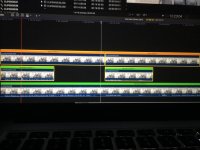
I have now converted the 4gb clips with the transfer tool. I could actually recover some of the gaps. But because the video is double speed I have only 50% of the total audio. Attached is a screenshot to explain it a bit easier. The first layer is the 4gb chunks with 2x slomo so it will play in realtime. Below is the same clip without slomo. The audio is playing in realtime and is in sync with the video above. The last layer is the merged prores file with the transfer tool. The audio gap is now filled (as you can see in the waveforms) but stops at half way through the video. (Not visible in screenshot)IMG_2856.jpg
 
I think that I figgured it out. I have now opened the prores in QuickTime and can export the full audio and then relink the file in fcpx. Fcpx was only showing the video and cutting off the audio.
 
For the future, may I suggest you set the frequency on the Odyssey to FOLLOWS INPUT? That way it will automatically reset and you won't have this issue.

But should you do this again in the future, you can reset the frequency on the CD ProRes Transfer Tool.
 
Mitch Gross,

Are you (or the engineers) aware that the O7Q+ DPX recording for 1080p59.94 & 1080p60.00 inverts the RGB datum order when using packing instead of "Method A Filling"? While Photoshop (through CC 2017) will not read packed dpx files correctly, Adobe Premiere and Adobe After Effects will read packed files natively (at least at 10 bit), but because the O7Q+ is storing in BGR order instead of RGB the Red and the Blue Channels are flipped. Mind you, a Channel Mixer filter can easily reverse this, but it is puzzling.

I've carefully read the spec for DPX V2.0 as available - http://www.simplesystems.org/users/bfriesen/dpx/S268M_Revised.pdf - and I've used a Hex Editor to carefully review both affected an unaffected dpx images generated with the O7Q+. In affected files Byte 804 has the value of "0x00", indicating packing to 32 byte words, whereas unaffected files have a value of "0x01" at Byte 804, indicating "Method A filling." Also, all O7Q dpx files use code 0x32 (decimal 50) at byte 800 to indicate RGB ordered image elements. The spec indicates that when using code 50 at byte 800, the datum order should be Blue, then Green, then Red, as datum 0, datum 1, and datum 2 respectively.

Using this information, when I read the actual image data stream on affected files, it is clear that Convergent Design's implementation has this order reversed for it's "packed" files - datum 0 is Red, datum 1 is Green, datum 2 is Blue.

This is the doc I used researching the spec: http://www.simplesystems.org/users/bfriesen/dpx/S268M_Revised.pdf

I'm attaching a pic showing the color reversal.
revColor.jpg
 
Last edited:
FYI, you can log a bug on the Convergent Design website by opening a support ticket.

Mitch is on these forums all the time but you might get a quicker reply and the tickets are tracked.

sean
 
FYI, you can log a bug on the Convergent Design website by opening a support ticket.

Mitch is on these forums all the time but you might get a quicker reply and the tickets are tracked.

sean

Aware. Thanks though. Its not anything urgent - afterall, the data is mis-arranged, not lost. A simple RGB channel mixer can correct existing footage in any NLE, and there is also the CD DPX Unpack Utility. I do think they should correct this to follow spec in future firmware upgrades, but I can't expect them to move it to the top of the priority list either.
 
Sony FS5 RAW question:

I have the 7Q+ and am considering the purchase of a Sony FS5 with RAW option and the C-D RAW bundle.
I have some Super16 primes that I am interested in using with the Center Scan mode to shoot 2k/HD 12bit RAW @ 24fps.


A) Can the Sony FS5 / Odyssey combination record 2k/HD 12bit RAW in Centre Scan mode @ 24fps?

B) If this is possible is the Center Scan 2k RAW 10bit or 12 bit? It seems like it drops down to 10bit in high speed mode, but what about 24fps?


I've done some research into this, but can't find a definitive answer.


Thanks
 
Last edited:
So I've been peaking around at the Odyssey 7q for a while and am still slightly confused on the difference between the 7q and 7q+. Is it just recording 4k through HDMI or am I missing something? Been debating on external recorders as I'm looking to upgrade some of my gear and high frame rates are important for me and the table top stuff I do so that basically leaves the odyssey for the 240 fps at 2k and 120 fps at 4k burst with the Sonys (curse you Phantom cameras for being to pricey).

Plus I need a new monitor for the F3 and everyone says the odyssey is a nice monitor as well.
 
ReelFilmGeek,

Yes, the only difference is the 4k through HDMI, once I found that out I bought a used 7Q since the fs700 output's via SDI anyway. On top of that you can buy a used 7Q (or 7Q+) with the raw codec. I paid for mine since it was before the RAW bundle was a bundle, mine came with canon and I bought Sony.

So in short, yes - the 7Q is still a fine recorder/monitor.

One thing I didn't realize at first which is really cool imo, is that you can shoot 4k pro res @ 120 fps as long as you want! Same w/ 240 @ 2k, but being able to shoot 4k 120 pro res unlimited was a nice surprise to me and it doesn't swap between cards either. That's pretty amazing!
 
ReelFilmGeek,

Yes, the only difference is the 4k through HDMI, once I found that out I bought a used 7Q since the fs700 output's via SDI anyway. On top of that you can buy a used 7Q (or 7Q+) with the raw codec. I paid for mine since it was before the RAW bundle was a bundle, mine came with canon and I bought Sony.

So in short, yes - the 7Q is still a fine recorder/monitor.

One thing I didn't realize at first which is really cool imo, is that you can shoot 4k pro res @ 120 fps as long as you want! Same w/ 240 @ 2k, but being able to shoot 4k 120 pro res unlimited was a nice surprise to me and it doesn't swap between cards either. That's pretty amazing!

Really?? I have never heard this. I thought the 4k 120FPS had a 'buffer induced' limit
of 4 seconds (which would of course be around 19-20 seconds once you
'conformed' it back to 24FPS.)
 
ReelFilmGeek,

Yes, the only difference is the 4k through HDMI, once I found that out I bought a used 7Q since the fs700 output's via SDI anyway. On top of that you can buy a used 7Q (or 7Q+) with the raw codec. I paid for mine since it was before the RAW bundle was a bundle, mine came with canon and I bought Sony.

So in short, yes - the 7Q is still a fine recorder/monitor.

One thing I didn't realize at first which is really cool imo, is that you can shoot 4k pro res @ 120 fps as long as you want! Same w/ 240 @ 2k, but being able to shoot 4k 120 pro res unlimited was a nice surprise to me and it doesn't swap between cards either. That's pretty amazing!

Maybe a link to a source is helpful for people considering the O7Q+:

Continuous:
FS 2K RAW High Speed to HD Apple ProRes (100, 120, 200, 240fps)

Burst:
FS 4K RAW Burst to 4K RAW (100, 120fps)
FS 4K RAW Burst to 4K (100, 120fps)
FS 4K RAW Burst to UHD (100, 120fps)
FS 4K RAW Burst to 2K (100, 120fps)
FS 4K RAW Burst to HD Apple ProRes (100, 120fps)

https://www.convergent-design.com/sony-nex-fs700
 
Complete list:

FS 4K RAW (24, 25, 30, 50, 60fps)
FS 2K RAW (24, 25, 30, 50, 60fps)
FS 4K RAW to 4K Apple ProRes (24, 25, 30, 50, 60fps)
FS 4K RAW to UHD Apple ProRes (24, 25, 30, 50, 60fps)
FS 4K RAW to 2K Apple ProRes (24, 25, 30, 50, 60fps)
FS 4K RAW to HD Apple ProRes (24, 25, 30, 50, 60fps)
FS 2K RAW High Speed to HD Apple ProRes (100, 120, 200, 240fps)
FS700 High Speed Burst Mode: 440 frames (100p /4.4s or 120p/3.7s)
FS 4K RAW Burst to 4K RAW (100, 120fps)
FS 4K RAW Burst to 4K (100, 120fps)
FS 4K RAW Burst to UHD (100, 120fps)
FS 4K RAW Burst to 2K (100, 120fps)
FS 4K RAW Burst to HD Apple ProRes (100, 120fps)
 
If you read w

edit - I feel like I may end up looking very stupid at the end of this!

Anyone who shoots @ 120 fps in 4kprores, ... do you do anything other than set the odyssey to that and set the camera s/q to 120?
 
Last edited:
Complete list:

FS 4K RAW (24, 25, 30, 50, 60fps)
FS 2K RAW (24, 25, 30, 50, 60fps)
FS 4K RAW to 4K Apple ProRes (24, 25, 30, 50, 60fps)
FS 4K RAW to UHD Apple ProRes (24, 25, 30, 50, 60fps)
FS 4K RAW to 2K Apple ProRes (24, 25, 30, 50, 60fps)
FS 4K RAW to HD Apple ProRes (24, 25, 30, 50, 60fps)
FS 2K RAW High Speed to HD Apple ProRes (100, 120, 200, 240fps)
FS700 High Speed Burst Mode: 440 frames (100p /4.4s or 120p/3.7s)
FS 4K RAW Burst to 4K RAW (100, 120fps)
FS 4K RAW Burst to 4K (100, 120fps)
FS 4K RAW Burst to UHD (100, 120fps)
FS 4K RAW Burst to 2K (100, 120fps)
FS 4K RAW Burst to HD Apple ProRes (100, 120fps)


If this is true - what is happening when I set the camera to 120 fps and on the odyssey I've set it to 4kRAW to 4kProRes OR 4kUHD? I do this all the time and start rolling. When I start rolling it doesn't stop and I have super long clips to prove it - I did it today. Either you can just roll unitl your HDD's are full or it is refusing to record @ 120 fps.

This video as an example: https://vimeo.com/185091441
Now I shot that in either 4k proRes or UHD I don't recall, but it's one of them you can see on the vimeo player it's 4k. Although non of the slo-motion clips are longer than whatever 4.4 seconds ends up being - I did roll for way longer than that multiple times. I realized this very quickly after shooting on the odyssey at the end of 2015. RAW-RAW it's burst, RAW-4k UHD it isn't. I could be wrong if the Odyssey somehow just records 60fps when I'm shooting but why would it do that? A Let me see if I can upoad a clip and prove it...


EDIT - wow, looks like I'm wrong just eyeballing a clip I shot today - I recorded almost the same shot twice, one @ 120 and one at 24, but this obviously isn't the case. I think I just assumed 120 is happening because 2.5 times slower I guess have often found to be slow enough and when I have done 240 in limited amounts I just find it too slow and introduces too many problems like light flicker etc. I put the clips in the timeline and just sped up the 120 (what I thought was) by 2.5 times and although it looks weird, it's closer to reality looking at the 24...I'll embed it as a learning experience and it can forever be pointed to that I made a boo boo.

So I'm hoping others can learn from my stupidity and I still need to learn something too. Those who are doing 4kRAW-4kProRes ... how are you doing 120? does it have to be recorded using the camera as a trigger? I know 2k 240 doesn't need that .... why wouldn't my burst just auto kick-in? The camera says 120, so I'm not sure what else to do? do I really have to change the settings on the Odyssey just to get a quick slow-motion clip @120? and I guess it just defaults to 60 if you don't...haven't checked yet but now I"m assuming that's what it is...

so the order of the clip is - original *120, then *120 sped up 2.5 times, then original 24p, then 24p slowed by 50%

 
Last edited:
although this has been embarrassing - I realize that I'll continue to shoot the same way. As I said w/ 2k@240 it introduces problems indoors in real-world situations but sometimes more than that I found switching to the 'high-speed' mode to take too long to do and wait for it to boot up. If doing the same for 120 is a similar process, for my boxing shoots that are time-sensitive I'd probably avoid it unless a drill was going to happen in more or less the same way for at least 10min.
 
The odyssey has 2 recording modes loaded into memory. So you can have the 2 you needed ready to switch back and forth at any time. There is no 3 minutes to wait.
 
If this is true - what is happening when I set the camera to 120 fps and on the odyssey I've set it to 4kRAW to 4kProRes OR 4kUHD? I do this all the time and start rolling. When I start rolling it doesn't stop and I have super long clips to prove it - I did it today. Either you can just roll unitl your HDD's are full or it is refusing to record @ 120 fps.

This video as an example: https://vimeo.com/185091441
Now I shot that in either 4k proRes or UHD I don't recall, but it's one of them you can see on the vimeo player it's 4k. Although non of the slo-motion clips are longer than whatever 4.4 seconds ends up being - I did roll for way longer than that multiple times. I realized this very quickly after shooting on the odyssey at the end of 2015. RAW-RAW it's burst, RAW-4k UHD it isn't. I could be wrong if the Odyssey somehow just records 60fps when I'm shooting but why would it do that? A Let me see if I can upoad a clip and prove it...


EDIT - wow, looks like I'm wrong just eyeballing a clip I shot today - I recorded almost the same shot twice, one @ 120 and one at 24, but this obviously isn't the case. I think I just assumed 120 is happening because 2.5 times slower I guess have often found to be slow enough and when I have done 240 in limited amounts I just find it too slow and introduces too many problems like light flicker etc. I put the clips in the timeline and just sped up the 120 (what I thought was) by 2.5 times and although it looks weird, it's closer to reality looking at the 24...I'll embed it as a learning experience and it can forever be pointed to that I made a boo boo.

So I'm hoping others can learn from my stupidity and I still need to learn something too. Those who are doing 4kRAW-4kProRes ... how are you doing 120? does it have to be recorded using the camera as a trigger? I know 2k 240 doesn't need that .... why wouldn't my burst just auto kick-in? The camera says 120, so I'm not sure what else to do? do I really have to change the settings on the Odyssey just to get a quick slow-motion clip @120? and I guess it just defaults to 60 if you don't...haven't checked yet but now I"m assuming that's what it is...

so the order of the clip is - original *120, then *120 sped up 2.5 times, then original 24p, then 24p slowed by 50%


It's not a real-time recording mode - you need to put the FS700 in S&Q mode, and choose Raw 4K 120 in the FS700 menu. You also need to set the Odyssey to FS 4K RAW Burst to 4K (assuming you want the same output in ProrRes). I set the FS700 S&Q to end trigger mode, which will continuously cache 4 seconds of recording - when you then press the record button the preceding 440 frames will be sent to, and be recorded by, the Odyssey.

There's a tutorial video from Convergent Design here...

https://vimeo.com/118184104
 
Back
Top