FS5: No audio on Sony PXW FS5 Mark ii using a Sennheiser ewG4 lavalier/lapel mic

My Sony FS5 Mark ii is not recording audio when I use my external Sennheiser ew G4 microphone which is connected to the XLR Input 2
I was wondering if anyone on this forum might assist me resolve this issue.
Below are the steps I have taken so far:

STEP 1
XLR Settings: I have set it to LINE IN
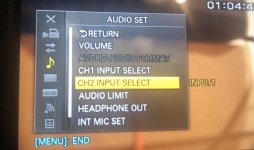
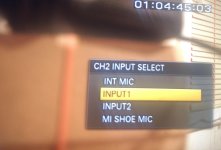
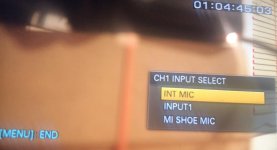
Camera Audio Settings: On Channel 1, I have selected Input 1 on and on Channel 2 I have selected Input 1 as well. This did not work

STEP 2
XLR Settings: I have set it to Mic in
Camera Audio Settings: On Channel 1, I have selected Int Mic and on Channel 2 I have selected Int Mic as well. This did not work

STEP 2
XLR Settings: I have set it to Mic in
Camera Audio Settings: On Channel 1, I have selected Int Mic and on Channel 2 I have selected Int Mic as well. This did not work

I would appreciate any help from anyone
Thanks
 
"Int Mic" means internal mic. You've got an external mic (G4) connected to Input 2 so set Channel 2 to Input 2. Set the level of Input 2 to "Mic in".
 
Below are the options on the XLR Input2 :
Line
Mic
Mic 48V

The settings for both Channel 1 and Channel 2 are:
Int Mic
Input 1
MI Shoe Mic

The mic is on, and unmuted
 
Hi Andy,
There is no "Mic In" settings.

Below are the options on the XLR Input2 :
Line
Mic
Mic 48V

The settings for both Channel 1 and Channel 2 are:
Int Mic
Input 1
MI Shoe Mic
 
Not sure exactly which microphone you are referring to but if they are ME2 models they have an operating requirement of 7.5 volt. In other words, they need to be powered which is something your transmitter units will do for the the ME2. On your FS5 you would need to be set to MIC IN but this will not work unless your mics are powered. DO NOT connect on the 48 volt phantom power on the camera directly with these mics. You will need the Sennheiser MZA900P Phantom Power Adaptor to connect pre-polarized condenser mics to your camera's XLR inputs. This will convert the camera's 48 volt phantom to the correct levels for your mics.

https://en-au.sennheiser.com/mza-900-p

Chris Young
 
- Try connecting the G4 receiver to Input 1
- Are you listening on headphones or also checking levels? Try changing the HEADPHONE OUT setting to the channel the G4 is plugged into as well as checking levels on the LCD.
- Are the audio pots on the side of the FS5 at a reasonable level (ie. not at zero)?
- Is an audio signal getting to the G4 transmitter (there is a level meter, does it move when you talk into the mic)?
- Are you sure the mic is plugged into the transmitter, not the receiver? The receiver has a coldshoe on the bottom.
- Is the G4 transmitter connected to the receiver? Go through the pairing (syncing) process again and check the signal strength meter on the receiver
 
- Try connecting the G4 receiver to Input 1
- Are you listening on headphones or also checking levels? Try changing the HEADPHONE OUT setting to the channel the G4 is plugged into as well as checking levels on the LCD.
- Are the audio pots on the side of the FS5 at a reasonable level (ie. not at zero)?
- Is an audio signal getting to the G4 transmitter (there is a level meter, does it move when you talk into the mic)?
- Are you sure the mic is plugged into the transmitter, not the receiver? The receiver has a coldshoe on the bottom.
- Is the G4 transmitter connected to the receiver? Go through the pairing (syncing) process again and check the signal strength meter on the receiver


Thanks Andy
-I have tried connecting the G4 to Input 1 but got no sound still
-Yes I'm using headphones & there's no sound when Channel 1 and Channel 2 are set to Input 1 or 2. There's sound when Channels are set to Int Mic
-Audio dials on side of camera are set to 5
-G4 transmitter is getting signal from mic...the level meter is moving, shows some bars
-Mic is definitely connected to transmitter, which has a Mic.Line socket and a Mute button
- I reset the G4 to default and went through the Easy Set Up, scanned for channels and then paired the transmitter & receiver. I did this a number of times
 
Sorry I didn't realize that you were coming directly from the Wireless RX unit into the camera. So that's using a 3.5mm mini-jack to XLR cable... correct?

By rights, if you are going into input #2 then yes it should be selected as input #2 in the menu. Then on the camera handle under the mic holder where input #2 is make sure the little slider switch to the left of the XLR input is set to MIC. Theoretically, that should work. If it doesn't then the cable's XLR plug may be wired incorrectly. Is that a genuine Sennheiser 3.5mm mini-plug to XLR cable? If it is and the cable is working okay then there may be an issue between the handle and the camera body at the multi-plug interface. But before suspecting that though have you tried going into MIC #1 input with its external selection switch set to MIC and the internal menu setting set to MIC. That's the switch on the outside of the body near the #1 input. If that also doesn't work I would be starting to suspect the 3.5mm mini to XLR cable because for two mic inputs with their input settings set correctly to fail simultaneously would be a very big coincidence. Also, just for your testing make sure that both audio level input dials are wound up to level #10 and that the AUTO/MAN switches are set to manual. If any audio feed is coming through you should hear it coming through loud and clear. Also, try setting the headphone audio output to stereo as you should then be able to hear Channel #1 and channel #2 as left ear/right ear. Note the headphone setting selection was something that was introduced in software upgrade v2.0 which I would imagine your FS5 already has as it is an FS5 II... correct?

Chris Young
 
Sorry I didn't realize that you were coming directly from the Wireless RX unit into the camera. So that's using a 3.5mm mini-jack to XLR cable... correct?

By rights, if you are going into input #2 then yes it should be selected as input #2 in the menu. Then on the camera handle under the mic holder where input #2 is make sure the little slider switch to the left of the XLR input is set to MIC. Theoretically, that should work. If it doesn't then the cable's XLR plug may be wired incorrectly. Is that a genuine Sennheiser 3.5mm mini-plug to XLR cable? If it is and the cable is working okay then there may be an issue between the handle and the camera body at the multi-plug interface. But before suspecting that though have you tried going into MIC #1 input with its external selection switch set to MIC and the internal menu setting set to MIC. That's the switch on the outside of the body near the #1 input. If that also doesn't work I would be starting to suspect the 3.5mm mini to XLR cable because for two mic inputs with their input settings set correctly to fail simultaneously would be a very big coincidence. Also, just for your testing make sure that both audio level input dials are wound up to level #10 and that the AUTO/MAN switches are set to manual. If any audio feed is coming through you should hear it coming through loud and clear. Also, try setting the headphone audio output to stereo as you should then be able to hear Channel #1 and channel #2 as left ear/right ear. Note the headphone setting selection was something that was introduced in software upgrade v2.0 which I would imagine your FS5 already has as it is an FS5 II... correct?

Chris Young


Thanks Chris for the helpful explanation
- I tried the MIC option on the XLR input (there are 3 options - Line, Mic & Mic +48V) and also selected MIC in the internal menu but this did not work
- I have set Audio dials to 10 and the AUTO/Man is set to Man
- I have set Headphone output to stereo
- I'm using a genuine Sennheiser 3.5mm mini-plug to XLR cable. I cant tell if its faulty or not so I'll try a get a new one tomorrow and test it.

I'll let you know how I go.

Vincent
 
Do you have another mic or audio source that you can connect to the camera's XLRs? That could help you determine if the problem is in the camera or in the audio source.

Also, is there a chance the output of the Sennheiser receiver is set too low? Check the "AF Out" menu setting. And make sure the receiver isn't set to MUTE. :-)
Perhaps start on pg63 of this manual:
https://assets.sennheiser.com/global-downloads/file/10312/ew_100P_G4_Manual_v2-0_06_2019_EN.pdf

Good luck!
 
If it still dont' work try this

Plug the xlr from the recever in XLR Input 1
XLR Input 1 Settings: set it to Mic in
Camera Audio Settings: On Channel 1, Input 1 Channel 2 Input 1
Set the headphone to stereo and control the volume of the headphone (you can change the volume in the audio menu)
Set audio dials to man and turn dials to 5

In your recever check if the Af out isn't to low (set it to 0 db)
In you emitter check if the Af in isn't to low (set it to 0 db)
 
Sorry I didn't realize that you were coming directly from the Wireless RX unit into the camera. So that's using a 3.5mm mini-jack to XLR cable... correct?

By rights, if you are going into input #2 then yes it should be selected as input #2 in the menu. Then on the camera handle under the mic holder where input #2 is make sure the little slider switch to the left of the XLR input is set to MIC. Theoretically, that should work. If it doesn't then the cable's XLR plug may be wired incorrectly. Is that a genuine Sennheiser 3.5mm mini-plug to XLR cable? If it is and the cable is working okay then there may be an issue between the handle and the camera body at the multi-plug interface. But before suspecting that though have you tried going into MIC #1 input with its external selection switch set to MIC and the internal menu setting set to MIC. That's the switch on the outside of the body near the #1 input. If that also doesn't work I would be starting to suspect the 3.5mm mini to XLR cable because for two mic inputs with their input settings set correctly to fail simultaneously would be a very big coincidence. Also, just for your testing make sure that both audio level input dials are wound up to level #10 and that the AUTO/MAN switches are set to manual. If any audio feed is coming through you should hear it coming through loud and clear. Also, try setting the headphone audio output to stereo as you should then be able to hear Channel #1 and channel #2 as left ear/right ear. Note the headphone setting selection was something that was introduced in software upgrade v2.0 which I would imagine your FS5 already has as it is an FS5 II... correct?

Chris Young

Your diagnosis was correct Chris, thanks! The issue was the Sennheiser 3.5mm mini-plug to XLR cable. I went down to Factory Sound this morning, got a new one, plugged in and my mic started recording!
Thanks once again

Vincent
 
Back
Top