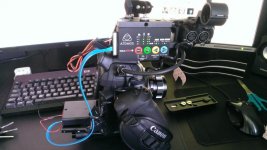
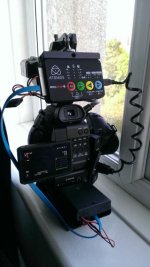
C100: Ninja Star Users......

...the Video Assist won't trigger record nor will it remove 3:2 or 2:2 pulldown. You will end up with 50i (PAL) ProRes which will need to be processed.

It isn't out yet, so is this confirmed? If so, that makes a decision I have to make very soon much easier. That is, rent an Atomos (and get reimbursed) now and buy the BM later. Or buy an Atomos now, and get some of the purchase price reimbursed by the production company.

Also, FWIW, I like the experimentation and am looking forward to seeing if you make it work, even though it doesn't affect me. I agree that it doesn't make sense that they made the budget friendly recorder record to media that is currently still quite expensive.

Edit: According to BM's webpage for the product, it does do trigger record. But will it correctly record progressive on the C100?

Recording is automatically triggered on your Blackmagic Video Assist using your video camera’s start/stop button, so you can remain focused on getting the shot without having to worry about operating additional gear!
 
There's enough interest in a CFast to SSD solution that someone has started a kickstarter and raised $7k of $15k with 25 days to go: https://www.kickstarter.com/projects/648471422/rig-friendly-c-box-system-use-any-ssd-on-your-cfas (via cinema5D: http://www.cinema5d.com/cheap-cfast-recording-with-new-ssd-interface-kickstarter-campaign/)

I'll stick to the cheap Super Talent CFast cards for my Star for now but applaud the DIY effort shown here. I'd love to see what rigging solutions you come up with to keep the package small. Please keep us updated!
 
Bad news. The SD adapter only writes at around 4MB/s! Sending it back and I'm trying to find out if the newer dual and 4x SD adapters have better write speeds. I thought the speed would be bad but 4MB/s is terrible!

SSD works as expected but my goal is still a little SD adapter for my Sandisk Pros.
 
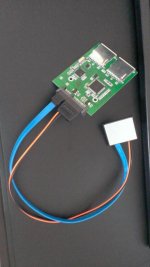
I have a reply from a seller stating that the dual SD slot to SATA adapters have a MAX read speed of 530MB/s and a MAX write speed of 130MB/s. They allow any size of SD card so I should be able to use 2x 64GB cards for 128GB of fast storage, if their claims are true. The adapter is around £10 so I'll order one.

I have a really neat setup for SSD recording (the SSD sits in an enclosure between the camera plate and 15mm rods).

However plugging a SATA cable into the unit, is far too risky due to the fragile connectors inside the Ninja. Not worthwhile doing in my opinion, one tug and you could easily damage the connector. I didn't realise the CFast male connector was so fragile compared to a standard SATA.

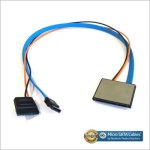
I have ordered a CFast breakout cable from Ebay. The seller/manufacturer has told me it is 3.3mm thick (type 1) so it is not what the C-Box guy is using for the URSA (Unless the URSA can use type 1 cards?). I have emailed again and asked him to double check it is indeed a type 1 dummy card.

I live in the UK so it won't arrive till next week.

Untitled.jpg

$_12.JPG
 
Last edited:
OK. I have now got the breakout cable and the new SD adapter. Unfortunately my Ninja Star was not mounting real CFast cards correctly and I'm now waiting for a replacement to arrive.

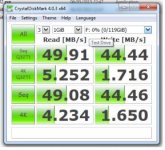
The good news is the breakout cable is indeed CFast type 1. The SD adapter is managing nearly 45MB/s with 2x 64GB Sandisk Extreme Pro cards. Good enough for 422 and HQ. I will update again once I have my new Star.

CF7XjyrW0AArIW3.jpgUntitled.jpg
 
Last edited:
How does it write them? Fill one, then the other or does it do some kind of RAID?

If it's some kind of RAID, no way I'd ever trust that.
 
How does it write them? Fill one, then the other or does it do some kind of RAID?

If it's some kind of RAID, no way I'd ever trust that.

It uses RAID0 however you can just use one slot and the max write speed is the same from my tests. There is no limit on card size so I guess you could use a 128GB card, my largest is 64GB so I can't test this.
 
Progress. The CFast breakout cable works and I've successfully recorded ProRes HQ to a 500GB spinning HDD. The Ninja isn't mounting my SSD or the SD adapter properly. Plugging these into the CFast USB reader works. Strange.

CG-mn5CWoAA8gUr.jpg
 
You have a lot of time on your hands. All of this so you don't have to buy Cfast cards? You know that Atomos sells CFast card? A 128GB card sells for 239$. My comment was not meant to be rude, it just seems that you put a lot of time on a solution that will not be as compact as with the Star alone. Why not sell your Star and buy a Ninja Blade?
 
You have a lot of time on your hands. All of this so you don't have to buy Cfast cards? You know that Atomos sells CFast card? A 128GB card sells for 239$. My comment was not meant to be rude, it just seems that you put a lot of time on a solution that will not be as compact as with the Star alone. Why not sell your Star and buy a Ninja Blade?

Well firstly, I think it's quite fun to mess with equipment and make it do things it wasn't intended to do. Secondly my clients are happy with the internal codec and this is mainly for my own personal projects and maybe the odd music video. Although I will use it on paid gigs which I feel would benefit.

Price wise a 64GB Atomos CFast in the UK is £117. This 500GB spinner is £37.

The Ninja Blade is £700. I can't really justify buying one. 80% of my paid work is shooting talking heads and promotional material for web delivery.

I will get CFast cards once the prices come down but I have no real reason to be spending lots of cash on them at the moment.

My original goal was to get my Sandisk Extreme Pro 95MB/s SD cards working with the Star. These cards outperform the Atomos CFast cards and I've got a ton of them.

This project is more useful for URSA owners. There is a Kickstarter for what is essentially what I've just shown. People are interested in the possibilities of using other media with a CFast connector.

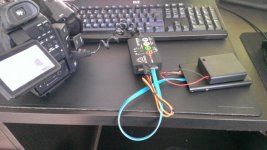
Here it is all mounted up as a bit of a test. Maybe I'm just strange but I find this kind of thing quite interesting and fun. :)

WP_20150608_004 (1).jpg
 
Last edited:
  • Like
Reactions: dpc
You're not strange at all. If you like it, go for it! In my personnal experience, I used to make my own DIY stuff, but discovered I lost more money doing it myself than buying the right tool in the beginning.
 
The Ninja Blade is £700. I can't really justify buying one.

Geeeze :| I totally get having fun and enjoying playing with stuff, but I'd pay $1000 to not have to deal with that even for 1 shoot :|
I guess thats the difference between Canon C shooters and BMC shooters, tolerance for finicky stuff maybe?
I shot 32 hours this weekend with my C100 & A7s... I couldn't imagine dealing with any of whats in that picture
 
One of the reasons I bought the C100 it is just plug and play. That being said I love my Blackmagic camera and if its a controlled studio shoot I would pick that
 
I've shot a huge amount on the BMCC including a feature film. It's a great image but a real pain of a camera, due to it's ergonomics and low light sensitivity. However using it for so many projects really brought me back to the basics of cinematography and lighting.

I find Canon C users to be a fairly closed group of people, fairly rigid in their thought process. The vibe on the BMC forums is way friendlier and they're open to new ideas on kit. Possibly because the BM cameras require you to use 3rd party batteries and kit.

Mention 3rd party batteries here and you get attacked.

The rig I just showed above is basically just a C100/Ninja with a HDD and a couple of extra cables. It's just a quick test as an idea but it's still more ergonomic than a BMCC. For BMCC shoots I had the camera, SDI/HDMI converter, V-Lock battery, SmallHD with 5+ cables running from the various bits.

That really was the bare minimum and that is a heavy and wide rig.

Maybe there are old ENG shooters here that don't like the idea of rigging accessories etc?

I now have a recorder that can use CFast cards for compactness or for a long studio shoot I can hook up much bigger drives. I'm not against CFast cards. My Ninja can still use them :)

In other news the ProRes off the Ninja is really nice, just put some through Resolve. Now what's this I hear about Atomos' 422 and LT implementation being 'broken'. Someone said only HQ isn't broken. Anyone care to chime in on this? I've shot all 3 codecs and they seem to be acting as they should to me.


CG_W06LW0AA0alN.jpg
 
Last edited:
I've shot a huge amount on the BMCC including a feature film. It's a great image but a real pain of a camera, due to it's ergonomics and low light sensitivity. However using it for so many projects really brought me back to the basics of cinematography and lighting. I find Canon C users to be a fairly closed group of people, fairly rigid in their thought process. The vibe on the BMC forums is way friendlier and they're open to new ideas on kit. Possibly because the BM cameras require you to use 3rd party batteries and kit. Mention 3rd party batteries here and you get attacked. The rig I just showed above is basically just a C100/Ninja with a HDD and a couple of extra cables. It's just a quick test as an idea but it's still more ergonomic than a BMCC. For BMCC shoots I had the camera, SDI/HDMI converter, V-Lock battery, SmallHD with 5+ cables running from the various bits. That really was the bare minimum and that is a heavy and wide rig. Maybe there are old ENG shooters here that don't like the idea of rigging accessories etc? I now have a recorder that can use CFast cards for compactness or for a long studio shoot I can hook up much bigger drives. I'm not against CFast cards. My Ninja can still use them :) In other news the ProRes off the Ninja is really nice, just put some through Resolve. Now what's this I hear about Atomos' 422 and LT implementation being 'broken'. Someone said only HQ isn't broken. Anyone care to chime in on this? I've shot all 3 codecs and they seem to be acting as they should to me. View attachment 101927
Still I think you're looking for trouble with all those cables dangling the side of your rigs...so many things could go wrong. IMO, the HDMI cable from the C100 to the Star is already a weak link (the mini HDMI port on the Star). Hope you're not relying only on the external recording and you're recording on the C100 too.
 
Still I think you're looking for trouble with all those cables dangling the side of your rigs...so many things could go wrong. IMO, the HDMI cable from the C100 to the Star is already a weak link (the mini HDMI port on the Star). Hope you're not relying only on the external recording and you're recording on the C100 too.

On a shoot I always cable tie cables to the camera/rails where possible. For example I would run the HDMI over the grip rosette and put a cable tie around it. I'd run the SATA cable through the handle and around the rosette as well under the cable tie. As you say the micro HDMI is easily the biggest risk. I used micro HDMI on my BM Pocket but I used a cage with a cable clamp. Micro HDMI is the worst and the ports easily damaged but understandable why they had to use it on the Star.

Of course! My C100 is always loaded with 2x 64GB Sandisk Extreme Pro cards. :)

Well I guess that's my tinkering over with for now. I'll update only if I manage to get the SD adapter working with it.
 
Back
Top