C100: Ninja Star Users......

analog_addict

Well-known member
I've just ordered a Ninja Star for my C100 on the basis of a thread I saw where a guy plugged a SATA cable direct into the Ninja and recorded ProRes to a 2.5 HDD. You need to shave a little plastic off the SATA connector for it to fit but that's all. I have a 480GB Sandisk Extreme Pro drive I could use.

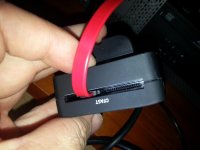
Here are the pics:
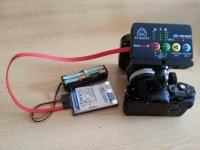
1d9cdbc7ca440fcc2a34a6c8b1f596.jpg8ba9970f8ab850dc8c682fd440a14a.jpg


The Ninja SATA only outputs 3.3V so you can't power a SSD/HDD from it. You need to power the drive externally. I have the parts to make a small SSD housing with a Sony plate to power the SSD. It will work but will also be bulky and more batteries to charge.

I've also ordered a SATA to SDHC adapter. I have many Sandisk Extreme Pro 64GB cards that record RAW from the BMPCC fine, so more than enough for ProRes 422 or HQ. I'm assuming this doesn't work or else I'm sure lots of people would be doing this. The 3.3V from the Ninja will happily power the SD card. So a little case for the adapter and a couple of short cables would be a very neat setup!
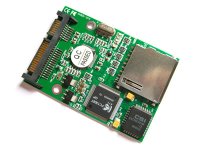
SLSA5001_SATA_TO_SD_Adapter-1.jpg

I can't see a reason for the SDHC adapter not to work with the Ninja if SATA HDDs already work. We shall see and I will update once I get the bits.


Any one tried this?
 
Last edited:
Lol at that point it kind of defeats its own purpose, no?

How does it defeat the purpose? The only objective is to record to cheaper media than CFast cards. In my case media I already own.

The SSD setup would be bulky but the SDHC adapter would add hardly anything to the unit.

The Ninja Star only uses CFast 1 cards. Sandisk Extreme Pro SSD and SDHC can more than equal the speed required.
 
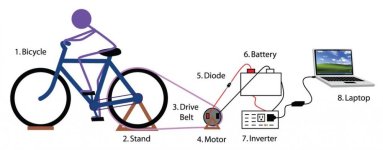
Have you tried plugging the HDMI from the C100 into a laptop and recording on the laptop's internal hard drive? You'd have to power the computer, speakers, mouse, etc., since the laptop battery probably won't last the whole shoot, so I'd suggest a generator on a cart. Kind of a big setup up but if the only objective is to record to cheaper media than CFast cards then you're all set, plus the cart could be used as a dolly. Though, since you're on a budget you may not want to spend money on the gas for the generator, so I'd suggest one of those bike generator setups. If you have a wife or girlfriend she can do the pedaling for free while you man the camera. Something like this.


FHQFHO3GBVJH04Q.LARGE.jpg
 
What a stupid reply. You clearly know nothing about electronics or power. How much power do you think an SSD draws!? A Ninja 2 powers a screen and an ssd with 2x lp-e6.

Anyway the SDHC adapter will take power from the Ninja.

I haven't been to DVXuser for a while. Has everyone turned into a snarky know it all here!?

This same subject was brought up on BMCuser with enthusiasm and interest.

It's like people who think 3rd part batteries will make your camera explode.
 
It's called sarcasm. The purpose of the ninja star is to record prores in a very small package. You want to save some money using your existing disk but you will lose a lot in convenience.
 
It's called sarcasm. The purpose of the ninja star is to record prores in a very small package. You want to save some money using your existing disk but you will lose a lot in convenience.

I want to use an SDHC adapter which will add what, 5 grams of weight? Put a little enclosure around it and Velcro it to the back of the ninja.

Really the star should have had SD instead of CFast. 1080p prores HQ can easily be recorded to SD cards as proven by the bmpcc and the new video assist from BM.

Most people are buying budget CFast 1 cards to use with thing whose speeds are not anything to go crazy over. I would much rather record to Sandisk Extreme Pro SDHC than an Atomos CFast card that is more than likely a rebranded budget Chinese card given it's spec.

Of course it may not work but it's interesting to try. The guy who recorded to an SSD proved that the ninja will interface with standard sata storage.

Why use CFast if SDHC can do the job for a lower price and better spec?
 
Last edited:
I don't have time to photoshop a great graphic like the one 3 posts up but I hereby suggest we stretch that idea a bit and power the C100 by a few of those big white wind turbines.

You will need planning permission though as well as run it by residents in the area you are filming on the day.
 
I was talking about powering the laptop since most laptop batteries won't last a whole shoot, not a generator for powering a Ninja star. A laptop would be beneficial since you wouldn't need to buy a little case for the adapter and a couple of short cables, plus those who don't have a Ninja Star would not need to buy one as they could just use their laptop. And helping your significant other stay in good physical condition is a nice added benefit.

I support the use of third party batteries and use them when I'm not powering my camera with my car battery or a beryllium sphere.


As for a serious reply to the idea, if the cables are secure, it's ergonomic, the setup is more compact and lighter than a Ninja 2 monitor/recorder, and you don't have too many exposed elements, then it may work well. I know the photos aren't a finalized version, but it looks like a good number of points of failure (batteries falling out, cables getting disconnected, etc.) in its current setup and I'm not sure a finalized setup would fix all of that.


EDIT: So I was thinking maybe instead of using your significant other, you could offer a gym membership program and actually make some extra money while filming the videos.
 
Last edited:
Yes, I think the same thing...they should've design the ninja star to take SDHC cards. Don't really know why cfast.
 
Please read. Those pictures are not mine. They were from a guy testing an an idea.

The atomos CFast cards have a max write of 80mb/s. My pile of Sandisks do a max of 95mb/s.

The only point of failure using the SD adapter would be cables unplugging. Considering we're using HDMI into the Ninja Star, this shouldn't be a concern. The HDMI could unplug far far easier than the little 5cm data cable.

There is an SD adapter for CFast 2 slots which unfortunately does not fit inside the Ninja due to it using CFast 1. My proposed method just means the adapter will need to be external to the slot.

I'll have the bits on Monday so I will update, even though there seems to be a negative vibe to using cheaper and better performing media :)
 
I also think this is an overly complicated setup. Personally I don't like all the connections which doesn't look very professional and has greater potential for failing. Mounting would also be more complicated. Ninjas are super cheap now and battery life doesn't seem to be much of an issue with mine. There's also battery adapter plates to plug into power
 
I find it amusing that SammyDavisJrJr happens to be a junior member on DVXUser.

Really, what are the odds?

PS. The KISS principle works the best. And, by that, I don't mean garish makeup and simplistic guitar riffs.
 
Maybe it's because I've been using a huge BMCC rig with V-Lock, HDMI-SDI Converters, Monitors etc.

Adding a small SDHC adapter isn't a big deal at all. A small problem is all of the adapters only accept 32GB cards. Still useful if the adapter doesn't limit speed. I think the SD adapter will work but unfortunately I'm guessing performance won't be great but we'll see.

Even adding a SSD enclosure hooked up to the Ninja, the C100 would still be small compared to the rigged up BMCC. As with most things it's just a case of adding a 1/4" mounting point to it and mounting it.

As for not looking professional, by the time I'm finished with it, it will look like it was part of the original unit. If a client spots 5cm of SATA cable and complains, well, that's just not going to happen is it?

I'm quite into soldering/electronics and like a lot of people I make all my own cables for my camera gear. I also make (home) audio gear, speakers and amps. This little project is nothing.
 
Last edited:
If I were you I'd look into selling the Ninja Star and pick up a Blackmagic Video Assist for $495. It's a bit bulkier, but you get a screen, uses same Canon batteries and records to SD cards. I'll pick one up myself to use for the 4k-->HD 422 out of 1Dc for longer event type recordings where 4k is impractical.

Seems hard to beat for ProRes to cheap media. AND you get an additional monitor.
 
If I were you I'd look into selling the Ninja Star and pick up a Blackmagic Video Assist for $495. It's a bit bulkier, but you get a screen, uses same Canon batteries and records to SD cards. I'll pick one up myself to use for the 4k-->HD 422 out of 1Dc for longer event type recordings where 4k is impractical.

Seems hard to beat for ProRes to cheap media. AND you get an additional monitor.

This was my original plan but the Video Assist won't trigger record nor will it remove 3:2 or 2:2 pulldown. You will end up with 50i (PAL) ProRes which will need to be processed. Not ideal.

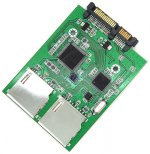
Further to my last post I have found a new SD to SATA adapter. It allows 2x SD cards to be used and has no size limit for the cards. Unfortunately I can't find a UK seller so this would need to be shipped from HK. If it works it could be perfect.

$_57.jpg
 
Last edited:
If it was completely enclosed and didn't look like ass, it might be useful.

That said, there are 128GB CFast cards knocking around for $85 each, so it's not like CFast for the Ninja Star is incredibly expensive.
 
If it was completely enclosed and didn't look like ass, it might be useful.

That said, there are 128GB CFast cards knocking around for $85 each, so it's not like CFast for the Ninja Star is incredibly expensive.

Yes it will be enclosed and very neat, obviously you wouldn't have an unprotected PCB. I think the adapter is actually 2.5" form factor. Easy to enclose but slightly larger than anticipated.

I've seen the Super Talent CFast cards that are reported working with the Star. Unfortunately here in the UK there is less choice. The cheapest option stocked in the UK is the Atomos 64GB card at £117 ($184USD). The 64GB Super Talent cards would cost around £55 imported from the US (plus import/duty).
 
Staying on the topic, Samsung just announced their new SD and microSD cards. They state 95 MB/s max write speed on their top of the line SD. No pricing yet available.
 
Back
Top