New Panasonic 4K 60P Camcorder HC-X1000

Well, if I was going to ask for just one clip, it would be a 4k 60P MP4 because that would be taxing the extreme of the camera, lens, codec and computer. Of course, I would like it to also be a pretty picture and showcase the 4K resolution.

And if I was going to ask for a second clip, it would be a low light scene.

In any event, I look forward to your reports.
 
Okay, so, this might seem trivial, but in the world of Panasonic camcorders this one is a change enough that I thought I should mention it. Traditionally, Panasonic handheld cameras used an AC power supply that doubled as a charger -- so you could either power the camera, or you could charge batteries, but you couldn't do both.

That changed with the AC90, where they included an AC input jack inside the battery compartment, and the AC power supply and battery charger were separate units. You could charge batteries while using the camera on AC, which was a step up, but still a bit limited.

On the HC-X1000, they got it right -- the AC power supply and the battery charger are, again, separate. But this time, the AC input is on the outside of the camera, not in the battery well. So this means, for the first time in I don't know how long, probably the first Panasonic handheld pro camera in history, you can actually run both AC and battery at the same time. This is a hugely welcome change for event shooters. Now you can run on battery, and when the battery's getting low you can plug in the AC while you do a hot battery swap, snap in the new battery, unplug the AC and keep going -- all while continuously recording. Or, alternatively, you could have a stationary camera plugged in AC, but also put a battery in there; that way if someone kicks out the power supply or a circuit breaker pops or the DJ unplugs your power cord because he wants to plug his own in, or any of a million other goofy situations that can happen, It Won't Matter -- the camera will seamlessly swap over to battery operation, even during recording, and you'll never even lose a frame.
 
I noticed that the power jack was in a better location and was really hoping for BOTH as opposed to either/or. This is a big plus!
 
Okay, another thing...

The 1080p in the camera is made from a full scan of the 4K sensor. We already knew that, but, stick with me...
The AC90 has a feature called i.Zoom. I don't remember offhand if the AC160/AC130 have it, but the AC90 definitely does. It's an integrated digital zoom that works via the zoom rocker, to magically extend the zoom range digitally by 2x. After you've zoomed all the way to Z99, the i.Zoom takes over and you can just keep zooming in and it scales the image and makes it seem as if you have twice the zoom range. It works okay in the AC90, but you can definitely see a loss of resolution by the time it's reached the full 2x reach. The AC90 has 1920x1080 chips, so to get the 2x range it has to use a smaller section of the sensor and digitally scale it up.

But on the HC-X1000, those two things work together and may result in making the i.Zoom a lot more useful. Because the camera is always scanning the full 4K and downconverting to 1080, that means that when you're in 1080p mode and using the i.Zoom, there should be little to no loss of quality! It should be able to double the zoom range without there being a significant hit to the image. At the full 2x magnification, it'd be just sampling a straight 1920x1080 matrix right off the center of the 4K chip...

I haven't put it through rigorous testing yet, I just realized this when going through the manual, but it sure seems promising. I'm optimistic partly because the i.Zoom doesn't work in 4K mode, it only works in 1080p, and that makes me think that they may have done it the "right" way...

A vaguely EX1-style 1080p ENG camera with a usable 40x zoom range? That's sort of kind of awesome...
 
Well, not entirely. At 4k res, yes, you're accurate here. 4:2:2 color sampling would give a color matrix of 1920x2160, and the sensor only has 1920x1080 color samples on it, so it would be a complete waste of bandwidth. But when considering 1080 recording, it sure would be nice to have 4:2:2 since the sensor is fully capable of filling out that recording space properly.

So if the sensor has 1920x1080 color samples, does this mean that if we shoot 8-bit 4:2:0 at 4k and down covert it to HD we can get 10-bit 4:4:4?
 
I already shot a color res chart (the DSC "Wringer") in 4K and downconverted it to 1080p, and yes it's undoubtedly vastly better in color sampling. The math tells us it should be 4:4:4, and it certainly looks like it is. It looks like perfect resolving (and that includes fine concentric rings of red and blue, which I then magnified to 400%; you could easily see if it was subsampled).

As to whether it's 10-bit or not, that will take some more testing. It should be, in that the four 8-bit luminance samples are being summed together (presumably) which would give us 1,024 brightness levels for each quad-pixel block, which would be 10 bits. I'll have to do some gradient testing to see if that's how it really works out.

But as of right now, yes, it looks to me that if you record 4K, you can convert it in post to 10-bit 4:4:4. Recording in 4K will take up more space and wouldn't allow the iZoom feature, but it seems like it should give you the option to create 10-bit 4:4:4 in post.
 
I feel like i shouldn't ask, but even though its a pre-production cam, is the Auto-Focus any better yet. I just do way to much run and gun ("quick turn the camera on and press record while its moving") to not use it.
 
I already shot a color res chart (the DSC "Wringer") in 4K and downconverted it to 1080p, and yes it's undoubtedly vastly better in color sampling. The math tells us it should be 4:4:4, and it certainly looks like it is. It looks like perfect resolving (and that includes fine concentric rings of red and blue, which I then magnified to 400%; you could easily see if it was subsampled).

As to whether it's 10-bit or not, that will take some more testing. It should be, in that the four 8-bit luminance samples are being summed together (presumably) which would give us 1,024 brightness levels for each quad-pixel block, which would be 10 bits. I'll have to do some gradient testing to see if that's how it really works out.

But as of right now, yes, it looks to me that if you record 4K, you can convert it in post to 10-bit 4:4:4. Recording in 4K will take up more space and wouldn't allow the iZoom feature, but it seems like it should give you the option to create 10-bit 4:4:4 in post.

Thanks for your quick answer, Barry. So on paper, you can down convert 4k to get HD at 10-bits 4:4:4, and if you confirmed it in real life, that's very impressive indeed. And I don't think shooting 4k really takes up any (or much) more space, because the specs list 4k mp4 recording rates as 100-150 Mbps, and HD mp4 recording as 50-200 Mbps. The only downside I see is the extra time in post to down convert. But hey, it's a great option to have.
 
Thanks for the hands-on updates Barry. Excited about this camera. As we wait for the official manual from Panasonic, a few more questions though (I know it's a prototype and things might change, and this is a long list so no rush)...


1) does it have time AND date stamp- or just time stamp? And is it centered in the frame, or off to the side?
2) you said it's sharper than the AC90- I would imagine it would be at 4k. Are you saying the HC's 1080 mode is sharper than the AC's 1080 mode?
3) I see it has composite outs for down converting- does this output have a side-crop feature where it's putting a true 4:3 SD signal?
4) does the zooming in and out have a dampening features for smoother start stops?
5) the mic looks like a DD 5.1- is it stereo or surround?
6) is it HMC 40 size or AC90 sized?
7) does it have any framing markers, like safety areas for 4:3?
8) how would you compare the autofocus to so etching like the AC130?
9) I understand it has simultaneous recording- does it also keep recording if one of the card fails

Thanks again :)
 
I feel like i shouldn't ask, but even though its a pre-production cam, is the Auto-Focus any better yet. I just do way to much run and gun ("quick turn the camera on and press record while its moving") to not use it.
They say that the autofocus is much faster. I haven't tried to rig any sort of test to compare it against the AC90 or HPX250, although I guess I should figure out some sort of proper test method...
 
1) does it have time AND date stamp- or just time stamp? And is it centered in the frame, or off to the side?
It has options for time, date, and time&date. In this preproduction version it's not working 100% properly when using time-only or date-only, but time&date works fine. It's a discreet small-font display in the lower right, within the 4:3 crop lines.

2) you said it's sharper than the AC90- I would imagine it would be at 4k. Are you saying the HC's 1080 mode is sharper than the AC's 1080 mode?
Haven't tested yet. Tried the 4K, and compared it to an older AC90 shot, and yes, it's incredibly better. Some were wondering whether 4K would even make a difference at such a small pixel size, and most definitely, yes, it makes a huge difference. 4K is not "wasted" on being employed on a 1/2.3" chip.

3) I see it has composite outs for down converting- does this output have a side-crop feature where it's putting a true 4:3 SD signal?
It has options for letterbox, squeeze, and side-crop.

4) does the zooming in and out have a dampening features for smoother start stops?
This unit's zoom action seems comparable to the prior Panasonics (DVX/HVX/HPX/HMC/AC160/130 series). It doesn't appear to have the buttery super-smooth zoom start of the PX270.

5) the mic looks like a DD 5.1- is it stereo or surround?
It sort of looks like there's three grilles where mics could be, but the specs list it as "stereo mic" and the recording options provide only for stereo LPCM or AAC, there is no 5.1 option.

6) is it HMC 40 size or AC90 sized?
It is close to AC90 sized. A little smaller, more dense -- in a good way.

7) does it have any framing markers, like safety areas for 4:3?
Gobs of 'em. It has a center crosshair marker, a level gauge (which takes up a lot of the screen, and makes it look sort of like you're making a run on the death star's exhaust port), and then there's a series of grid options (horizontal lines, or a framing box, or a grid), and then there's traditional framing guidelines in 16:9 90% safety, 4:3, 14:9, 1.85:1, 17:9, 2:1, 2.35:1, and 2.39:1.

8) how would you compare the autofocus to so etching like the AC130?
Haven't done so yet.

9) I understand it has simultaneous recording- does it also keep recording if one of the card fails
It has three modes of multi-card use. You can set it up to

1) automatically switch from one card to the next (although it will lose audio for about a second while doing so),

2) record on both cards simultaneously, or

3) do "background" recording, where one card responds properly to the start/stop switch, while the other card just rolls continuously all the time. That way you can make your "selects" reel on one card, but -- if something were to happen when you weren't recording and you wished you'd captured it, well -- you actually did, because it'd be recorded on the second card. Haven't explored that feature yet, so I don't know if it's the same recording or if it does a low-bitrate recording on the second card or what.

I didn't really know how to test this, I mean, how do you make an SD card fail on demand? But, the HC-X1000 lets you open the card door, while still recording. That's different from most AVCHD cameras. So I dug up an old card I didn't care about anymore (a 2GB mini-SD in an adapter) and stuck it in the second slot; put the camera in AVCHD mode, and told it to do a simultaneous record and, while recording, ejected the mini-SD card. I am very, very happy to report that it performed "properly" -- the recording continued on the regular card without a hitch. So, the "simultaneous" record method seems to protect you against an unexpected card failure.
 
Last edited:
Ah, one other minor tidbit -- on the AC90, the menu options were contolled by the touchscreen, and only the touchscreen. Which was fine when using the LCD panel, but was a bit of a pain in the patoot when using the viewfinder on a sunny day, as there was no way to change any menu settings! You'd have to stop, pull out the LCD, change the menu things, put the LCD back, and then go back to shooting with the EVF. Even though there was a physical "menu" button you could press to bring the menu up, there was no way to actually make selections, other than using the touchscreen.

Happily this is fixed on the HC-X1000. There's a menu button, and a multi-function wheel that can be used to cycle through the menus and make selections. That was a simple, small, obvious and necessary thing for them to do, but happily I can report that they did it, so now it is fully functional when using the EVF.
 
Ah, one other minor tidbit -- on the AC90, the menu options were contolled by the touchscreen, and only the touchscreen. Which was fine when using the LCD panel, but was a bit of a pain in the patoot when using the viewfinder on a sunny day, as there was no way to change any menu settings! You'd have to stop, pull out the LCD, change the menu things, put the LCD back, and then go back to shooting with the EVF. Even though there was a physical "menu" button you could press to bring the menu up, there was no way to actually make selections, other than using the touchscreen.

Happily this is fixed on the HC-X1000. There's a menu button, and a multi-function wheel that can be used to cycle through the menus and make selections. That was a simple, small, obvious and necessary thing for them to do, but happily I can report that they did it, so now it is fully functional when using the EVF.

Careful Barry, your next post puts you over the top!
 
It has options for time, date, and time&date. In this preproduction version it's not working 100% properly when using time-only or date-only, but time&date works fine. It's a discreet small-font display in the lower right corner.

Nuts- since it doesn't do SD, May not work for depositions. Depos are usually shot in 4:3 mode, or cropped in post if the camera only does widescreen. If the stamp is in the lower corner of a widescreen frame, it'll get cropped out. I hope in the production version it's centered (or movable).

- otherwise this camera is a home run for what I need. How would one get this idea to a Panasonic engineer.
 
Nuts- since it doesn't do SD, May not work for depositions. Depos are usually shot in 4:3 mode, or cropped in post if the camera only does widescreen. If the stamp is in the lower corner of a widescreen frame, it'll get cropped out. I hope in the production version it's centered (or movable).
I don't think you have to worry. It's not in the corner, it's going to survive a crop-out. I edited my post above to remove the reference to the corner.

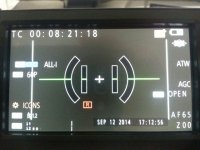
Here's a screen shot from a 16:9 image, with a 4:3 extraction safety zone on top.

HC-X1000-screenshot.jpg

And yes, the gigantic tie-fighter display in the center of the screen is the level gauge...

And before anyone worries, yes, with the press of a single button you can make everything on that screen disappear and get a pristine, clean display. You can individually control most of those displays so you can have the display as cluttered or as free as you want...
 
Last edited:
Re: chip size- I'm curious if the depth of field would be closer to what you would see on broadcast camera w/ 1/2" chips. Would love to see a side by side with this and a AC model (or other 1/3" model) when it gets released. My AC130 is tough to get shallow DOF- you have to be like 40ft away from the subject and zoom back in for a med shot. When I work w/ the Sony ENG cameras at our PBS station (using 1/2" 3CCD) it's so much easier.
 
Yes, the DOF will be extremely similar to what you'd get on a broadcast camera with 1/2" chips. A 1/2.3"-type chip is almost the same size as a 1/2" chip.
 
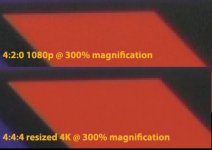
Okay, was fiddling with one of my charts and saw a patch in the corner that would make for a good example, so I shot it in 1080p 50-megabit, and in 4K 100mbit, and then downconverted the 4K to 1080p in PhotoShop.

Extracted the relevant portions and blew them up to 300% magnification so you can see the difference. Definitely much cleaner edges and higher fidelity in the color sampling, when downconverting in post.

4k-resized-color-compare.jpg
 
Back
Top