New GH1 stable 24p patch

rigs

Well-known member
I have been using several 1080 24p patch for over a year and finally found one that is stable in all conditions. This is a 12 gop, 220 Mbps patch that averages about 36 Mbps on very high detail scenes with no crashes in motion or locked off framing. I have only tested the 24p mode using a SANDISK EXTREME 30MB/S CLASS 10 card.

PTool v3.62d (160811) settings

WRAPPER
Native 24p/25p checked

AVCHD COMPRESSION
Video Bitrate FHD/SH = 115000000
Video Bitrate H = 120000000
Video Bitrate L = 110000000
Overall Bitrate = 115000000

AVCHD GOP LENGTH
720p60 GOP size = 15
1080p24 GOP size = 12

PATCHES FOR TESTERS
AVCHD MOVIE MODE

AVCHD COMPRESSION
Preset bitrate = 90
Preset bitrate 2 = 180
Overall bitrate 2 = 115000000

AVCHD Research
Constant for 1080p = 16110400
Constant for 720p = 16110400
Frame related comparison = 24
Video buffer = 50.000.000
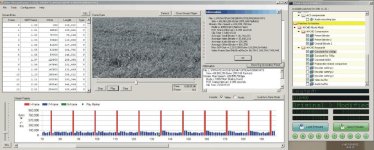
24p 12 gop.jpgView attachment rigs 24 p 12 gop.zip
 
Do you have some video to post???
in 720/60P SH mode, will this patch crash on highly detailed scenes?? I've only ever gotten up to about 32mb/sec, in that mode, before a crash. And, I have the older Sandisk Extreme III 30mb/second card-that actually is capable of 30mb/sec-not the newer UHS-I card, which is much slower.
 
I have did limited tests in 720/60p mode. It seemed stable on the chart. Give it a try
 
I Just did an extreme test with the 720/60 and it holds perfect using the kit lens at f22 1/60 and f9 1/125 averages about 55 Mbps
 
I have been using several 1080 24p patch for over a year and finally found one that is stable in all conditions. This is a 12 gop, 220 Mbps patch that averages about 36 Mbps on very high detail scenes with no crashes in motion or locked off framing. I have only tested the 24p mode using a SANDISK EXTREME 30MB/S CLASS 10 card.

PTool v3.62d (160811) settings

WRAPPER
Native 24p/25p checked

AVCHD COMPRESSION
Video Bitrate FHD/SH = 115000000
Video Bitrate H = 120000000
Video Bitrate L = 110000000
Overall Bitrate = 115000000

AVCHD GOP LENGTH
720p60 GOP size = 15
1080p24 GOP size = 12

PATCHES FOR TESTERS
AVCHD MOVIE MODE

AVCHD COMPRESSION
Preset bitrate = 90
Preset bitrate 2 = 180
Overall bitrate 2 = 115000000

AVCHD Research
Constant for 1080p = 16110400
Constant for 720p = 16110400
Frame related comparison = 24
Video buffer = 50.000.000

View attachment 39088View attachment 39087


Thanks for the patch will give it a try
 
I tried all the settings yesterday, 1080/24, 720/60, and MJPEG, and "highly detailed" scenes in my backyard(basically rocks, tree's bushes and a stuffed animal-to see the detail in the fur), and could not get it to crash. I have a Sandisk Extreme III(16GB 30mb/sec-old model-not the new "HD Video" POS).
I tried with the 14-42 lens, and also with my Nikon 50mm F2.0, at F2.0, and above-shutter speeds were all 2X frame rate-rock stable.
But, I only averaged around 36mb/sec, on the scenes. Did not try the "crunch test" chart-as I feel that's pointless, and not realistic.


This is the first patch I've tried, that exceeded 33mb/sec in 720/60P mode, and did not crash!!! Must have something to do with the GOP settings-but it looked fine, and I got slightly more detail than I got with my "custom" setting for 720/60, where I set it at 3000000.
 
I tried all the settings yesterday, 1080/24, 720/60, and MJPEG, and "highly detailed" scenes in my backyard(basically rocks, tree's bushes and a stuffed animal-to see the detail in the fur), and could not get it to crash. I have a Sandisk Extreme III(16GB 30mb/sec-old model-not the new "HD Video" POS).I tried with the 14-42 lens, and also with my Nikon 50mm F2.0, at F2.0, and above-shutter speeds were all 2X frame rate-rock stable.But, I only averaged around 36mb/sec, on the scenes. Did not try the "crunch test" chart-as I feel that's pointless, and not realistic.This is the first patch I've tried, that exceeded 33mb/sec in 720/60P mode, and did not crash!!! Must have something to do with the GOP settings-but it looked fine, and I got slightly more detail than I got with my "custom" setting for 720/60, where I set it at 3000000.

Thats great to hear, I use the same cards as well and have not had any crashes. High bit rates dont always add up to quailty, I have had patches that could run higher but would not transcode or import properlly. I think this patch offers a good amount of detail and motion.
 
Last edited:
......tried lowering GOP to 6 ,it works for me even outdoors and raising video buffer to 740000.... low light is just excellent.great patch rigs! my 100mbps patch from lpowell keeps freezing with my 32 transcend class 10 card so this patch makes up for it
 
......tried lowering GOP to 6 ,it works for me even outdoors and raising video buffer to 740000.... low light is just excellent.great patch rigs! my 100mbps patch from lpowell keeps freezing with my 32 transcend class 10 card so this patch makes up for it

Thats cool blues, did you mean 84.000.000 for video buffer. That is the next highest up from the 50.000.000 that I used.
 
I tried all the settings yesterday, 1080/24, 720/60, and MJPEG, and "highly detailed" scenes in my backyard(basically rocks, tree's bushes and a stuffed animal-to see the detail in the fur), and could not get it to crash. I have a Sandisk Extreme III(16GB 30mb/sec-old model-not the new "HD Video" POS).
I tried with the 14-42 lens, and also with my Nikon 50mm F2.0, at F2.0, and above-shutter speeds were all 2X frame rate-rock stable.
But, I only averaged around 36mb/sec, on the scenes. Did not try the "crunch test" chart-as I feel that's pointless, and not realistic.


This is the first patch I've tried, that exceeded 33mb/sec in 720/60P mode, and did not crash!!! Must have something to do with the GOP settings-but it looked fine, and I got slightly more detail than I got with my "custom" setting for 720/60, where I set it at 3000000.
Curious that some cameras will not crash and others will--maybe some subtle difference in the settings--did you have sharpening and contrast dialed down?
 
tried the rigs patch with my class10 transcend card using GOP3 and video buffer maximum, i think you guys should give it a go.... my lens was 28mm 2.8 blogon carl zeiss G lens and was set to iso 1600
am getting outdoor bitrates of 41mbps, clips are sharp no crash on bushes and detailed scene
 
Higher bit rates are nice but do they really add to better overall quality at that rate? I had used a 3 gop version of this patch on a 28 day shoot in June for with 2 GH1 cameras and a GH2. These where all exterior scenes. I did have some problems with higher bit rates not importing into Avid and had to transcode those clips. Some even had a hard time transcoding to DNxHD 175. Stange that they all played back fine in camera and on my PC via Splashlite.
 
I was able to shoot a standard outdoor scene at F/5.6 by keeping the GOP at 12 and upping the video buffer to 84,000,000 with a standard Transcend class 10 card.
Waiting for the Sandisk 30 MB/sec for more testing, but 24p on a standard card outdoors is good news.
 
Higher bit rates are nice but do they really add to better overall quality at that rate? I had used a 3 gop version of this patch on a 28 day shoot in June for with 2 GH1 cameras and a GH2. These where all exterior scenes. I did have some problems with higher bit rates not importing into Avid and had to transcode those clips. Some even had a hard time transcoding to DNxHD 175. Stange that they all played back fine in camera and on my PC via Splashlite.

I download thru FCP 7 (log and transfer),have no problems so far, another mts transfer can be thru TOAST tinanium10...works without the entire Private folder( takes just a little longer)
 
Back
Top