
Navigation
Install the app
How to install the app on iOS
Follow along with the video below to see how to install our site as a web app on your home screen.
Note: This feature may not be available in some browsers.
More options
You are using an out of date browser. It may not display this or other websites correctly.
You should upgrade or use an alternative browser.
You should upgrade or use an alternative browser.
NEW GH1 24p 110 MBs Gop 1 patch
- Thread starter rigs
- Start date
Aki_Hartikainen
Carbonite Member
I was thinking that the limit by the camera is ~100 mbits. When I see the bit rate rise to 95 mbits, the camera stops recording. If the bit rate hovers around 80 mbits the camera continues to record. So I tested with a Fotodiox low cost diffuser and indeed I can record more reliably but the filter effect is just too strong.
I have selected the sharpest vintage manual lenses which are the Minolta MD and Tokina AT-X lenses. They are sharper than anything else, including the new Lumix lenses and give incredible quality for RAW still images. However, for video I would not want to go back to softer lenses, like Canon FD.
Is there a way to tune the GOP-1 settings for a slightly lower bit rate? How about using GOP-2, would that work? GOP-3 is not that filmic motion, unfortunately.
I have selected the sharpest vintage manual lenses which are the Minolta MD and Tokina AT-X lenses. They are sharper than anything else, including the new Lumix lenses and give incredible quality for RAW still images. However, for video I would not want to go back to softer lenses, like Canon FD.
Is there a way to tune the GOP-1 settings for a slightly lower bit rate? How about using GOP-2, would that work? GOP-3 is not that filmic motion, unfortunately.
It’s true that this patch may fail in very high contrast, sharp detailed scenes. But at least it still retains the recorded file. I have had no issues recording in controlled lighting scenes and exteriors using ND filters to keep @ a 1/50[SUP]th[/SUP] shutter speed at - 1/3 of a stop underexposed. I mostly use FD lenses which gives a soft image. CRFilms - GOP1 does indeed have issues with extreme low light scenes – stop recording black and find more light beyond your hand covering the lens.
It’s a great tool that VK has provided us all. Please continue to test and expand upon all the patch’s out there. We all have the option to create our own versions tailored to our specific needs. And that is a very cool option to have at any point.
It’s a great tool that VK has provided us all. Please continue to test and expand upon all the patch’s out there. We all have the option to create our own versions tailored to our specific needs. And that is a very cool option to have at any point.
That frame grab was shot with the 14mm F2.5 Panny at ISO 100. Granted, very under exposed, but that should be a perfectly acceptable amount of light for a moody or spooky scene.
I shot that with your patch at GOP4. At GOP3-4 I can walk down that hall with no failures. At GOP1 it fails within 5-8 steps. Second pic further down the hall. Start at the dark end, you won't get half way to the second pic before it fails. There will be times when you need that light to dark to light moving transition and it will fail fast and not record to card.
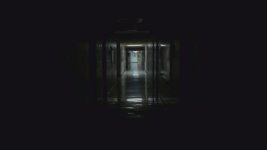
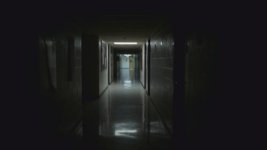
EDIT: Posted wrong pic, added second for added clarification
I shot that with your patch at GOP4. At GOP3-4 I can walk down that hall with no failures. At GOP1 it fails within 5-8 steps. Second pic further down the hall. Start at the dark end, you won't get half way to the second pic before it fails. There will be times when you need that light to dark to light moving transition and it will fail fast and not record to card.
EDIT: Posted wrong pic, added second for added clarification
Last edited:
Aki_Hartikainen
Carbonite Member
Rigs, this is the highest quality video images from GH13 so far. I am close to being able to use it for all purposes. I only need to focus slightly off in daylight and it records. I am pretty sure the slight modification can be done to allow reliable shooting in daylight at ~80 mbits. Still monster bit rate for video.
I don't think it can....the HARDWARE and software just won't support it. Also I just tested almost EVERY current hack for the GH1 against the papas 2k chart:
http://www.sendspace.com/file/5f0if7
I put this on my 42" LCD and pointed the camera and ALL FAILED. Max Latitude, Peak Reliability, Reliable in Camera Playback, Native 24p, GOP4, GOP1, all failed EXCEPT stock firmware, lol. Even with the 95mbs Sandisk Extreme Pro, it didn't matter. Some high detailed shots, just won't record.
Ultimately shooting on DSLRs is a compromise vs Pro Cameras. It's our job to figure those limitations and shoot around them. I'm going with Rigs hack changed to GOP4...that's the best compromise for me.
EDIT: Just tested a GH2 with one of the SeaQuake GOP1 166mb patches with that test chart...didn't fail, and I just used a standard Transcend 16gb Class 10 card. It's the hardware.
http://www.sendspace.com/file/5f0if7
I put this on my 42" LCD and pointed the camera and ALL FAILED. Max Latitude, Peak Reliability, Reliable in Camera Playback, Native 24p, GOP4, GOP1, all failed EXCEPT stock firmware, lol. Even with the 95mbs Sandisk Extreme Pro, it didn't matter. Some high detailed shots, just won't record.
Ultimately shooting on DSLRs is a compromise vs Pro Cameras. It's our job to figure those limitations and shoot around them. I'm going with Rigs hack changed to GOP4...that's the best compromise for me.
EDIT: Just tested a GH2 with one of the SeaQuake GOP1 166mb patches with that test chart...didn't fail, and I just used a standard Transcend 16gb Class 10 card. It's the hardware.
Last edited:
Aki_Hartikainen
Carbonite Member
Today I went from GOP-1 to GOP-2 and now I can record with the sharpest lenses in daylight and stopped down to f8 as well.
It is still rather sick video. I got some macro blocks at first, but then I upped the Video Bitrate L and Video Bitrate H to 34000 and 38000. Bit rates now hover from 35 mbits to 55 mbits for a video file. It did still fail twice and I had to power cycle the camera. There was no file when it failed.
I think this is it. With some tweaking I can probably up the bit rate slightly and not see much macro blocks. The motion still looks accurate because of extremely short GOP. There is no pulsating cadence. Obviously some more testing is needed. So if you are having problems with extremely sharp professional quality lenses, Leica, Zeiss, Minolta MD and Tokina AT-X producing bit rates over 90 mbits, going to GOP-2 may be the solution.
It is still rather sick video. I got some macro blocks at first, but then I upped the Video Bitrate L and Video Bitrate H to 34000 and 38000. Bit rates now hover from 35 mbits to 55 mbits for a video file. It did still fail twice and I had to power cycle the camera. There was no file when it failed.
I think this is it. With some tweaking I can probably up the bit rate slightly and not see much macro blocks. The motion still looks accurate because of extremely short GOP. There is no pulsating cadence. Obviously some more testing is needed. So if you are having problems with extremely sharp professional quality lenses, Leica, Zeiss, Minolta MD and Tokina AT-X producing bit rates over 90 mbits, going to GOP-2 may be the solution.
silvertonesx24
Member
Today I went from GOP-1 to GOP-2 and now I can record with the sharpest lenses in daylight and stopped down to f8 as well.
It is still rather sick video. I got some macro blocks at first, but then I upped the Video Bitrate L and Video Bitrate H to 34000 and 38000. Bit rates now hover from 35 mbits to 55 mbits for a video file. It did still fail twice and I had to power cycle the camera. There was no file when it failed.
I think this is it. With some tweaking I can probably up the bit rate slightly and not see much macro blocks. The motion still looks accurate because of extremely short GOP. There is no pulsating cadence. Obviously some more testing is needed. So if you are having problems with extremely sharp professional quality lenses, Leica, Zeiss, Minolta MD and Tokina AT-X producing bit rates over 90 mbits, going to GOP-2 may be the solution.
Sounds great! Could you post your settings file?
Aki_Hartikainen
Carbonite Member
Sounds great! Could you post your settings file?
I made no other modifications other than changed the GOP from 1 > 2, and raised Video Bitrate H and L to 36000000 and 44000000 after a couple of tries. It works and the motion still looks good, but overall bit rates are much lower and some image quality was lost. I'm hoping to have a better look at it soon, I have no experience at all with the settings or don't know what affects what and how.
shishboombah
New member
will this work for gh2 ??
leckel1996
Member
Is it possible to lower this to the 90mbps region? I feel as if that would make it the perfect patch. As of right now I'm having to use gop-1 inside and gop-3 outside because of the failure rate in outdoor shots with gop-1.

zcream
Well-known member
Aki. Are you filming in 25P ?
I made no other modifications other than changed the GOP from 1 > 2, and raised Video Bitrate H and L to 36000000 and 44000000 after a couple of tries. It works and the motion still looks good, but overall bit rates are much lower and some image quality was lost. I'm hoping to have a better look at it soon, I have no experience at all with the settings or don't know what affects what and how.