Navigation
Install the app
How to install the app on iOS
Follow along with the video below to see how to install our site as a web app on your home screen.
Note: This feature may not be available in some browsers.
More options
You are using an out of date browser. It may not display this or other websites correctly.
You should upgrade or use an alternative browser.
You should upgrade or use an alternative browser.
Native 24P/25p settings/problems discussion
- Thread starter NavinRJohnson
- Start date

rambooc1
Well-known member
What card were you using?
Stable in static high detail too?
Class 6 16gb, All the info is in the link i posted.
I'm now using sverchers surfer settings, the low detail rate is not quite as high but allows me to use native stable.
R
Alright, folks, I have some bad news. Apparently I discovered [part] of the reason why settings I found to be very stable in "real-world" and testbed scenarios were not very much so for others. Looks like two factors determine \ side on the moon we stay on: lens type and focus mode. All of my previous testing was done with pancake in MF mode. Pancake being a very sharp optic and focused precisely to capture every detail of the Death chart was supposed to present quite a formidable challenge to AVCHD encoder in native mode. Or so I thought. Apparently, the bigger challenge turned out to be AFS mode with all the detail-sapping focus hunting, which crashed ["motion picture recording canceled due to card speed limitation" followed by "card write error" -- yeah that means no file] above settings in about 2 takes out of 6 [static death chart]. Shots I've been doing outside employing AFS mode did not get complex (or static) enough for this error to popup earlier, I guess. Situation gets worse with kit lens, which reliably crashed the static scenes employing AFS/AFC modes in 100% of cases. Switching to MF or adding some motion seemed to help stability, but still. Bummer ...
Now, aren't there going to be good news you ask? Well, there might be some. I briefly tested the new "Overall Bitrate 2" patch in conjunction with "Remove Encoder Limits" as recommended and did not not find them very stable. Well, that's not very good news you might say, but wait ... By adding these two patches to the "previously" stable setting I was [quite to my amazement] not been able to cause a crash, not with AFS/MF'd pancake, not with AFS/AFC/MF'd kit. Not systematic testing by any means, but we might be on to something here.
So, here they are. Give 'em a spin. I would be great if someone could put together a more formal test report for the dev thread. I'm off ...
Now, aren't there going to be good news you ask? Well, there might be some. I briefly tested the new "Overall Bitrate 2" patch in conjunction with "Remove Encoder Limits" as recommended and did not not find them very stable. Well, that's not very good news you might say, but wait ...
By adding these two patches to the "previously" stable setting I was [quite to my amazement] not been able to cause a crash, not with AFS/MF'd pancake, not with AFS/AFC/MF'd kit. Not systematic testing by any means, but we might be on to something here.So, here they are. Give 'em a spin. I would be great if someone could put together a more formal test report for the dev thread. I'm off ...
Code:
[Information]
Comment=1) 50 Mbit AVCHD + Preset Bitrate<br>2) Graduated H/L Settings<br>3) Overall BR2 + Remove Encoder Limits<br>4) modulr's MJPEG settings
SD_Card=Sandisk Extreme Class 10
Camera=GH1 v1.32
[Settings]
Prevent version compare=Checked
720p30 420->422 color sampling=Checked
E1 Quality=188
E1 Table=4
E2 Quality=188
E2 Table=4
E3 Quality=188
E3 Table=4
E4 Quality=185
E4 Table=4
Native 24p/25p=Checked
Video Bitrate FHD/SH=50000000
Video Bitrate H=40000000
Video Bitrate L=32000000
Limiting Bitrate=60000000
Preset bitrate=500
Preset bitrate 2=500
[B]Remove encoder limits=Checked[/B]
[B]Overall Bitrate 2=56000000[/B]
rambooc1
Well-known member
Cool, just one question. What does remove encoder limits do ..????
Also Vitaliy has said in the official research volunteer thread that preset and preset2 not be enabled with the two new patches( Overall bitrate2 and remove encoder limits) http://www.dvxuser.com/V6/showpost.php?p=2059372&postcount=2767
As you know i've been running these same settings less the 2 new patches but PAL and class 6 card, Manual FD canons.
R
Also Vitaliy has said in the official research volunteer thread that preset and preset2 not be enabled with the two new patches( Overall bitrate2 and remove encoder limits) http://www.dvxuser.com/V6/showpost.php?p=2059372&postcount=2767
As you know i've been running these same settings less the 2 new patches but PAL and class 6 card, Manual FD canons.
R
Last edited:
Thank you svecher. I was wondering how you managed to go unfazed for long, you mortal :cheesy:
I am using the same setting as you mentioned for the AVCHD minus the newer settings. Today I will just add the newer encoder limit and OB2 patches and see. I had not paid any attention to the focus mechanism. So that's another point to consider. In the real world tests on high detail scenes and with some motion, using the kit lens on autofocus mode, I had no problem yet, though it crashes on charts or static charts. All this class 10 sandisk 16 Gb card.
I am using the same setting as you mentioned for the AVCHD minus the newer settings. Today I will just add the newer encoder limit and OB2 patches and see. I had not paid any attention to the focus mechanism. So that's another point to consider. In the real world tests on high detail scenes and with some motion, using the kit lens on autofocus mode, I had no problem yet, though it crashes on charts or static charts. All this class 10 sandisk 16 Gb card.
Code:[Information] Comment=1) 50 Mbit AVCHD + Preset Bitrate<br>2) Graduated H/L Settings<br>3) Overall BR2 + Remove Encoder Limits<br>4) modulr's MJPEG settings SD_Card=Sandisk Extreme Class 10 Camera=GH1 v1.32 [Settings] Prevent version compare=Checked Native 24p/25p=Checked Video Bitrate FHD/SH=50000000 Video Bitrate H=40000000 Video Bitrate L=32000000 Limiting Bitrate=60000000 Preset bitrate=500 Preset bitrate 2=500 [B]Remove encoder limits=Checked[/B] [B]Overall Bitrate 2=56000000[/B]
Ok I can finally shoot charts with above setting. This is the first time I could shoot charts for more than 2 seconds. I used kit lens on AFS at 640 ISO at 140mm. There were crashes but once zoomed in a bit on the chart it went OK.
I don't know if is a downside, but the clip is 26.7 Mbps. This was on rock solid tripod with no motion. My previous hand held shots of the chart were averaging 42 Mbps. I just don't remember the previous setting. Will post later. So it could be reduced data rate. Need to check this further.
Well, if I'm reading the tea leaves correctly ("first one could be useful for static high bitrate shots using native (as we have problems in encoder here)") it's a stab at the bug in AVCHD encoder that causes a crash in progressive mode (but not in PsF mode). An old adage comes to mind: "if you just finished fixing your car and have no spare parts left in the bin you did it wrong." So my guess in the bin goes spaghetti code, duplicates, fixed constants/parameters and various other transgressions of "Good Coding Standards."Cool, just one question. What does remove encoder limits do ..????
Yes, in fact that's what I tried first on top of Native+Video Bitrate & Limiting Bitrate at 50 Mbps, but found the combination quite unstable. So I just threw the OBR2 and REL on top of the last known stable settings and quite to my astonishment saw them stickAlso Vitaliy has said in the official research volunteer thread that preset and preset2 not be enabled with the two new patches( Overall bitrate2 and remove encoder limits) http://www.dvxuser.com/V6/showpost.php?p=2059372&postcount=2767
I actually missed that note from the 25th. My guess is that because of manual lenses you will not be seeing any issues with them. I shot some stuff on the weekend, which looks simply breathtaking. Also, for the testing part, I shot an hour and a half long "fractal dance" (on computer screen), which produced an 4Gb and 2.5 Gb files (seamlessly switched) that I can't even open for analysis with anything on my current hardware.As you know i've been running these same settings less the 2 new patches but PAL and class 6 card, Manual FD canons.
Great, we need more test reports, even they are just "these settings work for me." Also, we need more "academic" tests performed I think. One such test, for example, is to compare footage at low level with Overall Bitrate 1 and separately with Overall Bitrate 2. Or compare what happens when different values of Overall Bitrate 2 are selected. This requires a very specific test setup, as camera must shoot the exact same image to make sure that input into AVCHD encoder is identical in every case to understand how different settings affect encoder behaviour. Shooting from tripod is not good enough, camera needs to be completely locked down (in a vice almost).I am using the same setting as you mentioned for the AVCHD minus the newer settings. Today I will just add the newer encoder limit and OB2 patches and see. I had not paid any attention to the focus mechanism. So that's another point to consider. In the real world tests on high detail scenes and with some motion, using the kit lens on autofocus mode, I had no problem yet, though it crashes on charts or static charts. All this class 10 sandisk 16 Gb card.
Ok here was my old setup
SD_Card=Sandsik Extreme Class 10
Camera=GH1 v1.32
[Settings]
Version increment=1
Prevent version compare=Checked
Native 24p/25p=Checked
Video Bitrate FHD/SH=50000000
Video Bitrate H=50000000
Video Bitrate L=32000000
Overall Bitrate=56000000
Limiting Bitrate=60000000
Preset bitrate=500
Preset bitrate 2=500 (Edit: Earlier mentioned 50 here, which was a typo)
This was giving me 42 mbps on high detailed scenes and on charts with handheld. Static chart on tripod would cause freeze in 2 seconds.
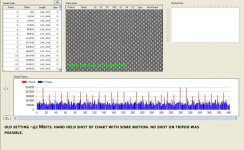
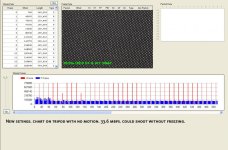
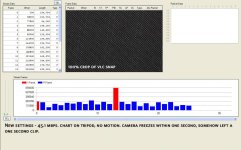
Now with the settings Svecher gave including the OB2, the charts on tripod are about 30-32 mbps but can record for long time with no freeze. If I zoom out on chart to increase details, I will get abt 35 Mbps. Such scenes can be recorded for about 12-15 seconds before camera error. When zoomed out further with maximum details, card error within seconds. One such scene luckily left clip of one second on the card and it was 41.6 mbps.
So this new settings that Svecher posted would certainly help tripod shoots of charts and high detailed static real life scenes. For real world scenes, this will be a very stable setting.
Only thing I need to know is if my original settings are better for high detail scenes involving moderate to fast motion. If that is the case I will stick with that as my type of shoot seldom has static chart kind of scenes.
Anyway will try to do a more controlled trial tomorrow. Will post some images as well to show what I am shooting. BTW, I am using crunchy's chart.
SD_Card=Sandsik Extreme Class 10
Camera=GH1 v1.32
[Settings]
Version increment=1
Prevent version compare=Checked
Native 24p/25p=Checked
Video Bitrate FHD/SH=50000000
Video Bitrate H=50000000
Video Bitrate L=32000000
Overall Bitrate=56000000
Limiting Bitrate=60000000
Preset bitrate=500
Preset bitrate 2=500 (Edit: Earlier mentioned 50 here, which was a typo)
This was giving me 42 mbps on high detailed scenes and on charts with handheld. Static chart on tripod would cause freeze in 2 seconds.
Now with the settings Svecher gave including the OB2, the charts on tripod are about 30-32 mbps but can record for long time with no freeze. If I zoom out on chart to increase details, I will get abt 35 Mbps. Such scenes can be recorded for about 12-15 seconds before camera error. When zoomed out further with maximum details, card error within seconds. One such scene luckily left clip of one second on the card and it was 41.6 mbps.
So this new settings that Svecher posted would certainly help tripod shoots of charts and high detailed static real life scenes. For real world scenes, this will be a very stable setting.
Only thing I need to know is if my original settings are better for high detail scenes involving moderate to fast motion. If that is the case I will stick with that as my type of shoot seldom has static chart kind of scenes.
Anyway will try to do a more controlled trial tomorrow. Will post some images as well to show what I am shooting. BTW, I am using crunchy's chart.
Last edited:
This last setting should be 500Ok here was my old setup
SD_Card=Sandsik Extreme Class 10
Camera=GH1 v1.32
[Settings]
Version increment=1
Prevent version compare=Checked
Native 24p/25p=Checked
Video Bitrate FHD/SH=50000000
Video Bitrate H=50000000
Video Bitrate L=32000000
Overall Bitrate=56000000
Limiting Bitrate=60000000
Preset bitrate=500
Preset bitrate 2=50
Interesting, as I'm not observing a significant drop in bitrates. 45 Mbps average is what I get. I'm also not seeing any freezing with the new settings. What card do you use?This was giving me 42 mbps on high detailed scenes and on charts with handheld. Static chart on tripod would cause freeze in 2 seconds.
Now with the settings Svecher gave including the OB2, the charts on tripod are about 30-32 mbps but can record for long time with no freeze.

PappasArts
Veteran
What if H - L and Preset/Preset2 were dropped off-. Streamlined to below?
[Settings]
Prevent version compare=Checked
Native 24p/25p=Checked
Video Bitrate FHD/SH=50000000
Limiting Bitrate=60000000
Remove encoder limits=Checked
Overall Bitrate 2=56000000
Also would "Remove encoder limits" improve 60i/24psf performance from errors?
Pappas
[Settings]
Prevent version compare=Checked
Native 24p/25p=Checked
Video Bitrate FHD/SH=50000000
Limiting Bitrate=60000000
Remove encoder limits=Checked
Overall Bitrate 2=56000000
Also would "Remove encoder limits" improve 60i/24psf performance from errors?
Pappas

Vitaliy Kiselev
Carbonite Member
"Remove encoder limits" patch really removes many checks in encoding process that can lead to error (to be precise, it substitutes this error code to "all ok" code).
Limiting bitrate patch is not required in this case, as it adjusts one of error checks
I'll integrate this patch later in video bitrate patch.
Limiting bitrate patch is not required in this case, as it adjusts one of error checks
I'll integrate this patch later in video bitrate patch.
rambooc1
Well-known member
All the Tester patches are within PTools, you have to download the latest version each time as they are updated.
http://www.dvxuser.com/V6/showthread.php?t=206788
Thanks for the clarification Vitaliy, svercher re - ""remove encoder limits""
Rambo
http://www.dvxuser.com/V6/showthread.php?t=206788
Thanks for the clarification Vitaliy, svercher re - ""remove encoder limits""
Rambo
This last setting should be 500
Yes it was 500, it was a typo. Edited the original post.
Interesting, as I'm not observing a significant drop in bitrates. 45 Mbps average is what I get. I'm also not seeing any freezing with the new settings. What card do you use?
Interesting. I am using 16 Gb Sandisk Extreme Class 10.
I would expect a drop in bit rates because there are three direct differences between the old and new settings (highlighted in red) in addition to the OB2 & REL settings for the new setup.
Old Settings:
SD_Card=Sandsik Extreme Class 10
Camera=GH1 v1.32
[Settings]
Version increment=1
Prevent version compare=Checked
Native 24p/25p=Checked
Video Bitrate FHD/SH=50000000
Video Bitrate H=50000000
Video Bitrate L=32000000
Overall Bitrate=56000000
Limiting Bitrate=60000000
Preset bitrate=500
Preset bitrate 2=500
New Settings:
SD_Card=Sandsik Class 10, 16 gb
Camera=GH1 v1.32
[Settings]
Prevent version compare=Checked
Native 24p/25p=Checked
Video Bitrate FHD/SH=50000000
Video Bitrate H=40000000
Video Bitrate L=32000000
Overall Bitrate=60000000
Limiting Bitrate=60000000
Preset bitrate=500
Preset bitrate 2=500
Remove encoder limits=Checked
Overall Bitrate 2=6000000
So the new settings has caused about 8-10 Mbits less bitrates in subjective tests, which may be one reason for the stability. The charts are the same for both tests, only there were no care taken to see I am shooting the same area of the chart. However I had more area of the chart on the scene in the second settings as it was steady and allowing me to shoot without freezing.
All done with Kit lens, initially at 140mm, later as I zoomed out, around 110-130 region. ISO 500 & 400. AFS. Smooth mode, -2, -1, -1-, -1.
Also note that Crunchy chart 2 have more details than the one I have seen from Pappas Art. Which chart are you using?
rambooc1
Well-known member
So the new settings has caused about 8-10 Mbits less bitrates in subjective tests, which may be one reason for the stability. The charts are the same for both tests, only there were no care taken to see I am shooting the same area of the chart. However I had more area of the chart on the scene in the second settings as it was steady and allowing me to shoot without freezing.
I'm guessing the I frame size has been decreased in proportion to the P frames in the new settings. Can you confirm this in streamparser snapshot of both settings?
Rambo
Just one question. I plan to do a more controlled tests as follows, provided time permits.
Chart underneath on a flat surface, Camera on Tripod facing down. All camera settings kept the same between shoots, also no movement of camera between firmware patches. Shoot one minute clips with varying firmware with just one parameter (may be overall Bitrate 2) changing. There will not be any control on lights (shot indoor during afternoon in natural light) and on audio. Or may be audio is not a factor as it is fixed bitrate.
Now what must be my initial setup and what must be the increment/decrement that will determine stable setup? Any suggestions?
Chart underneath on a flat surface, Camera on Tripod facing down. All camera settings kept the same between shoots, also no movement of camera between firmware patches. Shoot one minute clips with varying firmware with just one parameter (may be overall Bitrate 2) changing. There will not be any control on lights (shot indoor during afternoon in natural light) and on audio. Or may be audio is not a factor as it is fixed bitrate.
Now what must be my initial setup and what must be the increment/decrement that will determine stable setup? Any suggestions?
I'm guessing the I frame size has been decreased in proportion to the P frames in the new settings. Can you confirm this in streamparser snapshot of both settings?
Rambo
Ok attached the pics.