Native 24P/25p settings/problems discussion

This was the case with old "C" settings. Those two little "Preset Bitrate" patches make all the difference ... ;)

Yes i agree setting them at 500 to match the FHD/SH setting does stabilize the 24/25pN more when enabled, but NATIVE still pushes the limit of my class 6 card whereby 50i doesn't. When i purchase a Sandisc classs 10 extreme i may enable native again. It's good to have the stable settings for both.

If we had a button push to switch between enable/disable NATIVE on the camera body on demand without reloading FW patch that would be fantastic (or a menu choice). I think Vitaliy is already a step ahead of us on this with "patch enabling" from the root of an SDHC card like CHDK system.
 
Hey guys... really appreciate all your help.. i just tried the following

sandisk class 6 extreme 30mb/s
60i
50, 52, 60
preset 1 - 640
preset 2 - 640

Failed on me when shooting still grass, but it took a lot more time than it did before when I tried the "c" settings without the "preset changes", so then I tried

60i
50, 52, 58
preset 1 - 540
preset 2 - 540

Had no issues with the FHD even when shooting still grass for a prolonged time... I was very happy!

But then I thought i'd give SH a try because I do like to do slow-mo from time to time... it stopped recording after a couple of seconds....

Any thoughts?

****Nevermind guys... I guess it was too late in the evening and I didnt have that bright sun to contend with... looks like its back to "b" settings for me... i was hoping the preset bitrate 1 and 2 would help :(
 
Last edited:
Yes i agree setting them at 500 to match the FHD/SH setting does stabilize the 24/25pN more when enabled, but NATIVE still pushes the limit of my class 6 card whereby 50i doesn't. When i purchase a Sandisc classs 10 extreme i may enable native again. It's good to have the stable settings for both.
So given equivalent Video/Overall/Limiting bitrate settings no problems are encountered with Native 24p/25p unchecked, but appear when Native + Preset Bitrate 1 & 2 + Video Bitrate H/L are checked and appropriate values filled? Note that settings in bold are required for stable "native" mode operation, at least in my testing with NTSC camera.
 
But then I thought i'd give SH a try because I do like to do slow-mo from time to time... it stopped recording after a couple of seconds....

Any thoughts?

****Nevermind guys... I guess it was too late in the evening and I didnt have that bright sun to contend with... looks like its back to "b" settings for me... i was hoping the preset bitrate 1 and 2 would help :(
What happens in FHD mode when you try the exact settings I posted?

Also, Video Bitrate H/L settings that are gradually lower than FHD/SH one, aside from appearing to help increase stability of native FHD mode, also have a nice side benefit of allowing options in the field in 720p mode. Above settings result in card speed errors in 2-10 seconds of static shooting of Death Chart in SH mode (footage is preserved however). Switching to H mode resolves that problem.
 
What happens in FHD mode when you try the exact settings I posted?

I still get a card crash when aimed at still grass in bright light.... Maybe the firmware panasonic included in the gh1 was there for a reason. It seems that even with a class 6 30mb/s card I can get a card read error when hacked.

Surely Panasonic didn't expect everyone who was to buy a GH1 to be video junkies like us who would drop a couple hundred on a high end SDHC card. I remember first getting the GH1 shipped in from B&H... I had to go to a local photo chain here in Canada to get a card. I went to Henry's which is one of the bigger chains in the Toronto area and when I asked for the sandisk extreme III 30mb/s edition the guy told me it was overkill and that if I wanted to waste my money he wouldn't stop me.

Maybe the GH1 was meant for people who want to shoot their kids by the pool with a cheapo SD class 2 card???

But of course, why would they give the 24fps option then??

Urg I'm so confused... I love trying to find optimal settings, but sometimes I wish I could just go out and shoot and stop thinking about it. I'm not ready to be a canon convert yet though... please give us something just a tiny bit more decent in a GH2!!!! You were so close with the GH1, definately not bad for a first try!!!!
 
Surely Panasonic didn't expect everyone who was to buy a GH1 to be video junkies like us who would drop a couple hundred on a high end SDHC card. . . .

Maybe the GH1 was meant for people who want to shoot their kids by the pool with a cheapo SD class 2 card??? . . .

Urg I'm so confused... I love trying to find optimal settings, but sometimes I wish I could just go out and shoot and stop thinking about it. I'm not ready to be a canon convert yet though... please give us something just a tiny bit more decent in a GH2!!!! You were so close with the GH1, definately not bad for a first try!!!!
I'm confused. The problems you're talking about seem to be related to the bitstream the GH1 is writing being too fast for the SDHC card. Why would you think the GH2 would be any better?

In other words, if you're trying to write a high-bitrate stream then you need a high throughput card. No way around it, whether it's GH1 or GH2, Canon or Nikon.

One thing is for sure: the GH2 is not somehow going to be able to magically write high bitrate streams to low bitrate cards. It's far from clear that the stock GH2 will be enable to write with bitrates as high as the GH1, precisely because Panasonic must be very conservative for a stock product that must work every time, for everyone. With the hack you bypass Panasonic's necessary conservativism. The hack allows user to test the limits of the hardware -- both camera and SDHC card -- but at the same time necessarily places extra responsibility on the user to understand the equipment and possibility of error.

The tester13 hack lets you do whatever you want. If you want something that works every time then flash the camera back to the original firmware, or a tester13 setting like "A" or "B" that doesn't stress the camera or SDHC card much. If you want best possible quality and are willing to risk write problems, then move to settings like setting "C". This all seems flexible and good. Where's the problem?

The interesting thing will be when higher class/higher rated SDHC cards become available. It seems to me lke being able to use something like a Class 15, 50MB/s rated SDHC card would be likely to remedy problems with "C" settings on the GH1. Nothing certain, but doesn't all the evidence indicate that?
 
Last edited:
I'm confused. The problems you're talking about seem to be related to the bitstream the GH1 is writing being too fast for the SDHC card. Why would you think the GH2 would be any better?

I wouldn't expect it... but I'd hope that something like the GH2 would have the ability to accept and use SDXC cards with the UHS-1 speed class which claims to have a maximum transfer speed of 104mb/s. Thats why I'm not holding my breath for some kind of magical fix for the GH1, just something a little better than the 17mb/s mud that so many videos are sticken with.

Something tells me that Panasonic won't do that with the GH2, but here's to hoping.
 
I still get a card crash when aimed at still grass in bright light.... Maybe the firmware panasonic included in the gh1 was there for a reason. It seems that even with a class 6 30mb/s card I can get a card read error when hacked.

Could you measure speed of your card as explained in the following thread:

http://www.dvxuser.com/V6/showthread.php?t=217260

We might all benefit if we know what are the main limiting factors. Maybe it is a card, but maybe it's limited speed of GH1.
 
The interesting thing will be when higher class/higher rated SDHC cards become available. It seems to me lke being able to use something like a Class 15, 50MB/s rated SDHC card would be likely to remedy problems with "C" settings on the GH1. Nothing certain, but doesn't all the evidence indicate that?

As I said in the previous post, it also depends on GH1's writing speed. Maybe it becomes the main bottleneck for faster cards and 50MB/s would not help much. However, in order to know more, we have to make repeatable experiments. First step is to measure the speed of our cards:

http://www.dvxuser.com/V6/showthread.php?t=217260

If majority of GH1 owners would measure performance of their cards we might find some pattern (why similar settings work or don't work). Maybe even the same cards might give different results?
 
I wouldn't expect it... but I'd hope that something like the GH2 would have the ability to accept and use SDXC cards with the UHS-1 speed class which claims to have a maximum transfer speed of 104mb/s.
I don't think SDXC is a panacea. For one thing, the currently available SDXC cards have rating slower than current SDHC cards. For another, SDHC cards that implement SD 3.0 specs (like Panasonic's Class 10 SDHC cards) have the same UHS104 speed ability as SD 3.0 SDXC cards. Also, current SDHC devices will support SD 3.0 SDXC cards with UHS104 speeds (they won't support Ver. 4.0 SDXC cards that will go up to 2.4Gb/s). See http://en.wikipedia.org/wiki/Secure_Digital

I assume at some point the use of faster speed SDHC cards will reveal to what extent limitations of the tester13 hack are result of limitations in the GH1 or limitations in SDHC cards. But I don't see any reason to say that the GH1 is somehow "not enough".

Technology always advances. RAW video is on the horizon of the near future. That doesn't mean the GH1 is somehow a weak effort, or that the tester13 hack is a weak effort, somehow "close, but not enough". If you want to record video today, it's a great choice. If you want to wait a year or two to get a better camera, that's fine too. But you miss out in the meantime.
 
Last edited:
So given equivalent Video/Overall/Limiting bitrate settings no problems are encountered with Native 24p/25p unchecked, but appear when Native + Preset Bitrate 1 & 2 + Video Bitrate H/L are checked and appropriate values filled? Note that settings in bold are required for stable "native" mode operation, at least in my testing with NTSC camera.

Yes fully stable in 50i, but if the same settings are used for 25p, as soon as i hold steady on a high detail scene like grass, it triggers a camera lockup. A class 10 will probably overcome this as it does in your cam/testing.

With the cam in native mode i'm anxious, breaking out in a sweat. In 50i i'm relaxed and confident. I'm in NY in a few weeks so will pick up a class 10 then.

I love SH 720p, it cuts perfectly with my HMC 152 720p. One has Shallow DOF for the beauty shots, the other Deep DOF and CCD (no jello) for the action stuff. I can finally eat my cake.

R
 
Alright hsitz... I raise my hands and surrender... I'm not here to argue, and I do love my gh1. Iike I've said before... I've owned it from the release, and understand it has it's limitations. So does every dslr camera on the market right now. My choice has been to stick with the GH1 because it has the most amount of things I'm looking for.

As for the tester13 hack being a weak effort... I'm not sure where you got the idea I was even insinuating that. This hack is genius.... and even if I stay on the "b" settings, which have been completely stable, I feel like I own a brand new camera. The problem is that we always want more... and I am completely guilty of that at times.

It hasn't stopped me from getting caught up in pushing the limits and jumping into this very very interesting world of testing and sharing. Afterall, 95% of the time I'm completely intrigued by reading and learning all the things people have to say on this site, and 5% of the time I'm just looking for an end. This also means that 95% of the time I'm out and about shooting and completely loving it!

I'm a self-proclaimed rookie with all this video stuff, and apologize if anything I've ever said has come across as "out of line". And I should note that the characters in these various threads have been completely helpful and patient. Something I should probably be more of when it comes to video dslr development ;)

@crunchy... thanks for the tip.... I've downloaded HD Speed and am running it through winebottler as we speak on my sandisk class 6 card. I'll post the results promptly. I'm a teacher and have the summer off here in Canada, so I'm literally doing nothing... if anyone needs me to run any tests or anything please let me know
 
Yes fully stable in 50i, but if the same settings are used for 25p, as soon as i hold steady on a high detail scene like grass, it triggers a camera lockup. A class 10 will probably overcome this as it does in your cam/testing.
By lockup you mean the same freeze/crash/burn we saw in native mode before introduction of Preset Bitrate pathes, not the "Card Speed too slow" error, right?

Question to c.cook88 which scenario above do you mean by "card crash" in "I still get a card crash when aimed at still grass in bright light"?

With the cam in native mode i'm anxious, breaking out in a sweat. In 50i i'm relaxed and confident. I'm in NY in a few weeks so will pick up a class 10 then.
Well that's not good then! Hopefully by the time you get here and pick up that Class 10 card more is known about this. Hurricane season is coming soon, so there might be some surfing action to shoot on Long Island as well ...
 
By lockup you mean the same freeze/crash/burn we saw in native mode before introduction of Preset Bitrate pathes, not the "Card Speed too slow" error, right?

I think he means "Card Speed too slow" error, Which results in a complete loss of footage- unlike shooting in 50/60i mode. It's playing Russian Roulette with your footage especially on material that is not repeatable.

svecher, I need to run your settings though. What is the highest in Mbits you can go? Did you shoot static death shots for a long amount of time? If I could get my 58-60-68 to be more stable without fear of error- than 24PN could be viable. However in 60i I am safe from errors- or at least I don't loose any footage and can continue recording immediately.


Pappas
 
I think he means "Card Speed too slow" error, Which results in a complete loss of footage- unlike shooting in 50/60i mode. It's playing Russian Roulette with your footage especially on material that is not repeatable.
Pappas

Yep that "Arrrh" error where you loose ALL the footage, not good....haha.

svecher.......
Well that's not good then! Hopefully by the time you get here and pick up that Class 10 card more is known about this. Hurricane season is coming soon, so there might be some surfing action to shoot on Long Island as well ..
If it's like last year on the Hudson when the race was canceled due to 8ft chop and 40mph winds, i could be in for some fun shooting the race from a boat on the river.

r
 
Last edited:
I think he means "Card Speed too slow" error, Which results in a complete loss of footage- unlike shooting in 50/60i mode. It's playing Russian Roulette with your footage especially on material that is not repeatable.
Yep that "Arrrh" error where you loose ALL the footage, not good....haha.
I don't know why I'm getting such different results than you guys. Whenever I got "Card SpeedTtoo Slow" error all footage shot to that point was always preserved. It was lost only when that error was followed by "Error writing to card" message, which happened quite rarely when testing some unusual settings, like modulr's 50/50/50 ones.
What is the highest in Mbits you can go? Did you shoot static death shots for a long amount of time?
I usually get 48 Mbps average on Static Chart of Death Shots with those settings. Which is equivalent to 48 * 1.2 = 57.6 Mbps in 24PsF mode. The longest shot I ran was around 5 minutes. I am planning to run an hour long test to see if there are any audio synchronization or other issues due to 23.971 fps, so I'll report how stable that will be.
 
I used to get both card speed AND card write errors in NATIVE mode, i have only ever had card speed errors in 50i, and that's when i shoot the static chart 100%. I still think a class 10 will fix that too.

R
 
Last edited:
I don't know why I'm getting such different results than you guys. Whenever I got "Card SpeedTtoo Slow" error all footage shot to that point was always preserved.

Now that's interesting, I wonder if that has to do with your settings not being to high...

Which is equivalent to 48 * 1.2 = 57.6 Mbps in 24PsF mode.

svecher, where, or how did you come to this number 1.2?


Pappas
 
From here Pappas, 1.2 times bigger.

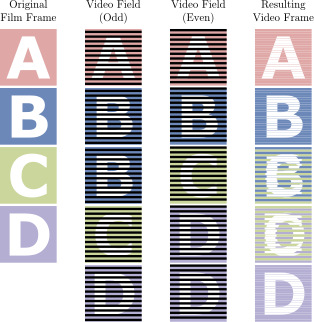
Courtesy of another Wikipedia article may I present the following graphic illustrating "2:3 pulldown", or how you take 24P footage and turn it into 24PsF (60i).

314px-32pulldown.svg.png


As you can see, 24PsF stream contains two duplicated fields (upper B and lower D) per 10 field sequence. If I'm doing my math correctly that means native stream will have 20% extra bandwidth thrown at its progressive footage than progressive-split-frame stream with equivalent length and bitrate.
 
Rogue Frames do not actually exist.

Rogue Frames do not actually exist.

I have posted testing results in the AVCHD research thread in the GH13 Development/Testing section that prove that there are no "rogue" frames - it's just a bug in StreamEye.

Therefore, whatever is causing write errors in 24pN mode has nothing to do with any rogue frame bug - the streams look perfectly fine. Time to go back to experimenting with the other settings. There appears to be nothing wrong with the Native 24p/25p setting itself. Native 24p/25p does produce more color data than wrapped FHD mode (per Barry); that probably explains why you can't use as high data rates with it checked. Same thing with SH mode versus FHD mode.

Chris
 
Back
Top