NAB 2014: Adobe Reveals Next Wave of Premiere Pro CC, After Effects, Speedgrade (vid)

Just curious what CC owners have found to replace Encore DVD/Blu-Ray creating software which use to come with CS5/CS6? And I mean the kind of DVD authoring software that was comparable to Adobe Encore in terms of layers, animated movie backgrounds, complexity, etc.. ?
 
Just curious what CC owners have found to replace Encore DVD/Blu-Ray creating software which use to come with CS5/CS6? And I mean the kind of DVD authoring software that was comparable to Adobe Encore in terms of layers, animated movie backgrounds, complexity, etc.. ?

Encore CS6 is still available for download and use through CC.

Though I personally haven't needed to author a disc for probably 4 years.
 
I would hope that were were almost done with DVDs but there are some film festivals that require them for submissions.
 
Hi guys,
Let me know if any of you have questions about the new features that were recently shown at NAB 2014.

Thanks,
Kevin

Kevin,

Thanks for offering to answer some questions.

I was disappointed with the result of the NAB 2013 release in Q3 2013, implementing Premiere editing of Blackmagic Cinema Camera (BMCC) RAW CinemaDNG files. In summary, Premiere currently 'auto' levels the footage, and sadly, Premiere does not allow recovery of clipped highlights, etc, something Premiere is automatically doing without user control or choice, thus losing information actually available from the RAW files.

Will the next major release of CC later this year provide a GUI, say, similar to Red R3D support in Premiere, when importing BMCC CinemaDNG files into Premiere? If so, please clarify the level of control(s) available upon import of BMCC CinemaDNG files into Premiere?

Thank you, Kevin.
 
Kevin,

Thanks for offering to answer some questions.

I was disappointed with the result of the NAB 2013 release in Q3 2013, implementing Premiere editing of Blackmagic Cinema Camera (BMCC) RAW CinemaDNG files. In summary, Premiere currently 'auto' levels the footage, and sadly, Premiere does not allow recovery of clipped highlights, etc, something Premiere is automatically doing without user control or choice, thus losing information actually available from the RAW files.

Will the next major release of CC later this year provide a GUI, say, similar to Red R3D support in Premiere, when importing BMCC CinemaDNG files into Premiere? If so, please clarify the level of control(s) available upon import of BMCC CinemaDNG files into Premiere?

Thank you, Kevin.

Hi Christopher,
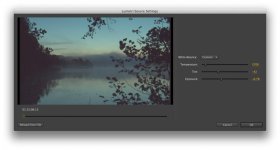
Thanks for your response. I did have a look at the new Source Settings window for DNG footage.

It looks like this:

Screen Shot 2014-04-17 at 4.14.32 PM.jpg

It offers settings for:
White Balance
Temperature
Tint
Exposure

I hope that is what you were looking for.

Thanks,
Kevin
 
Hi Kevin, is this Source window the final version or will there be improvement when the patch is actually released? The range of option here is quite limited compared to what you can do with RED footage. There's no Curve adjustment nor ISO setting and more importantly there's no way to "save" a setting so that it can be apply across multiple clips. When Premiere loads the RAW DNG footage does it still auto level the footage?
 
Hi Kevin, is this Source window the final version or will there be improvement when the patch is actually released? The range of option here is quite limited compared to what you can do with RED footage. There's no Curve adjustment nor ISO setting and more importantly there's no way to "save" a setting so that it can be apply across multiple clips. When Premiere loads the RAW DNG footage does it still auto level the footage?

Hi Huy,
Nothing is ever set in stone until shortly before we release. I suggest that you file a feature request that contains your suggestions, which are good ones, as soon as possible: http://adobe.ly/feature_request

BTW, the new DNG Source Settings dialog box looks much like the existing one for ARRI Alexa, and there are no curves adjustment there either. I will take a look at the feature request database and will add my own feature request for curves in Alexa and DNG Source Settings if one does not already exist. If one does, I'll add your suggestions.

Thanks so much for your comments and concern.

Kevin
 
Hi Huy,
I was talking with engineering and they said you can apply a Curves effect in addition to your basic grade in Source Settings, so that should solve that basic issue. This effect could be saved as a Preset and applied to other Master Clips for consistency (We have Master Clip effects in the upcoming version of Premiere Pro CC).

In testing this workflow, I noticed you could select multiple clips and then apply Source Settings, so you can get a basic change in Source Settings across multiple clips easily.

That said, I do encourage you to file your feature request.

Thanks,
Kevin
 
Thanks Kevin, I have submitted the request. I'm interested in the Curve effect mainly because I don't know if the new patch has done anything to change the way Premiere processes CinemaDNG footage on import. Previous version will arbitrarily selects a highlight and shadow exposure value for the clip and locks it at that level, meaning that even if I apply a Curve effect after the fact those dynamic range are gone. Having a Curve setting at the Source Setting level would presumably mean that the entire range of the recorded footage has been preserved. Can you shed some lights on whether this new patch will improve on this issue?
 
Thanks Kevin, I have submitted the request. I'm interested in the Curve effect mainly because I don't know if the new patch has done anything to change the way Premiere processes CinemaDNG footage on import. Previous version will arbitrarily selects a highlight and shadow exposure value for the clip and locks it at that level, meaning that even if I apply a Curve effect after the fact those dynamic range are gone. Having a Curve setting at the Source Setting level would presumably mean that the entire range of the recorded footage has been preserved. Can you shed some lights on whether this new patch will improve on this issue?

Hi Huy,
When you asked, "When Premiere loads the RAW DNG footage does it still auto level the footage?" The reply from engineering was, "We convert to the correct color space as defined in the file, just as we try to do with all footage so you are editing against what the image should look like." I'm not aware of any auto levels applied to the clip to currently supported DNG files (like that from the BlackMagic Cinema Camera), so if that's what you're experiencing, I urge you to file a bug report: http://adobe.ly/ReportBug

Thanks,
Kevin
 
Hi Christopher,
Thanks for your response. I did have a look at the new Source Settings window for DNG footage.

It looks like this:

View attachment 85086

It offers settings for:
White Balance
Temperature
Tint
Exposure

I hope that is what you were looking for.

Thanks,
Kevin

Kevin, thank you for your reply.

The sample import Source Settings window is the same as I had observed earlier and this raises my fear of proper RAW functionality, after waiting almost another year for what may follow with the next major Adobe CC release.

As per my point in my previous post, and Huy has also raised the same concern, currently Premiere imports CinemaDNG files, applies some 'auto' function to levels. Either limited to REC709 or perhaps similar to AE/ACR 'auto levels'. There is no user control at the moment. Once imported into Premiere, you can not recovery lost highlights or crushed shadows. If you now apply an RGB Curves or Colour Correction effect, you simply can not recover highlights, you can not recover crushed shadows.

While the new import Source Settings window allows for 'exposure', if the same non-recoverable structure follows with the next update, while adjusting exposure to, say, protect highlights, you may then be crushing shadows. If non-recoverable after import into Premiere, I am going to have to bail.

Samuel H posted a comparison to AE/ACR and Premiere's 'auto' import. Scrub over the image at the bottom, it shows the Premiere 'auto' level clipping a high dynamic range shot, from a Blackmagic Cinema Camera - CinemaDNG. You can not recover this highlight in Premiere, and with the limited Source Settings window, limited to 'exposure', then this may be another Adobe flop release for CinemaDNG users, unless Adobe program the Premiere effects to access the source CinemaDNG file and apply a Curve or other colour tool to recover what is there in file.

Premiere CinemaDNG clipping

It is similar to applying LUT in Premiere via Lumetri. Sometimes, the LUT blows out highlights or crushes shadows, depending on the camera, exposure, etc. So in the effects chain, apply an RGB Curves effect pre-LUT, to recover, say, the highlights. If you apply the RGB Curves post the Lumetri effect, you can not recover highlights. Premiere and CinemaDNG is like applying a Curve post-import. The new Source Settings window does not look promising, exposure will not be enough, unless an RGB Curves effect can act on the file 'pre-import', or the like...

Kevin, is this clear to you and your engineer contact as to what the problem currently is? Thank you.
 
Hello Kevin,

do you think the upcoming Premiere Pro update will bring back OpenCL support for all those cards that were supported at first but then, after 2.0 the support was discontinued? I do not wish to roll back but this is reason enough to do so.
 
Kevin, thank you for your reply.

Sure, Christopher. Thanks for your post.

Kevin, is this clear to you and your engineer contact as to what the problem currently is? Thank you.

I pointed engineering to this thread. We are not aware of the "auto-leveling" issue you describe. If possible, could you please upload footage exhibiting this behavior to dropbox (or similar) so we can take a look? I understand the blog post that you sent me to has a file which exhibits the behavior you described, but we need actual files to test to make sure this is occurring. A single .DNG file would be fine. I will then have engineering look at the file and report back.

Thanks so much for your feedback and concern. I hope I can help resolve this issue ASAP.

Thanks,
Kevin
 
Back
Top