More Nikon D800 1080P video tests

Third option: set the D800 to respect limited range (in compliance with the HDMI 4:2:2 YCbCr specification, as well as SMPTE and ITU signal standards). See page 257 of the D800 User Manual. -- Bob Elkind

Nice catch, Bob!

Aside: Bob, did you see Atomos' NAB press release about Bob Proebstel, who was just named as their new VP of Product Development? Apparently he lives in Portland, so I wondered if maybe you know him. Small world!
http://www.atomos.com/press/articles/press007-NAB2012-AtomosStrengthensTeam-20120410.pdf
 
Aside: Bob, did you see Atomos' NAB press release about Bob Proebstel, who was just named as their new VP of Product Development? Apparently he lives in Portland, so I wondered if maybe you know him. Small world!
http://www.atomos.com/press/articles/press007-NAB2012-AtomosStrengthensTeam-20120410.pdf
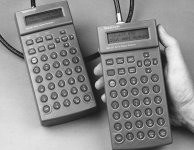
Fascinating! Bob Proebstel and I both worked at Tektronix TV Test & Measurement in the 1990s. At the time, I was devoted to digital interface products development and Bob P was devoted to low-cost products development.

Two products I worked on, the SDA-601 and TSG-601, were handheld battery-powered (8x AA-cell) pure digital video (SDI) test instruments, the first of their kind. They were a bit... large. Bob Proebstel is also... large (considerably taller than me!). We used Bob Proebstel as a hand model in the product photos to help make these handheld instruments look less like armheld instruments. If you click on the product links, the destination pages have a photo of the instrument in the top right corner. "the hand" is Bob Proebstel, in both cases. We didn't need Michael Jordan, as long as we had Bob Proebstel!

UPDATE: My products, Bob Proebstel's hand.
A000_0063-L.jpg

-- Bob Elkind
 
Last edited:
Third option: set the D800 to respect limited range (in compliance with the HDMI 4:2:2 YCbCr specification, as well as SMPTE and ITU signal standards). See page 257 of the D800 User Manual.

-- Bob Elkind

Like the man said, when all else fails read the bloody manual! Thanks, Bob.
 
BUT, this is my theory. The HDMI output of the nikon seems to be full range, and prores is a limited range codec.

In a dpreview thread I recently wrote the following:

The D800 (and D4) should not have a limited range vs. full range menu selection.
  • When providing RGB output on the HDMI port (like most dSLRs, for image review or playback), output should be full range.
  • When providing YCbCr output on the HDMI port (for recording video), output should be limited range.

Would there be any objection from the video community for such a change?
Would it be better to allow range selection only for RGB output, and not for YCbCr output (this would be consistent with HDMI standard, which allows either full-range or limited-range only for RGB)?

For what it's worth, the D800 user manual is characteristically unclear in its description of output range menu selection (page 257):

Auto is recommended in most situations. If the camera is unable to determine the correct RGB video signal output range for the HDMI device, you can choose from the following options:
•
Limited range: For devices with an RGB video signal input range of 16 to 235. Choose this option if you notice loss of detail in shadows.
•
Full range: For devices with an RGB video signal input range of 0 to 255. Choose this option if shadows are “washed out” or too bright.
​


Note that there is no explicit reference to YCbCr (vs. RGB) in this description, and there is no elaboration on the auto mode selection.
I wonder if the user manual is intentionally worded as it is, and the full range output in YCbCr format is actually a design bug rather than an incorrect user setting.

-- Bob Elkind
 
Last edited:
Then the FStoppers' test is valid since they'd have to apply the parameters set by Atomos in order to record the 1080P "uncompressed" signal with the Ninja??? Atomos says (demands): "HDMI Out settings - AUTO"
Are there options - ways around this DR limiting mode?
 
Then the FStoppers' test is valid since they'd have to apply the parameters set by Atomos in order to record the 1080P "uncompressed" signal with the Ninja??? Atomos says (demands): "HDMI Out settings - AUTO"
Are there options - ways around this DR limiting mode?

Augghhh!!! Menu settings overload!

AUTO + HDMI are used in the D800 user manual for more than one menu item:

  • HDMI (Advanced) Output Range -- page 257
  • HDMI Output Resolution -- also on page 257

Note two different menu items, both with an AUTO setting. They are not the same!

The black/white levels mismatch (see the FStoppers' "test") is related to "output range".
The P24 vs. P24-converted-to-I60 signal format problem is related to "output resolution" (a very imprecise and inadequate use of the term "resolution").

-- Bob Elkind
 
Last edited:
Let me put it this way then (Ninja and D800) which HDMI menu settings would you choose to best represent the advantages of an "uncompressed" signal and the DR of the camera, and so on?

PS. I'm not looking for an easy way out, I'm just interested in your take on the users manual and how it applies to Atomos' parameters for the Ninja.
 
Let me put it this way then (Ninja and D800) which HDMI menu settings would you choose to best represent the advantages of an "uncompressed" signal and the DR of the camera, and so on?

For me, the answer is simple: I do not know. There isn't enough information in the D800 user manual to know what will happen without trial and error, and I do not have a D800 with which to experiment.

I'm just interested in your take on the users manual and how it applies to Atomos' parameters for the Ninja.

Clever me, I answered both questions with one answer!

The desired end result is: YCbCr output in "native" p24/25/30 signaling, using "limited" output range (using 16-235 for black to nominal peak white on luminance/Y and 16-240 for the colour difference channels).

-- Bob Elkind
 
Last edited:
That is how I feel ( about myself) Bob. I feel I am missing something crucial with the info at hand. And I'm still waiting to get my mitts on "my" D800.
 
For the atomos just choose limited range.

Have you tried this and verified limited range YCbCr output? Anyone?

note: Limited range for YCbCr signal format isn't a "atomos" consideration. Limited range is the signal standard for YCbCr signaling.


-- Bob Elkind
 
It is perfect how it is. No need to change anything.
For the atomis just choose limited range.


And yet Atomos demands that we use "AUTO": or is "Limited Range" within the Auto options? I do not think it is. And this is what confuses the hell out of me. I would love to see comparison video samples.
 
Stuart, and anyone else who needs clarification on what "Auto" settings apply here.

The closest thing to a menu tree in the manual is the default settings table on p. 410.

The table makes it clear that Setup>HDMI>Output Resolution (which Atomos says to set to Auto) is on a different branch of the tree from Setup>HDMI>Advanced > Output Range, which is where you can select "Limited Range" instead of the default "Auto."

Now look back at p. 257 and Bob's frustrated engineer comments. Make sense now?

But I definitely agree with Bob, that until we see tests (by people who know what they are doing), we don't know what the camera is capable of, since Nikon seems to be blazing its own trail in a lot of ways.

And thanks again, Bob.
 
Thanks Mr. bufo55. With no way to cross reference with a camera, the nikon illustrations are not the most helpful. But I believe this is the missing link, regarding my frustration. And a good point of departure to test Bob's revelations regarding the fStoppers' test.
 
Thank you, buf055, for clarifying this.

I re-edited post #68 in this thread to more clearly emphasise that HDMI + AUTO can (and does) refer to multiple D800 menu items. My original wording was too subtle, now fixed.

-- Bob Elkind
 
Stuart, and anyone else who needs clarification on what "Auto" settings apply here.

The closest thing to a menu tree in the manual is the default settings table on p. 410.

The table makes it clear that Setup>HDMI>Output Resolution (which Atomos says to set to Auto) is on a different branch of the tree from Setup>HDMI>Advanced > Output Range, which is where you can select "Limited Range" instead of the default "Auto."

Now look back at p. 257 and Bob's frustrated engineer comments. Make sense now?

But I definitely agree with Bob, that until we see tests (by people who know what they are doing), we don't know what the camera is capable of, since Nikon seems to be blazing its own trail in a lot of ways.

And thanks again, Bob.

And excuse me if I am off base, but I am of the mind that the Output Resolution relates to a display device and the Advanced option under HDMI is for external capture devices. And I am a bit confused by Atomos who originally said to set to 1080i when it was a 60i stream and now being :1080/24p we set the output to Auto, why not go with the camera default of 1080/24p. If they are in close comms. with Nikon how come we can't get a better explaination from them. To much mudding the waters for my liking.
 
And excuse me if I am off base, but I am of the mind that the Output Resolution relates to a display device and the Advanced option under HDMI is for external capture devices. And I am a bit confused by Atomos who originally said to set to 1080i when it was a 60i stream and now being :1080/24p we set the output to Auto, why not go with the camera default of 1080/24p. If they are in close comms. with Nikon how come we can't get a better explaination from them. To much mudding the waters for my liking.
OK, time to take a deeeeep breath.

We'll recap how we got to this point, step by step...

1. First came the D800 User Manual. We learned:

  • The OUTPUT RESOLUTION setting didn't matter for Live Movie (record through HDMI) mode, because "Regardless of the option selected, Auto will be used for movie live view, movie recording, and playback." (Page 257)
  • Then we learned that HDMI output resolution and frame rate aren't necessarily set in the HDMI Output Resolution menu setting, because "During movie live view and movie recording and playback, HDMI output will be adjusted according to the option selected for Movie settings > Frame size/frame rate in the shooting menu. Note that some HDMI devices may not support the selected setting; in this case, select 1080i (interlaced) for HDMI > Output resolution" (page 258)

2. Then came the initial reports from the field. Jon Thorn (AJA) reported native mode success with the Ki Mini Pro recorder (firmware v 3.0), but some were not convinced.

2.a Reports from Atomos were... less than illuminating. Atomos reported in their website that the D4 and D800 worked just fine, just like all the other dSLRs -- every video mode was translated to either 1080i/50 or 1080i/60, and their colourful and professional charts explained how 3:2 pulldown works. This reinforced the doubters who proclaimed that there was no such thing as native p24 output from the D4/D800.

3. Reports trickled in that the Atomos Ninja was barfing (that's a technical term) on the D4/D800 p24 output translated to i60. It looked like the D4/D800 translated p24 to i60 using 2:2:2:4 pulldown sequence rather than the 3:2 pulldown sequence which Atomos fabulously describes.

4. Next, we hear from Atomos that Ninja firmware version 2.1 enables perfect results with the D4/D800! Atomos is not very specific about these results, but it sure sounds encouraging. Is it native mode, or is it error-free recovery of PsF from the 1080i wrapper?

5. But wait, there's more... Ninja 2.1 does not work well with the D800... It seems Ninja gets confused. There's a suspicion that Ninja 2.1 is not connecting to the D4/D800 in native mode, only in 1080i mode, and the "pulldown" sequence used by the D4 does not match the pulldown sequence in the D800. The perfect working interface to the D4 is not perfect with the D800.

6. Finally, Atomos announces Ninja firmware 2.2, and Atomos directly posts in these forums that true native p24/25/30 output from the D800 has been achieved. There are a few requirements, including setting the HDMI Output Resolution to AUTO. And the pretense that the D4/D800 will only output 1080i begins to fall away. We also learn from Atomos that removal of the memory cards is not required for Live Movie mode, and another undocumented rumour has fallen.

7. Then FStoppers posts their D800 + Ninja evaluation, with the grim observation that Ninja crushes blacks and wipes out bright details. Within hours, we begin to realise that FStoppers had FStopped themselves by not troubleshooting the problem, and prematurely blaming the Ninja. The obvious and plausible and presumed answer to the mystery is the entirely under-documented HDMI Output Range menu selection must be set to Limited instead of Full when using the 4:2:2 YCbCr output of the HDMI port. There's an AUTO selection as well, but its description in the manual is little more than "trust me". [note: For those of you who do not speak technical, the phrase "trust me" means "you figure it out"] Further adding to confusion (like... we don't have enough already?) is that there are several HDMI output menu selections on the same user manual page (page 257), and at least two of them have a similar-sounding AUTO setting. dSLR owners are easily confused, and one HDMI AUTO menu selection sounds very much like other HDMI AUTO menu selections.

7.a Atomos does little to rescue Nikon from the muddled vagueness of the D800 user manual. The Ninja 2.2 firmware release does not mention HDMI output range (and why should it? the HDMI standard requires Limited Range for YCbCr, everybody knows that!), and the Ninja (presumably) does not complain about the illegal video levels received on the HDMI input.

Have I about captured this correctly? Does anyone think we've all settled into a deep understanding of how the D4/D800 work, how to set them up, and what to expect? Right... neither do I.

To Be Continued (the ongoing saga...)

-- Bob Elkind
 
Last edited:
Back
Top