
Navigation
Install the app
How to install the app on iOS
Follow along with the video below to see how to install our site as a web app on your home screen.
Note: This feature may not be available in some browsers.
More options
You are using an out of date browser. It may not display this or other websites correctly.
You should upgrade or use an alternative browser.
You should upgrade or use an alternative browser.
T2i Magic Lantern for 550D in progress!
- Thread starter ...
- Start date
It's not a bug. Do you prefer frozen zebras or recording stopping?
The camera doesn't have a lot of processing power. If you push the bitrate, you can't have zebras and peaking with decent frame rate at the same time.
Maybe if I didn't implement the bitrate option at all, there were less people advising against ML on blogs/forums. (this is not about you; just a random thought)
The camera doesn't have a lot of processing power. If you push the bitrate, you can't have zebras and peaking with decent frame rate at the same time.
Maybe if I didn't implement the bitrate option at all, there were less people advising against ML on blogs/forums. (this is not about you; just a random thought)
Last edited:
But I didn't say it ISIt's not a bug.
 rogar-Shock(DBG):... I was marely pointing at an issue I have... (which got answered by you)
Of course that the latter.Do you prefer frozen zebras or recording stopping?
Yes, I know. but the previous version (8-7) didn't have this at 1.3 . no biggie. I can live with that...The camera doesn't have a lot of processing power. If you push the bitrate, you can't have zebras and peaking with decent frame rate at the same time.
Keep up the great work !
A
Nope.Maybe you had a different setting for BuffWarnLevel? Try playing with that
The overlay sticks for a few seconds and it seem to be gone after that. I have to test more to say that it is completely gone for the entire session (until next restart).
It seems to me like it is not CPU dependent. only a hunch.
No, I didn't.Maybe you had enabled "hide zebra during recording" (which is now a hidden setting, i.e. disable it from config file).
ML is amazing, and makes everything so much easier. Thanks for all the great work!
I just updated from the April build and noticed that the cropmark file that is 16:9, and has the title/safe areas drawn is no longer there. Is there a place where I can get that crop mark file for the t2i?
I just updated from the April build and noticed that the cropmark file that is 16:9, and has the title/safe areas drawn is no longer there. Is there a place where I can get that crop mark file for the t2i?

kgimedia
Well-known member
ML is amazing, and makes everything so much easier. Thanks for all the great work!
I just updated from the April build and noticed that the cropmark file that is 16:9, and has the title/safe areas drawn is no longer there. Is there a place where I can get that crop mark file for the t2i?
Do you save your old builds? If so it is in the cropmarks folder. I believe it was called HD_TA.bmp.
kgimedia
Well-known member
no i didn't... kickin myself now! I'll see if i can find an old build somewhere.
I recommend to all ML users to save at least the last version that worked for you. You never know when a feature you love will be missing or broken in the "latest" build.
This is my personal archive.
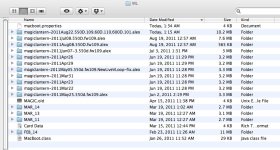
Your folder looks familiarThis is my personal archive.
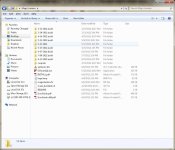
I'm a bit of a collector.
Hi Alex,
Im not sure where to post known issues so Ill do it here.
With t3i on newest build.
Going from 3x back to 1x screws up peaking & magic zoom.
Sometimes config files get changed for no apparent reason ie. some settings get switched off.
Also you mikght be able to help on something.
I have the transcend 64gb cards and more often than not when I first hit record after a few seconds Im getting the Movie has stopped recording message. I then have to hit it again.
Generally the release is excellent if it werent for these few issues.
Thanks again for everything.
Grif
Im not sure where to post known issues so Ill do it here.
With t3i on newest build.
Going from 3x back to 1x screws up peaking & magic zoom.
Sometimes config files get changed for no apparent reason ie. some settings get switched off.
Also you mikght be able to help on something.
I have the transcend 64gb cards and more often than not when I first hit record after a few seconds Im getting the Movie has stopped recording message. I then have to hit it again.
Generally the release is excellent if it werent for these few issues.
Thanks again for everything.
Grif
i also have trouble with the 3x on the latest build but did not have this with the july build (previous posts have the details.
using the transcend 32gb cards it gives the movie stopped recording and usually the battery has to be removed to resume. do not have any issue with the t2i so i think it is something with the 3x feature.
using the transcend 32gb cards it gives the movie stopped recording and usually the battery has to be removed to resume. do not have any issue with the t2i so i think it is something with the 3x feature.
If you have trouble, check if anything was fixed in http://bit.ly/ml-aug28 (testers needed). Magic Zoom and Focus Peak won't work, but I'm asking about stability issues.
Turning off cropmarks seems to help with recording stopping (a user who had this problem just discovered that).
Maybe I should consider getting a T3i myself (only if T3i users agree )
P.S. Just received the promised HDMI monitor from SmallHD: http://bit.ly/ml-hdmi-support
Turning off cropmarks seems to help with recording stopping (a user who had this problem just discovered that).
Maybe I should consider getting a T3i myself (only if T3i users agree
)P.S. Just received the promised HDMI monitor from SmallHD: http://bit.ly/ml-hdmi-support
Last edited:
loaded the august 28 build on a transcend 32gb card.
card on the t3i boots ok but locks in the ml menu when accessing the expo settings. camera is unresponsive until the battery is removed.
same card in the t2i does not lock when accessing the expo menu.
no changes were made to the configuration of the files copied.
card on the t3i boots ok but locks in the ml menu when accessing the expo settings. camera is unresponsive until the battery is removed.
same card in the t2i does not lock when accessing the expo menu.
no changes were made to the configuration of the files copied.
brandonanthony1
Well-known member
What are you planning to do with the SmallHD monitor Alex?
Well... primarily fix ML bugs when used with external monitor (both HDMI and SD). Then I'll try 1080i while recording (very little chance of success) and getting clean HDMI output without black bars (chances of success are a tiny bit higher).
I don't have any use for the monitor for myself, since I use the camera primarily for stills and hand-held shooting.
I don't have any use for the monitor for myself, since I use the camera primarily for stills and hand-held shooting.
Last edited:


M. Gilden
Canon DSLR Moderator
WHOA! how'd you manage that? And at 1920x1088? Interesting that its not quite 1080p, makes me wonder what you needed to do for this to happen!
Did you write your own video routine? Does that mean you have control over the resolution off the sensor?
This has some crazy implications!