One of the features I like in the newer builds is the primitive follow focus using the arrow keys. It's especially nice with the magic zoom. However, I'm thinking about buying a viewfinder that attaches to the lcd screen. This will block the lcd sensor. How will this effect the follow focus? Will it then be impossible to use this feature once I affix the frame to the lcd on my t2i? Are there any workarounds for this? Do others use a viewfinder that blocks the lcd sensor and what should I consider in regard to ML?

Navigation
Install the app
How to install the app on iOS
Follow along with the video below to see how to install our site as a web app on your home screen.
Note: This feature may not be available in some browsers.
More options
You are using an out of date browser. It may not display this or other websites correctly.
You should upgrade or use an alternative browser.
You should upgrade or use an alternative browser.
T2i Magic Lantern for 550D in progress!
- Thread starter ...
- Start date
Yes, you will still be able to use follow focus (but for moving around the AF frame, you will have to disable FF, then use arrows to move it, then enable it back).
You will also lose LCD remote shot and a few shortcuts which I don't consider essential. Everything else should work.
You will also lose LCD remote shot and a few shortcuts which I don't consider essential. Everything else should work.
brandonanthony1
Well-known member
Are there any new developments with full HD via HDMI out? Functional yet, or no?

M. Gilden
Canon DSLR Moderator
No, and probably will never be (remember 7D has two DIGIC cores to do this).
That's what I thought, but I recall Trammell Hudson showing off some early 5D Magic Lantern experiments that had interlaced HD via HDMI out during filming.
Not sure what happened to it after that, as far as I know the current editions don't have it yet. But he did record this video to show us almost 2 years ago:
http://www.vimeo.com/6618825
I'm sure if it were simple we'd all have it by now, but since the 5D has a similar single-chip setup to ours, it *might* be possible. Then again, there is probably good reason it wasn't released on the 5D version yet either?
Experiment - simplified install procedure: download, unzip, upgrade firmware, reboot, done! http://bit.ly/oXXKfB
M. Gilden
Canon DSLR Moderator
Code is available, if you can fix it... you are welcome. I wasn't able to do so.
Yeah, I figured it wasn't going to come anytime soon if Trammel hasn't included it in the 5D by now. Just mentioned it because I once said you need the dual chip design of the 7D for hdmi, and someone point out that this happened. Not sure what happened to it since then, why it was scrapped. Must have had good reason because that's a major selling point.
Experiment - simplified install procedure: download, unzip, upgrade firmware, reboot, done! http://bit.ly/oXXKfB
Ohh, I like this!
Great! Can you help me simplify this install guide? http://magiclantern.wikia.com/wiki/Unified/Install
Thanks.
Thanks.
Bleeding edge: a complete package with the new installation method (just for testing): bit.ly/qimSpD
This new installation method doesn't work on my 600D
This new installation method doesn't work on my 600D
I cannot post on the Magic Lantern Google Groups or I would have posted this there.
This new installation method doesn't work on my 600D. I get as far as updating the Firmware Update Program Loading... screen which I see for a couple of seconds then the screen goes black while the red light is pulsing but finally it returns to the Info screen (not the Menu screen). That's all & the firmware doesn't get updated. I have tried it with the full package & just with the autoexec.bin & ml-600d-101.fir. I never reach the stage of the green confirmation screen.
I tried the old installation method but the firmware doesn't 'stick'. This seems to be the same issue as a guy who has posted on the ML Google Groups that "magiclantern.fir won't install/update on T2i"
This new installation method doesn't work on my 600D
I cannot post on the Magic Lantern Google Groups or I would have posted this there.
This new installation method doesn't work on my 600D. I get as far as updating the Firmware Update Program Loading... screen which I see for a couple of seconds then the screen goes black while the red light is pulsing but finally it returns to the Info screen (not the Menu screen). That's all & the firmware doesn't get updated. I have tried it with the full package & just with the autoexec.bin & ml-600d-101.fir. I never reach the stage of the green confirmation screen.
I tried the old installation method but the firmware doesn't 'stick'. This seems to be the same issue as a guy who has posted on the ML Google Groups that "magiclantern.fir won't install/update on T2i"
Last edited:
AriG: many users said the diff is difficult to read, so I didn't include it. I'll add it in the next release.
nigelbb: can you make a short movie with a second camera, with what happens during install? What card are you using? It's important to format it from the camera (at least on 550D and 60D, where I can test myself).
nigelbb: can you make a short movie with a second camera, with what happens during install? What card are you using? It's important to format it from the camera (at least on 550D and 60D, where I can test myself).
I am on vacation at present & only have my 600D. I'll be back home in a couple of days so can film it then but it's just the regular Firmware Update screen.nigelbb: can you make a short movie with a second camera, with what happens during install? What card are you using? It's important to format it from the camera (at least on 550D and 60D, where I can test myself).
The card is a Sandisk Extreme 32GB card that I format in the camera. I use the same card to install & re-install the 1.0.1 Canon firmware.
I signed up for the Google Groups mailing list or whatever it is but it is just the most awful user interface experience. Is there some reason why you don't want to use proper forum software like the VBulletin used by this site? At least if it were a proper Usenet newsgroup I could use an off-line reader but as it exists the web interface is horrible.
DorianVasco
Member
Hi Alex, what do you think about reducing the size of the audio meters a little bit, so that the informations on the top of the screen can remain?
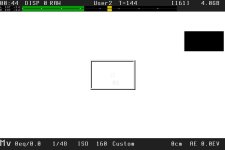
Thanks a lot for your work on the gorgeous Magic Lantern!
Thanks a lot for your work on the gorgeous Magic Lantern!
Try it here: http://bit.ly/aj-like
(it also has a bottom bar a bit more like AJ's one)
Tip: shutter and ISO are color-colored (it shows "good" values for the 180 degree rule and low noise).
(it also has a bottom bar a bit more like AJ's one)
Tip: shutter and ISO are color-colored (it shows "good" values for the 180 degree rule and low noise).
Last edited: