
Navigation
Install the app
How to install the app on iOS
Follow along with the video below to see how to install our site as a web app on your home screen.
Note: This feature may not be available in some browsers.
More options
You are using an out of date browser. It may not display this or other websites correctly.
You should upgrade or use an alternative browser.
You should upgrade or use an alternative browser.
Magic Lantern Firmware
- Thread starter M. Gilden
- Start date

drapeama
Well-known member
Alright, the only thing I've read in the FAQ (3rd line right?) is that it can "not be compatible on all models". Is that the answer? If so why was it working previously without problems?3rd line
ANyway...I'll stick with the Nov 25th build as it's working.
drapeama
Well-known member
Not the FAQ... the built-in help menu (told you to suggest another icon...)
Ohh, Press Q for bringing sub-menus...All right, case closed, everything works fine. Sorry about that one!
Neil A Russell
Member
Hi Alex, probably a dumb question here and something I'm just not finding, but in the pre-Nov 25 builds I was able to see my Canon default lightmeter with just a half press on the shutter button.
From Nov 25 and onward that seems to have gone away and I have to press DISP once to get the meter, and then 2 more presses of DISP to get back to the normal shooting screen.
Is there something that allows the old half shutter one-press or has that gone away?
(This is on a 550D)
Thanks!
From Nov 25 and onward that seems to have gone away and I have to press DISP once to get the meter, and then 2 more presses of DISP to get back to the normal shooting screen.
Is there something that allows the old half shutter one-press or has that gone away?
(This is on a 550D)
Thanks!
Canon light meter is not something you should rely on (and it's on ML bar too, on the right).
---------
If you shoot in darkness, you may like this update: http://bit.ly/ml-jan26
---------
If you shoot in darkness, you may like this update: http://bit.ly/ml-jan26
Neil A Russell
Member
Thanks Alex!
Now about putting back the "Big Clock"...kidding!
Now about putting back the "Big Clock"...kidding!
Just a quick question from a ML newbie here. Once ML is installed, can I delete ML files or should I keep ML files in all sdhc cards I will use?
You can delete the .pdfs, the .firs, but you need to keep autoexec.bin/cropmarks/docs(if you want the docs).. Otherwise if you do not have the autoexec.bin, then it will boot up without ML loading.
@Alex, I think he was talking about using ML and if he needed to keep the files on the card to use ML.

bumkicho
Well-known member
You can delete the .pdfs, the .firs, but you need to keep autoexec.bin/cropmarks/docs(if you want the docs).. Otherwise if you do not have the autoexec.bin, then it will boot up without ML loading.
@Alex, I think he was talking about using ML and if he needed to keep the files on the card to use ML.
Answer I needed. Thank you.

Ted Ramasola
Veteran
-deleted

drapeama
Well-known member
I've deleted the DOC folder and everything not needed on the card:I am wondering if I can safely remove the doc folders with all the bmp files deleted. Will it affect ML's performance or functionality?
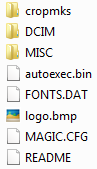
You can delete the .pdfs, the .firs, but you need to keep autoexec.bin/cropmarks/docs(if you want the docs).. Otherwise if you do not have the autoexec.bin, then it will boot up without ML loading.
@Alex, I think he was talking about using ML and if he needed to keep the files on the card to use ML.
Are you sure about this? I just recently started playing with ML and if I insert a non-ML card after installing ML, it boots fine to the regular Canon firmware.
Wizardgold
New member
600D Firmware question
600D Firmware question
On my 600D I have 1.0.2 firmware now. Will I have to downgrade to version 1.0.1 so that I can install the present version of ML ?
Thanks
600D Firmware question
On my 600D I have 1.0.2 firmware now. Will I have to downgrade to version 1.0.1 so that I can install the present version of ML ?
Thanks