Magic Lantern enables 14-bit RAW CinemaDNG on 5D

Does anyone know if we have a RAW to CinemaDNG converter for windows yet?

I'm currently using RAWanizer and its a superb tool, but it doesn't create CinemaDNG files so they can't be used by resolve...

We need the windows geeks on the case!!
 
Remarkably filmlike grade. The extra latitude is what's making this type of grade work. https://vimeo.com/68000054

Very nice result indeed. But I don't understand why not grade the initial tiff files in lightroom or photoshop, but only at a later stage on the re-compressed mov file?
I am sure that the tiff files are much more resistant to even serious grading than the compressed mov files with the video codecs, not to mention that lightroom and photoshop give you plenty of space to color correct or grade at will.
 
Very nice result indeed. But I don't understand why not grade the initial tiff files in lightroom or photoshop, but only at a later stage on the re-compressed mov file?
I am sure that the tiff files are much more resistant to even serious grading than the compressed mov files with the video codecs, not to mention that lightroom and photoshop give you plenty of space to color correct or grade at will.

Have you tried tracking a face in photoshop or lightroom?
Once you have done a few animated corrections you will see my point.
 
I guess that your point is that it is easier to create a mask and track using key frames on a video, rather than on individual tiff frames. And I will not disagree on this.
In any case the whole raw workflow is heavy and I would consider it only when really needed.
My point is that once you have started the process of exporting individual tiff frames from you clip, you have more range to do a global color correction or grading without any quality loss, and recompress only when you need to play the video on a screen. Looks more like the BMC raw workflow.

I am pretty sure that even outside of this raw thing, even if you shoot H.264 and you export tiff files from your timeline, grade them in lightroom or photoshop and recompress the clip to h.264, you get a much cleaner look rather than adding filters and plugins on the clip on your timeline. I intended to mention this on a separate topic too, and may do so once I have done more extensive tests.
 
I guess that your point is that it is easier to create a mask and track using key frames on a video, rather than on individual tiff frames. And I will not disagree on this.
In any case the whole raw workflow is heavy and I would consider it only when really needed.
My point is that once you have started the process of exporting individual tiff frames from you clip, you have more range to do a global color correction or grading without any quality loss, and recompress only when you need to play the video on a screen. Looks more like the BMC raw workflow.

I am pretty sure that even outside of this raw thing, even if you shoot H.264 and you export tiff files from your timeline, grade them in lightroom or photoshop and recompress the clip to h.264, you get a much cleaner look rather than adding filters and plugins on the clip on your timeline. I intended to mention this on a separate topic too, and may do so once I have done more extensive tests.

Grading, especially for video should happen on a grading monitor. These are YUV/SDI, not RGB.
Neither photoshop nor Lightroom will show up on a grading monitor for this reason. You will be viewing on a conventional computer screen. Which is fine for Youtube or vimeo, but not television or cinema. Even though a DCP uses tif's, it still must go through an elaborate conversion process to get a decent output for the big screen.

A rec709 simulation on an RGB screen is not the same thing as viewing it on a real video monitor, and in addtion you should look at the scopes from a video package anyway, in order to judge safe zones and the color of your blacks from one shot to another, etc. etc.
So in fact from the point of view of broadcast accuracy it has to leave an RGB enivronment anyway.

I guess what I am saying is that ACR and Lightroom are great perhaps for the first step, but eventally you will need to take it through a dedicated application.

People often say that they don't see why we need to do any work on other than an imac screen wth a puck for calibration. Once they have actually seen the same image side by side between the two, they go "oh my god." Their RGB image is so far away from a standarized pro system it is laughable.

In order to understand this think about CMYK for instance. Have you converted an image into CMYK and seen the difference from a Chromalin or an actual printed image? What you are seeing on a screen is only a simulation. The same is true for YUV video.

When people come in with something they say has been corrected in photoshop for instance, the first thing I look at are the parades and the color of their blacks. They aren't matched at all, they are all over the place. Imagine having a shot in a scene with blacks that are blue and another that are red in the shot from the same scene after it. That's the kind of thing I am talking about.

At the end of the day, if you cannot use an actual grading system, at least use your pickers and try to look at the scopes in your NLE after.
 
Last edited:
Thanks for the heads up on the Komputer bay cards- I had a bunch on order from Amazon and cancelled to switch to Lexar. Its definitely not worth the risk of losing clips on a shoot- even if its just a b or c cam.
 
Grading, especially for video should happen on a grading monitor. These are YUV/SDI, not RGB.
Neither photoshop nor Lightroom will show up on a grading monitor for this reason. You will be viewing on a conventional computer screen. Which is fine for Youtube or vimeo, but not television or cinema. Even though a DCP uses tif's, it still must go through an elaborate conversion process to get a decent output for the big screen.

A rec709 simulation on an RGB screen is not the same thing as viewing it on a real video monitor, and in addtion you should look at the scopes from a video package anyway, in order to judge safe zones and the color of your blacks from one shot to another, etc. etc.
So in fact from the point of view of broadcast accuracy it has to leave an RGB enivronment anyway.

I guess what I am saying is that ACR and Lightroom are great perhaps for the first step, but eventally you will need to take it through a dedicated application.

People often say that they don't see why we need to do any work on other than an imac screen wth a puck for calibration. Once they have actually seen the same image side by side between the two, they go "oh my god." Their RGB image is so far away from a standarized pro system it is laughable.

In order to understand this think about CMYK for instance. Have you converted an image into CMYK and seen the difference from a Chromalin or an actual printed image? What you are seeing on a screen is only a simulation. The same is true for YUV video.

When people come in with something they say has been corrected in photoshop for instance, the first thing I look at are the parades and the color of their blacks. They aren't matched at all, they are all over the place. Imagine having a shot in a scene with blacks that are blue and another that are red in the shot from the same scene after it. That's the kind of thing I am talking about.

At the end of the day, if you cannot use an actual grading system, at least use your pickers and try to look at the scopes in your NLE after.

I agree with all of this. I think you can work with settings to get Lightroom to output a great starting point for a YUV finish. If LR can do the heavy lifting of maximizing DR, lens corrections and sharpening, then the resulting output will have plenty of headroom to be adjusted in your video editor without penalty. But as you state, it will need to be adjusted.
 
I would say that color correction (making all clips look similar) is the initial step that you do in ACR/LR. Then for the final step of color grading, if you have a colorist, he'll take care of everything. If you don't, it's probably because you're working on a smaller project, and you'll have to do with whatever you have at hand.

Or, to put it another way: right now my equipment is miles ahead of my skills...
 
Hi just got my computerbay cards finally and wanted to try the hack on my Mark 3... is there a consensus what the best mac based workflow is. Also does the hack work when recording external sound... want to use this for a short project next week so wanted to test it out... anything in particular that I need to keep in mind? Someone was talking about that you needed to underexpose. Is this hack ready to be used in the field? Thanks
 
5DmkII, it is out of pre-alpha and now has ALPHA 1.
For those who are following the nightly builds, the June 12 compile by developer a.d. is the module version of ALPHA 1.
Link to jun 12 NB:
https://bitbucket.org/a_d_/magic-lan...ed3721fc44.zip

Alpha 1 is for those who are starting from scratch.
Link to ALPHA 1:
https://bitbucket.org/a_d_/magic-lan..._Alpha_One.zip

Alpha 1 PDF instructions:
https://bitbucket.org/a_d_/magic-lan..._Alpha_One.pdf

There is now jun 13 NB (able to save your settings implemented )
https://bitbucket.org/a_d_/magic-lan...3385aa13bd.zip

here are SOME of the 5D raw resolutions, aspect ratio and its status. (using a 1000x Lexar CF card)

1880x1058 -- 16:9 -- 400 frames approx.

1880x940 -- 2:1 -- 1,900-2,400 frames approx.

1880x854 -- 2.20:1 -- stable/continuous til card full

1728x972 -- 16:9 -- 10,000 frames approx. ( 7min ) This is already near 32gig card capacity.

1728x864 -- 2:1 -- stable/continuous til card full


In 3x (5X magnify) crop mode ( note for now NB jun 12, centering and cropping in this mode is off a bit to the left)
crop mode will give optimum results when used with FPS over ride (23.976)

2152x1078 -- 2:1 -- 184 frames approx.

2048x1078 -- 1.90:1 -- 242 frames approx.

1920x1078 -- 16:9 -- 335 frames

1880x1058 --16:9 -- 430 frames approx.

1880x854 -- 2.20:1 -- stable/continuous

1728x972 -- 16:9 -- stable/continuous


There are more resolution and aspect ratio combinations.

For now the raw video in the 5D2 records beyond the 4gig limit by spanning several files.

Programmers have written several programs to extract the dngs, combine the spanned files and convert them to files understood by most systems.

Post processing:

Aside from DNGs you also can convert them to Cinema DNGs to make them compatible with Resolve.

RAWanizer by developer Marten has a windows interface to batch process your raw files to DNGs, Tiffs or proxy files in Prores, MP4, DNxHD, Csupport for Cineform.
http://www.magiclantern.fm/forum/index.php?topic=5557.0

Raw to Cinema DNG converter by developer Chmee for windows. I've tested this and the footage will open in both AE CS5 and Resolve.
http://www.phreekz.de/wordpress/2013...ng-cinema-dng/

RAWMagic by developer Thomas Worth converts raw to Cinema DNG works for Mac.
http://www.magiclantern.fm/forum/index.php?topic=6218.0


So, is this ready for use in production? I'd say test it first and see if it works for you. If you already have a raw workflow and raw capable A camera, a BMC, red etc, I'd say you can use this as B cam for now.
Again, test it first if it works for you, remember, you need a fast CF card to get the optimum, stable and continuous recording (ex.lexar 1000x). If you're a DSLR shooter and want to use this in your project, test it and with a sound recorder, you might and could be succesfull in using this tool as it is now. :)
 
Last edited:
Thanks for the run-down Ted. So it looks like the 5DMKII is pretty close to 1080p. I would guess that the RAW 1728x972 looks a lot more detailed than the h.264 1080p. Is this true? I have the MKII & MKIII that I use more for still work and favor the MKIII for video. I never liked the color accuracy out of the MKII for video, especially when I put the files in Edius (YUV environment). I like the power of RAW. Does the RAW ability sort of 'cure' the color on the MKII for video use? Thanks for your input.
 
Bassman,

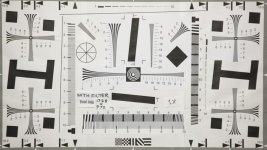
Here is a chart of 1728x972, I'm on EDIUS as well, try it on the timeline. Note that this was shot with VAF filter.
1728x972vafrawml.jpg

I tested skin tone and color chart the other day with raw video, I did so to compare CDNG and DNG, I was satisfied since you can tweak and grade to your hearts content.

In After Effects CS5 the color don't vary when loading the exported file to Edius for finishing. With CS3 make sure you set your project color space in AE to adobe rgb to get a close match between edius and AE.

I can preview my AE to my monitor via GrassValley HDSpark to match colors closely.
 
Thanks Ted. It looks like a complete transformation of this camera. I am getting very excited about trying it out although I am waiting until an SSD solution is created to dive in.
 
Thanks Ted!
isn't it a 3-3,5X crop?? Why 5x?
Have you tried with the 2.39:1 ar?
If you get 1880x854 stablethen probably with that we could go near to 1920x800!!!!
What's the max you can get???
How far you can get with 1920x800?
...keep us posted!!!!!!!!
Pleaseee!
;)
 
dia3olik,

Thanks for pointing it out, I edited my post, it is 3x crop mode using the 5x magnify button in on the camera.

1880 x 786 2.39:1 is stable and continuous.

1920 width is not possible on the mkII at 1X only in crop mode.

1920 x 804 2.39:1 crop mode is Stable and continuous.
 
Back
Top