Stephen Mick
Totally Usable
Looks pretty cool…
http://www.magiclantern.fm/forum/index.php?topic=7139
(From ML Forum…)
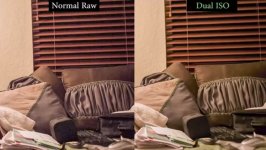
Time for the first real image quality improvement in ML history
Here's a trick that samples half of the sensor at ISO 100 and the other half at ISO 1600, for example. If you mix these two, you can get almost the entire dynamic range the sensor is capable of (around 14 stops). 5D3/7D only.
There are no motion artifacts; not even a difference in motion blur for the two exposures. So, it works well for fast moving subjects.
Warning
This code changes low-level sensor parameters. In the technical doc you can see how this method messes with the feedback loop for optical black, for example. Therefore, it's safe to assume it can fry the sensor or do other nasty things. My 5D3 is still alive after roughly one week of playing with this, but that's not a guarantee.
We don't pay for repairs. Use it at your own risk.
Also, the 7D implementation seems quite buggy right now. Don't use it for serious stuff yet. Programming the dual DIGIC is not that easy for parallel computing noobs like me.
Usage
- 5D3: works for both raw photo and raw video. 7D: photo only.
- Select one ISO from Canon menu, the other from Dual ISO submenu.
- Expose to the right for the lower ISO (usually ISO 100). Maybe darken 1 stop from there.
- Start at ISO 100/1600.
- Try a larger gap for really extreme situations, or a smaller gap for better midtone detail (less aliasing).
Histograms, ETTR, playback tricks [5D3 only]
- Raw zebras will use the darker exposure for highlight warnings and the brighter one for shadow warnings.
- Raw histogram will use the darker exposure. Consider the brighter one as some sort of shadow recovery.
- JPEG zebras/histogram are totally unreliable.
- In photo LiveView you will see the ISO from Canon menu. In movie mode, you will see horizontal lines.
- ETTR will use the darker exposure.
- Playback in 1x will show some sort of HDR preview. At certain zoom levels, you'll be able to see only one of the two exposures, at very low resolution.
- The dynamic range indicator from the histogram is not accurate.
Postprocessing
- For CR2 files: cr2hdr.c (Windows: cr2hdr.exe). It requires dcraw and (optional) exiftool in your path.
- For RAW video files: latest raw2dng.exe.
- To get a natural HDR look: try my automatic color grading script.
Price to pay
- Half resolution in highlights and shadows
- Aliasing and moire - of course, in highlights and shadows
- You can no longer check critical focus when zooming in
http://www.magiclantern.fm/forum/index.php?topic=7139
(From ML Forum…)
Time for the first real image quality improvement in ML history
Here's a trick that samples half of the sensor at ISO 100 and the other half at ISO 1600, for example. If you mix these two, you can get almost the entire dynamic range the sensor is capable of (around 14 stops). 5D3/7D only.
There are no motion artifacts; not even a difference in motion blur for the two exposures. So, it works well for fast moving subjects.
Warning
This code changes low-level sensor parameters. In the technical doc you can see how this method messes with the feedback loop for optical black, for example. Therefore, it's safe to assume it can fry the sensor or do other nasty things. My 5D3 is still alive after roughly one week of playing with this, but that's not a guarantee.
We don't pay for repairs. Use it at your own risk.
Also, the 7D implementation seems quite buggy right now. Don't use it for serious stuff yet. Programming the dual DIGIC is not that easy for parallel computing noobs like me.
Usage
- 5D3: works for both raw photo and raw video. 7D: photo only.
- Select one ISO from Canon menu, the other from Dual ISO submenu.
- Expose to the right for the lower ISO (usually ISO 100). Maybe darken 1 stop from there.
- Start at ISO 100/1600.
- Try a larger gap for really extreme situations, or a smaller gap for better midtone detail (less aliasing).
Histograms, ETTR, playback tricks [5D3 only]
- Raw zebras will use the darker exposure for highlight warnings and the brighter one for shadow warnings.
- Raw histogram will use the darker exposure. Consider the brighter one as some sort of shadow recovery.
- JPEG zebras/histogram are totally unreliable.
- In photo LiveView you will see the ISO from Canon menu. In movie mode, you will see horizontal lines.
- ETTR will use the darker exposure.
- Playback in 1x will show some sort of HDR preview. At certain zoom levels, you'll be able to see only one of the two exposures, at very low resolution.
- The dynamic range indicator from the histogram is not accurate.
Postprocessing
- For CR2 files: cr2hdr.c (Windows: cr2hdr.exe). It requires dcraw and (optional) exiftool in your path.
- For RAW video files: latest raw2dng.exe.
- To get a natural HDR look: try my automatic color grading script.
Price to pay
- Half resolution in highlights and shadows
- Aliasing and moire - of course, in highlights and shadows
- You can no longer check critical focus when zooming in