
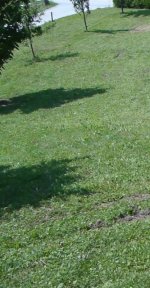
I've made first experiments with GH1 and found out that shadowed areas produce noticeable mud like in the attached picture. The subject was already discussed in some posts, but I think that it deserves a separate thread in order to warn potential new users.
The video was taken with 1080p25 (50i wrapper) AVCHD settings (FHD=50M, Overall=56M, Limiting=60M). I have used faster shutter speed (1/250s) in order to get sharper picture. Overall data rate was 41.4Mb/s (388MB file, 75s long clip).
Is there any possible way how to improve picture quality in shadowed areas? I will use AVCHD settings, since I bought this camera to get FHD resolution. Moreover, what kind of settings (in camera MENU) are preferred for taking video in low-light?
The video was taken with 1080p25 (50i wrapper) AVCHD settings (FHD=50M, Overall=56M, Limiting=60M). I have used faster shutter speed (1/250s) in order to get sharper picture. Overall data rate was 41.4Mb/s (388MB file, 75s long clip).
Is there any possible way how to improve picture quality in shadowed areas? I will use AVCHD settings, since I bought this camera to get FHD resolution. Moreover, what kind of settings (in camera MENU) are preferred for taking video in low-light?
Attachments
Last edited:
 The issue here is that you are stopped down for deep focus, using a fast shutter speed, and every inch of the frame has some busy detail in it.


 rogar-SunGlass(DBG