Log & Transfer in FCP 7 bringing in 720 30pn footage as DVCPro HD 720 p60

DinaM

Member
Hi-

I am a newbie, so please forgive me if I am overlooking something "Obvious".

I shoot my footage on the HPX-170 in 720 30PN.

I normally ingest it by creating a .dmg file with disc utility, then Log and Transfer in FCP. I set the timeline to Apple ProRes 422 (LT) 960x720 30p. The clips always compress to DVCPro HD 720p60, not 30.

For Sh*ts and giggles, I even tried ingesting footage with the Panasonic P2 software. Same result.

I have checked the camera settings. They are definitely set at 720 30pn. If I play the clips within the camera itself, that setting shows up on the bottom.

What am I not setting up properly in FCP, which is what I am assuming is the culprit?

Thank you!
 
What have you checked for "remove pulldown" in the log and transfer preferences?

And what is the reason to use a Pro Res LT sequence rather than the DVCProHD sequence in FCP?
 
Hi David-

TY for getting back to me!

I use ProRes because I have read a lot of suggestions that that is a better codec to edit in.

I do not know what my pulldown preferences are. Where do I find this and what should they be?
 
1. Edit DVCProHD natively. You can't improve its quality by transcoding to Pro Res LT, and it's a great codec anyway.

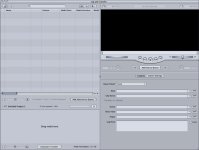
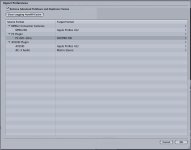
2. The remove pulldown preferences are set in the log and transfer window. The Log and Transfer window has several preferences that you can access by choosing Preferences from the Action pop-up menu in the Browse area. It is located right under the word "log" in the upper middle of the window.

log_transfer_fcp7.jpg

3. What frame rate are you using when you set 30 pN?
 
Set 30pn? On the camera? I didn't see pn in FCP.

I am editing in a video rate of 29.97fps

Should remove Pulldown be checked?
 
ok, here is something interesting.

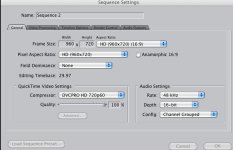
So I set up a new project in FCP. I choose to make the sequence settings DVCPro HD 720p30. It does it's thing. I haven't logged or transferred any clips in the project yet. When I look at the timeline settings, the QT Video settings have the compressor set at DVCPro HD 720p60. When I click on that to change the choices, there isn't a DVCPro HD 720p30 choice. the only 720 choices are DVCPro HD 720p50 or DVCPro HD 720p60. Can that make a difference?
 
Are the transcoded video clips 720/30p?

Let us know by right clicking them in the bin and determining their attributes.
 
I didn't transcode anything yet

I still don't know what I am supposed to check for preferences in Log and transfer.
 
ok.

So I unchecked pulldown menu.

I tried changing the target format for P2 AVC-intra to DVCPRO HD and then tried "Native". Logged and transferred two different clips. Both came out DVCPro HD 720p60.

?!?!?!?!?!??!?!
 
All those clips are 30p (29.97).

Where do you see them as 60?

To confirm, open the clips in the QuickTime Pro player, and use the Movie Inspector to confirm the frame rate there.
 
Add those clips to a new sequence and click okay/yes when prompted to change sequence settings to match clips.

Then edit.
 
I'm actually not having any issues at all. But I was telling a fellow videographer about this and he said this shouldn't happen and some setting might be wrong. I just wanted to make sure I wasn't doing something harmful.
 
Back
Top