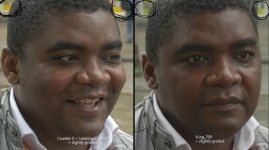
GH4 Leeming LUT One – the best LUT for the Panasonic GH4

Here is VLOG and Leeming v121 pretty matched

Used Lukes "Nothing Crazy" and a personal LUT of mine for VLOG
Used Leeming v121 and the same personal LUT

VLOG:

VLOG copy.jpg

Lemming v121:
Lv121 copy.jpg

So before you go on some tangent, Joe. Understand that I get how to grade.

What I've found is that each of you need to find what works for you and yourself. I see advantages in both VLOG and Paul's LUT. I see disadvantages is each as well. There are two sides of the coin in pretty much everything. Flip your coin a few times and find out what works out for you.

PS. I agree with Lpowell in the post above.
 
Right, but see, you have a signal that is in a 0-255 space. You take that 0-255 space and slice it down to 16-235 (not compress), and while nothing is being clipped or crunched, there is more contrast. This is true of any of the profiles - if you have the camera set to 0-255 internal space, the HDMI output will have more contrast because the ends are getting "snipped off". The difference between regular profiles and V-LOG L is you can change the space with the other profiles to 16-235 internally, and then the recorder gets all of the bits. You can't change the internal luminance space with V-LOG L.

Then answer me this. How come my 16-235 set CineD is exactly the same internally as externally? Always has.
 
Okay, watch this. Watch for when he changes the internal settings from 16-255 to 16-235. Watch what the external recorder does...


So what. He's using CineD. I'm seeing a difference in VLOG. Which should send out the same luminance as it's not switchable. It should be sending out what Lpowell, Barry, and I agree on. Externally, internally, on the dark side of the moon.

What you posted with that JM video is expected. It proves NOTHING.
 
My point is that you can't change the V-LOG L internal settings from 0-255 to 16-235. So while, yes, NOTHING WILL BE CLIPPED because V-LOG L's range is safely well within the 16-235 range, it WILL increase in contrast because the GH4 is forced to 0-255 and the HDMI output can't reflect that. So to make externally recorded V-LOG L match up properly to LUTs created for internally recorded V-LOG L, you will first need to apply a levels filter with output black at 16 and output white at 235.
 
Anyway, this is a tangent, just wanted to address that point because it confused me for a bit as well. Believe me or don't, doesn't bother me any, not interested in getting into a flame war.

Great work BTW, Paul. :)
 
My point is that you can't change the V-LOG L internal settings from 0-255 to 16-235. So while, yes, NOTHING WILL BE CLIPPED because V-LOG L's range is safely well within the 16-235 range, it WILL increase in contrast because the GH4 is forced to 0-255 and the HDMI output can't reflect that. So to make externally recorded V-LOG L match up properly to LUTs created for internally recorded V-LOG L, you will first need to apply a levels filter with output black at 16 and output white at 235.
DUDE! I CAN VERIFY THIS WITH MY WAVEFORM MONITOR WHAT LPOWELL HAS STATED ABOVE. Do you have a waveform monitor?
 
v105 had a huge problem in the orange/yellow area. Now it looks better but judge for yourself...

password: LUT
 
Last edited:
Some of your video links aren't working guys.

Anyway, a few people on Facebook wanted some video footage of my LUT, so I've uploaded a 4K demo reel of some of the testing clips I've been using, with v121 of the LUT. It's rough and ready as it wasn't meant to be forward facing, but it'll give you a bit more insight into my work and you can enjoy Leeming LUT One in motion:


Enjoy!
 
Cine-D has its own issues, but with reasonable settings and Paul's LUT, it's a more workable in-camera solution. The manner in which Leeming LUT de-emphasizes shadow noise means that I'll have greater confidence shooting at higher IO's without running footage through Neat ... which is a godsend when needed, but I would rather avoid.

Very quick question, I don't want to derail this thread. I have only been using Panasonic, the GH4, and Cine-D for about 2 months now, I'm still trying to learn this camera.

Do you have a rule of thumb for your maximum, internally recorded "higher ISO without running through Neat Video?" Either prior to this LUT, or with it?

I know "that depends" on a lot of things, especially artistic intent.

My own rough feel is that my "limit" for event videos is probably about ISO 1600, for lower light images with a lot of black areas, multiple people in the frame, and a fair amount of movement. I think I would have to do noise reduction on what I have seen at ISO 3200 internally, especially for out of focus, darker faces in the background and similar. I wish that my Nikon D750 could shoot 4K, it is incredibly clean at ISO 6400, but I lose so much flexibility in post ... ;)

+++

Cheers, and thank you **very much** for your great posts in this threats! and all of the testing and tweaking of the LUTs! Thank you too to Dusty, and Paul of course. Now, can I get a free copy of the LUT just for my valiant work trying to understand WTH you are all talking about? :)

(I'm sure I'll buy a copy soon. I first had to calibrate my Canon 1DsII around 2004, when I couldn't match stills images of an orange, yellow, and black checkered skirt, in a fashion image. I still struggle with some of this theory though ....)

Cheers!
Michael
 
Last edited:
Do you have a rule of thumb for your maximum, internally recorded "higher ISO without running through Neat Video?" Either prior to this LUT, or with it?
Traditionally, I haven't been comfortable going above 1600 ISO. But as I come to accept how important it is to not under-expose the GH4, I'll be less reluctant to push it higher if need be. And now that I've learned to bump the ISO in smaller steps, that should help as well.
 
My point is that you can't change the V-LOG L internal settings from 0-255 to 16-235. So while, yes, NOTHING WILL BE CLIPPED because V-LOG L's range is safely well within the 16-235 range, it WILL increase in contrast because the GH4 is forced to 0-255 and the HDMI output can't reflect that. So to make externally recorded V-LOG L match up properly to LUTs created for internally recorded V-LOG L, you will first need to apply a levels filter with output black at 16 and output white at 235.
Ah, I assumed you were talking about an HDMI output from a computer to an HDTV. There's no problem there, since the graphics card driver assumes both the video and the monitor use the same 16-235 range. But it sounds like you're concerned about the GH4's built-in HDMI output, which is interfaced to the camera's image sensor processing system during external recording. In that case, high-precision video data is converted directly into a 16-235 HDMI stream, with no need to encode and decode it to H.264 format. For that reason, the 0-255 range used by the internal H.264 encoder in V-Log-L mode is irrelevant to the GH4's HDMI output.
 
Last edited:
Very quick question, I don't want to derail this thread. I have only been using Panasonic, the GH4, and Cine-D for about 2 months now, I'm still trying to learn this camera.

Do you have a rule of thumb for your maximum, internally recorded "higher ISO without running through Neat Video?" Either prior to this LUT, or with it?

I know "that depends" on a lot of things, especially artistic intent.

My own rough feel is that my "limit" for event videos is probably about ISO 1600, for lower light images with a lot of black areas, multiple people in the frame, and a fair amount of movement. I think I would have to do noise reduction on what I have seen at ISO 3200 internally, especially for out of focus, darker faces in the background and similar. I wish that my Nikon D750 could shoot 4K, it is incredibly clean at ISO 6400, but I lose so much flexibility in post ... ;)

+++

Cheers, and thank you **very much** for your great posts in this threats! and all of the testing and tweaking of the LUTs! Thank you too to Dusty, and Paul of course. Now, can I get a free copy of the LUT just for my valiant work trying to understand WTH you are all talking about? :)

(I'm sure I'll buy a copy soon. I first had to calibrate my Canon 1DsII around 2004, when I couldn't match stills images of an orange, yellow, and black checkered skirt, in a fashion image. I still struggle with some of this theory though ....)

Cheers!
Michael
With my LUT effectively minimising colour noise, I'm confident to go to ISO 3200 in most conditions and ISO 6400 when it's needed. I tried pulling up ISO 800 footage to ISO 6400 levels in a test, but found greater colour noise as it was severely underexposed, losing colour precision in the bottom stops being pulled up. ISO 6400 native looked really good considering, so I'm confident if I need it that the results will looks good, and the grain is organic looking enough that it's not distracting (unlike colour noise).

Cheers,

Paul :)
 
So now that everyone has v121 with correct colorimetry, I'd love to hear a round of feedback on what changes, if any, you'd make to the LUT.

I don't mean in terms of mood etc. That's not what the LUT is for.

I mean, how do you feel about the level of saturation of the individual colours, is the initial brightness ok, that sort of thing.

Would love to hear feedback and see any sample images which you feel could be improved, and where.

Thanks in advance!

Paul :)
 
Uwe, subjectively both look good. As you were there, which would you consider the most accurate representation of your model's skin?

I can´t really say but I know this guy well. Maybe its a good idea to take a picture of him and then we can compare the colors...
 
What happened to the colors in the upper part of the image ? ( look at where I marked )

CineD VlogL.jpg

Both Standard and Leeming have a more yellow tone and VLog_709 is more green.
Which oner is more acurate ?
 
Back
Top