GH4 'Lab Review Reveals 10bit Flaws in Vlog + FREE GH5 LUT'

All blackmagic non studio cameras when recording raw, get 16 bits from the sensor, then log encode the data to 12 bits. the bmpcc then writes lossless compreessed , the irsa s give you the choice of lossless compressed or lossy compressed.
I know that's what BMD calls it, and perhaps it's quibbling, but if the "raw" sensor data is being transformed in ways other than to repackage (like lossless compression), then by definition it's not RAW.
 
I know that's what BMD calls it, and perhaps it's quibbling, but if the "raw" sensor data is being transformed in ways other than to repackage (like lossless compression), then by definition it's not RAW.
It's RAW transcoded into a non-linear dynamic range, which preserves lossless detail down to 12-bits. But you're right, it's technically 12-bit LOG, rather than 16-bit RAW.
 
Agreed. Even recording externally 8bit ProRes422 from the GH4 shows significant improvement with V-log. There is still some potential for banding but most of the odd color artifacts go away. .

I have to agree with this. I've just been shooting extensively with V-Log internally and externally and 8 bit 422 externally fixes almost all the V-log issues. 10 bit is then just icing on the cake for grading. 8 bit 422 (even LT) makes skin tones and colours look really nice from the GH4.
 
FWIW, 43Rumors has a thread on this topic with posts by Nick Driftwood, Emanuel Pampuri (quoted) and the author of this article Cinema5D's Sebastian Wöber. There's some interesting back&forth going on there.
 
Panasonic GH5 Lab Test – Temporarily Offline
by Sebastian Wöber | 1st March 2017

"Due to the agitated discussion and hostility arising from our test of the Panasonic GH5, and our commitment to re-evaluating our test methodology based on reader comments, we have decided to temporarily remove this content while awaiting further feedback from the manufacturer. We value feedback from our audience, and our common goal is to find the most affordable and portable cinema tools out there".

https://www.cinema5d.com/panasonic-gh5-lab-test-temporarily-offline/
 
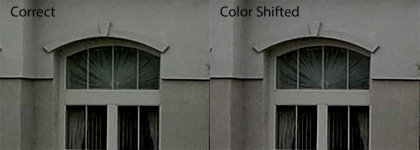
I can confirm an issue with ProRes generated with ffmpeg being incorrectly interpreted by Premiere Pro with a result of having a color shift. The ProRes video is (incorrectly) labeled as Rec.601 which causes Premiere to use incorrect primaries. I have not confirmed if this only an issue on non-Apple certified ProRes encoding. Resolve interprets the video correctly.

Also beware that for 8-bit full range H.264 videos the GH5 (and possible the GH4 as well) uses the yuvj420p pixel format as opposed to the yuv420p pixel format. Regardless of the fact that the video header describes the video as Rec.709 Premiere Pro uses the yuvj420p pixel format as an overriding factor with the result that the video will be interpreted as Rec.601 with the effect of having color shifts. Resolve handles this case correctly.

Comparison of log formats:
compare-ab.jpg

Premiere Pro correctly interprets 10 bit 422 clips converted to DNxHR:

ffmpeg -i original.mp4 -c:v dnxhd -profile:v dnxhr_hqx converted.mov

(This operation requires ffmpeg 3.3. "Hilbert" or later.)
 
Last edited:
Did you test Legal Range also?

Often record ProRes externally so leave my GH4/5 in Legal Range, & also avoids a conflict with some monitors where Full Range will display a overly contrasty image with crushed shadows.
 
Did you test Legal Range also?
8 bit legal range H.264 is interpreted fine by Premiere because it reads the yuv420p pixel format.

For 10 bit both the legal and full range H.264 are recorded as yuv422p10le so there is no issue there, however currently Premiere can't read these files.

For 10 bit ProRes generated with ffmpeg both the full and legal range have the color shift in Premiere due to the Rec.601 label.
(If you do an matrix conversion from Rec709 to 601 during encoding the color shift disappears - however this may introduce more issues because the matrix conversion may be 8 bit only)


If anyone would like to help and convert these 10 bit 422 SMPTE full and limited files with an Apple certified ProRes encoder I can confirm if the issue is limited to the ffmpeg version of ProRes.

422 10 bit full range:
https://www.dropbox.com/s/ep0r0u0nur2c92m/full10.MP4?dl=0

422 10 bit limited range:
https://www.dropbox.com/s/fclzatiavwz5bdk/limited10.MP4?dl=0
 
8 bit legal range H.264 is interpreted fine by Premiere because it reads the yuv420p pixel format.

For 10 bit both the legal and full range H.264 are recorded as yuv422p10le so there is no issue there, however currently Premiere can't read these files.

For 10 bit ProRes generated with ffmpeg both the full and legal range have the color shift in Premiere due to the Rec.601 label.
(If you do an matrix conversion from Rec709 to 601 during encoding the color shift disappears - however this may introduce more issues because the matrix conversion may be 8 bit only)


If anyone would like to help and convert these 10 bit 422 SMPTE full and limited files with an Apple certified ProRes encoder I can confirm if the issue is limited to the ffmpeg version of ProRes.

422 10 bit full range:
https://www.dropbox.com/s/ep0r0u0nur2c92m/full10.MP4?dl=0

422 10 bit limited range:
https://www.dropbox.com/s/fclzatiavwz5bdk/limited10.MP4?dl=0

I converted them to ProRes422 with FCPX.

https://www.dropbox.com/s/yymdq8zey5sm68n/FCPX-2-ProRes422.zip?dl=0
 
Thanks Thomas!

I checked them and these work perfectly in Premiere Pro!

That confirms that the Apple licensed ProRes encoder is correct and that due to the mislabeling of the ffmpeg ProRes encoder (I suspect a simple relabeling to Rec.709 should fix this) it is incorrectly interpreted as Rec.601 in Premiere Pro.
While DaVinci Resolve interprets it correctly Premiere does not.

Also full range 8 bit GH5 output is definitely a problem in Premiere Pro. I do not have the GH4 but if the GH4 also records a yuvj420p pixel format in full range your colors will be off in Premiere Pro. And it will likely be the same for all other Panasonic cameras that output 8 bit full range. Also here DaVinci Resolve interprets the information correctly.
 
Last edited:
8 bit legal range H.264 is interpreted fine by Premiere because it reads the yuv420p pixel format.

For 10 bit both the legal and full range H.264 are recorded as yuv422p10le so there is no issue there, however currently Premiere can't read these files.

For 10 bit ProRes generated with ffmpeg both the full and legal range have the color shift in Premiere due to the Rec.601 label.
(If you do an matrix conversion from Rec709 to 601 during encoding the color shift disappears - however this may introduce more issues because the matrix conversion may be 8 bit only)


If anyone would like to help and convert these 10 bit 422 SMPTE full and limited files with an Apple certified ProRes encoder I can confirm if the issue is limited to the ffmpeg version of ProRes.

422 10 bit full range:
https://www.dropbox.com/s/ep0r0u0nur2c92m/full10.MP4?dl=0

422 10 bit limited range:
https://www.dropbox.com/s/fclzatiavwz5bdk/limited10.MP4?dl=0

ffmpeg is converting my 10 bit 4:2:2 V-Log-L files with gamut undefined, not flagging them rec.601, which is a good thing since they are V-gamut. It is also not flagging the range full/limited. With Resove color management I assign the appropriate gamma, gamut, range they are brought in at.
 
ffmpeg is converting my 10 bit 4:2:2 V-Log-L files with gamut undefined, not flagging them rec.601, which is a good thing since they are V-gamut. It is also not flagging the range full/limited. With Resove color management I assign the appropriate gamma, gamut, range they are brought in at.
What codec do you use?
 
What sort of a bit rate conversion do you get?

???

I just imported the clips Cary provided into FCPX and exported as ProRes422 regular. I didn't do HQ to save space and I knew the level wouldn't affect the color at all. Sorry not sure I understand the question.
 
What codec do you use?

Prores422HQ

ffmpeg -i "input.mp4" -c:v prores_ks -profile:v 3 -qscale:v 9 -vendor ap10 -pix_fmt yuv422p10le -c:a copy "output.mov"

If you examine with Mediainfo, see that there is no metadata for matrix, range, primaries, transfer. You can add it yourself and may need to if the NLE isn't reading the file the way you want, but YUV doesn't otherwise say anything about range (full/legal) or gamut, or any of that.
 
Prores422HQ

ffmpeg -i "input.mp4" -c:v prores_ks -profile:v 3 -qscale:v 9 -vendor ap10 -pix_fmt yuv422p10le -c:a copy "output.mov"

If you examine with Mediainfo, see that there is no metadata for matrix, range, primaries, transfer. You can add it yourself and may need to if the NLE isn't reading the file the way you want, but YUV doesn't otherwise say anything about range (full/legal) or gamut, or any of that.
I just ran a test with your settings and you are correct, if you select "prores_ks" as the codec it works correctly, however if you select "prores" as the codec it does give a color shift.
 
Last edited:
Does FCPX correctly interpret the converted ProRes 422 V-Log video?
In DaVinci I have to use ProRes 444 to get the data levels to be interpreted correctly.
 
Back
Top