Just got a new camera - Sony F35

I know this isn't really the place, but seeing as there has been a lot of talk about 2k vs 4k in this thread I'll give it a go:
Andrew Reid (who is prone to spread quite suspect claims) recently wrote that 4k 8-bit 4:2:0 can be converted to 1080p 10-bit 4:4:4. I know the subsampling claim is true, but I find it hard to believe the part about bits. Can you really dig up color and luma information that was never recorded? I guess that would be through an approximation between neighbouring pixels, or what?

I would wait for a more reliable source to detail the facts before jumping to any conclusions.

I guess so, but I would personally be terrified of any acquisition medium that was "4K" and 4:2:0 at 8-bit. That sounds to me like a serious case of wrong priorities. But then I'm in a minority on things like this I guess (compared with the average consumer)

The F35's sensor wouldn't be too far off 4k and 4:2:0 would it? It's only the oversampling that gives you proper 4:4:4 when the sensor is output in a 1080p container. You don't really get more information with 4:4:4 1080p over 4:2:0 4K - you just get more information 'per pixel'.
 
Alister Chapmen suggested 4k 8bit subsampled dow to 1080, will remain 8bit, but 4k 4:2:0 to 1080, will end up 422.
Who cares anyway, I don't :)
 
Exactly.

If you want to test the effect of 8-bit being subsampled down from 4k to 2k, you can use Photoshop.
Just create a subtle gradient in 8-bit mode, then convert the document to 16-bit mode and resize to half it's original image size. Apply a levels layer over it, and drag your black and white pointers to each side of the histogram. Voila. Banding.
Now create a new document in 16-bit mode, the same size as the current smaller document. Apply the same gradient and levels. It should be beautiful. If it's not, it is likely your monitor. So use your eyedropper to sample the banding. In the downconverted image, the numbers don't change within the bands. With the original 16-bit document, the numbers change continuously - regardless of what your monitor may be showing. Originating in a higher bit-sample can't be duplicated by resizing an image.
And this is working with a 4:4:4 workflow.

8-bit, no matter what size you give the final image, is always going to be coarse once you start applying heavy grades to it.

Subsampling 4:2:0 and 4:1:1 to half the original size gives you 4:2:2
Subsampling 4:2:2 to half its size gives you 4:4:4.
To get 4:4:4 from a 4:2:0 source would require shooting at 8K, not 4K!


Note that down-rezzing offers no advantage (that I can see) to anything shot at a lower bit sample. A smaller image just means the banding is now taking half as many pixels to display the same ugliness.

In the end, it's not the size of your pencil, but how you write your name. :)
And 8-bit is still a crayon, at any size.
 
Just wanted to point out that 4K is actually 4 times the size of 2K Sandbox :) can you reproduce the test with that factor to see if the results are still the same?
 
The F35's sensor wouldn't be too far off 4k and 4:2:0 would it? It's only the oversampling that gives you proper 4:4:4 when the sensor is output in a 1080p container. You don't really get more information with 4:4:4 1080p over 4:2:0 4K - you just get more information 'per pixel'.

Nonononono 4K 4:2:0 will resample to 2K 4:4:4 (or 1080p 444). Do the math!
 
Subsampling 4:2:0 and 4:1:1 to half the original size gives you 4:2:2
Subsampling 4:2:2 to half its size gives you 4:4:4.
To get 4:4:4 from a 4:2:0 source would require shooting at 8K, not 4K!

Negatronic.
The thing is that 4K is not double 2K, but 4 times 2K. Check it and you'll see :D
 
Hi guys, I suggest you guys read this article from John Galt talking about the myths that have been created with 4K marketing, it’s pretty awesome. He explains color and pixels in a very clear way.
He wrote it back in 2009, but it’s as relevant as ever with regards to resolution & sampling.

http://library.creativecow.net/galt_john/John_Galt_2K_4K_Truth_About_Pixels/1

While I agree with Macgregor that 8 bit ~4K 4:2:0 mathematically downsamples to 12 bit 1080p 4:4:4, we should emphasize the color generated is interpolated. A camera recording and encoding 8bit 4:2:0 data at 4K is throwing a lot of color away, and depending on the algorithm used, many missing colors are guessed/calculated. But because we have enough resolution to make a better calculation, it looks close, but it’s not the same. That is why sandbox’s real world 8bit test still shows banding. It’s still a garbage in - garbage out world. Starting with 8 bit data doesn’t magically produce 10 bit or 12 bit gradations, it just hides them better through calculated downsampling / dithering / perceptual coding. Full RGB color information that is captured and recorded from actual sensor data, will always look better than downsampled color using nearby pixel interpolation (eg. 4:2:0 encoded sources)

Which is the best part of the F35, and the reason why I think we all like it’s mojo, it doesn’t interpolate its color data to generate its output. The sensor captures real color data/information at each photo site for each given color (R,G.B) in both the horizontal and vertical axis (yielding a true 4:4:4 at 1080p with 10 or 12 bit depth). There are 6 photosites that generate the full color information for 1 pixel, whereas Bayer sensors typically use 4 photo sites for one pixel, and red & green is interpolated between each alternating line (+ some magic math to yield a ~70% efficiency).

So when downsampled 1080p is created from half filled bit buckets like the Canon 1DC eg. high resolution 4K 4:2:0, we’re doing ‘fuzzy’ math. It’s mathematically 4:4:4, based on the container, but it’s not true 4:4:4, rather interpolated 4:4:4, since most Bayer sensors are guessing at the values of the neighboring pixels. Ultimately this method of virtual downsampling gets us pretty close to the real world representation of 4:4:4 because we have enough luminance information and resolution to play with. Bryce Bayer @ Kodak found this out many years ago, and subsequent chip makers played on the fact that our eyes are less sensitive to color vs. brightness.

While this type of virtual downsampling in post is perceptually ‘good enough’ for our eyes not to discern the difference, the closest analogy is like putting one liter of Coke in a 3 liter container, and calling it 3 liters of Coke. It’s still 1 liter of Coke in a bigger container, but we’ve diluted it with a little water (math) to ‘make’ more Coke. While it passes the ordinary taste (visual) test for most circumstances if you don’t mess with it. Upon grading and compositing you realize it’s not real Coke. All this 4:4:4 stuff really matters in high-end compositing, where keying difficult images like smoke or water can be incredibly difficult if the data is not there. In these situations true 4:4:4 data will yield cleaner, more seamless composites, while 4:4:4 interpolation will yield artifacting at some level.

Hope this explanation helps.
Thanks,
Film Scientist
filmscientist.com
 
Last edited:
While I agree with Macgregor that 8 bit ~4K 4:2:0 mathematically downsamples to 12 bit 1080p 4:4:4, we should emphasize the color generated is interpolated. A camera recording and encoding 8bit 4:2:0 data at 4K is throwing a lot of color away, and depending on the algorithm

Did I say that?
 
Sorry misquoted, you said: "4K 4:2:0 will resample to 2K 4:4:4 (or 1080p 444)", there was no bit depth qualified with the statement.
I added bit depth myself to aid in the downsampling discussion (which is relevant when comparing prosumer 4K cameras to something like an f35.)
I think it is helpful include bit depth when talking about 4:4:4, 4:2:2, 4:2:0 encoding methods. Thanks.
 
If you want to test the effect of 8-bit being subsampled down from 4k to 2k, you can use Photoshop.
Just create a subtle gradient in 8-bit mode, then convert the document to 16-bit mode and resize to half it's original image size. Apply a levels layer over it, and drag your black and white pointers to each side of the histogram. Voila. Banding.
Now create a new document in 16-bit mode, the same size as the current smaller document. Apply the same gradient and levels. It should be beautiful. If it's not, it is likely your monitor. So use your eyedropper to sample the banding. In the downconverted image, the numbers don't change within the bands. With the original 16-bit document, the numbers change continuously - regardless of what your monitor may be showing. Originating in a higher bit-sample can't be duplicated by resizing an image.
And this is working with a 4:4:4 workflow.

8-bit, no matter what size you give the final image, is always going to be coarse once you start applying heavy grades to it.

Good idea but it sounds like you're not doing the test right. You need to make sure that the 8-bit source has correct dithering.

Turn on dithering for the gradient. Maybe add a little more noise. THEN do the downscale.

I know this isn't really the place, but seeing as there has been a lot of talk about 2k vs 4k in this thread I'll give it a go:
Andrew Reid (who is prone to spread quite suspect claims) recently wrote that 4k 8-bit 4:2:0 can be converted to 1080p 10-bit 4:4:4. I know the subsampling claim is true, but I find it hard to believe the part about bits. Can you really dig up color and luma information that was never recorded? I guess that would be through an approximation between neighbouring pixels, or what?

Andrew Reid is correct. IF the 8-bit image has the correct amount of dithering / noise.

It's exactly the fact that you're sampling four pixels down to one that allows for the bit-depth improvement. But you need some pixel noise at 1:1 resolution to make it work.

If you try to downscale a 4K image with blocky compression or even slight quantization in the compression, you'll obviously won't get a true 10-bit downscaled result and will get banding.

Bruce Allen
www.boacinema.com
 
Its all just meaningless numbers to get stuck thinking cyclically upon, you guys know- its about the image. Does it look good? Shouldn't give too much of a f* after that IMO.
 
Ugghh.

Do I feel sheepish.

Wasn't thinking straight on downsampling. If we simply stripped out every other line, 4:1:1 could only get you 4:2:2 :(
Apologies for the confusion.
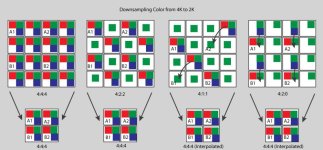
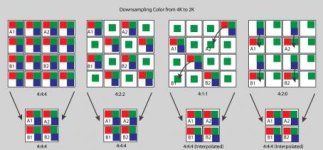
Here's a graphic showing one method of how downsampling can get 4:4:4 from each source. Hope it clears up the mess I made.

Downsampling.jpg


As to the bit-depth growing from being downsampled, I am lost.

Granted, none of this matters when asking, "Is the picture good enough?" I suppose.
But the F35 is more than a camera with "mojo." It offers, for the "special effects" community, a camera with an amazing amount of mathematical accuracy when recording light. Not just in terms of physical detail (area) but in color-accuracy for each preserved detail. This makes extremely accurate mattes possible from keying, easier tracking in cluttered settings, cleaner color-replacement possible, and an easier workflow wherever math is being used to analyze the image for further manipulation (as film scientist already pointed out.)

That said, if I have a collection of pixels in a 16x16 array, and they all measure 110,110,110 (on an 8-bit scale), how can downsampling them to an 8x8 array provide me the same information that another 8x8 array of 10-bit imaging would have? With a 10-bit recording, each pixel value could have recorded 1 of 64 different color combinations per single combination found in an 8-bit recording. On a 12-bit recording, those colors could be any one of 4,096 combinations of actual recorded information for each pixel value in an 8-bit recording.
Are we saying that resampling an image down to 1/4 its area (1/2 per axis of resolution) could provide 64 x the original color information it started with, when going from 8 to 10-bit? Maybe someone could PM me, as I am very interested in this without hijacking the thread any further. I'm only hanging onto this discussion for FX purposes, so it may not belong on this thread. At this point, however, I don't see how resampling creates information that was never recorded. Remember, in a 12-bit image (size has nothing to do with bit-depth), it can record 4,096 color combinations for every color recorded in 8-bit. 8-bit is still a crayon, by comparison.


Thanks.
 

Attachments

  • Downsampling.jpg
    Downsampling.jpg
    22.8 KB · Views: 1
Last edited:
I suppose what you're talking about is a form of colour anti-aliasing.... but I think it kinda proves a point about sensor resolution and colour resolution being wildly different. The number of photosites is just one tiny factor in end resolution.
 
@Sandbox: The key is dithering at the acquisition stage - like how a printer makes a grayscale on a piece of paper (tiny black dots). By averaging four 8-bit pixels (which will have different values if strategic dithering is applied), the resulting value can be more exact than the 256 options of 8-bit. Thus you can get something more resembling 10-bit if the dithering is good enough. However, since this is in actuality mathematical guesswork (kinda like bayer patterning), the resulting color and luma information will be inferior in accuracy to a "true" 10-bit image.
 
That said, if I have a collection of pixels in a 16x16 array, and they all measure 110,110,110 (on an 8-bit scale), how can downsampling them to an 8x8 array provide me the same information that another 8x8 array of 10-bit imaging would have? With a 10-bit recording, each pixel value could have recorded 1 of 64 different color combinations per single combination found in an 8-bit recording. On a 12-bit recording, those colors could be any one of 4,096 combinations of actual recorded information for each pixel value in an 8-bit recording.

PM me if you need to continue this but basically... let's say that the true value of your 8-bit pixel is not 110 out of 255 but 110.25 out of 255. If you had a 10-bit imager, you'd get two additional bits of precision. So it would be able to see the difference between 110, 110.25, 110.5 and 110.75.

Now... if you have a slightly noisy 8-bit 4K image, you're going to have 4 pixels making 1 HD pixel. So let's say three of those pixels read 110 and another one reads 111 (because of noise it got bumped up to the next 8-bit value).

When you average those 4 8-bit pixels down to a single HD pixel, you'll get... 110.25.

But as you can see it needs a little bit of noise in the signal for it to work.

Actually, when CDs first came out, they had no dithering or noise and they sounded terrible because 16-bit 44khz had definite aliasing. After a little while, they figured out to master at higher bit depth (24-bit) than 16-bit... and then at the end of the process they dither down and add some shaped noise to make a very, very good 16-bit signal that basically expresses a 24-bit signal reasonably well within the quanitzation limitations of 16-bit.

Back on topic... there's one thing we haven't covered yet with the F35 and that is the Optical Low Pass Filter. John Galt explained once that one of the big benefits of the F35 is that since you have equal resolution for R, G and B... you can choose an optical low pass filter perfectly suited to get as crisp a 1080p image as possible. Because all the color channels alias at the same frequency since they share the same resolution.

Now with Bayer sensors, you're going to get Red-Blue chroma aliasing before you get luma aliasing because the resolution on the red-blue axis is so low because there are 2 green pixels to every red or blue pixel. So they have to design the Bayer filter so that it doesn't alias the red and blue... but this means that they are introducing an unnecessary blur to the green / luma information. Eg those green pixels could handle higher-frequency detail than they are being fed. You can see this for sure with the Red One and it's a big reason why the F35 does so well vs the 4K Bayer cameras.

And BTW... worrying about 4:4:4 on a 4K Bayer sensor is of course completely silly because between the OLPF and the Bayer sensor, you're just not getting that kind of information. A Bayer sensor's real resolution actually matches well with 4:2:2 or even 4:2:0 IMHO. Which is again another reason why the F35's 4:4:4: HD looks so darn good.

Bruce Allen
www.boacinema.com
 
Hello everyone,

Sorry for interrupting the discussion on color sampling and 4k/2k discussion. I have a question I'm hoping you all can help me.

I will be receiving my F35 from Otto Nemenz tomorrow and batteries and charger sometime next week (I went with the Lanparte V-mount Li-ion battery 150Wh ones on EBay from China - thanks Barrett!).

I've been looking everywhere for a used Sony BKP-L551 but could not find one. Honestly $315 for this camera plate from B&H seems too expensive, so trying to figure out what would be a good compromise between cost/practicality I came up with the following solution which I would like to receive your opinion. I am thinking of getting the Switronix GP-S V-Mount Plate (http://www.bhphotovideo.com/c/product/364643-REG/Switronix_GP_S_GP_S_V_Mount_Plate_with.html) which has 2 power tap ports (one on each side) and an Anton Bauer PowerTap Plug (http://www.bhphotovideo.com/c/produ...uer_POWERTAP_9_XLR_PowerTap_Plug_Male_to.html). This way I will connect the Hyperdeck Shuttle (I will get an Odyssey 7q some time in the near future) to one of the P-taps on the Switronix and the Anton Bauer 9" cable to XLR to power the camera on the other side. The total cost of these two items would be $116 and I like the fact that I will not have to power the Hyperdeck from the battery (connecting and disconnecting the cable constantly). Also I don't really mind modifying the Switronix to fit correctly to the interface box.

What do you guys think of this solution? Will this work?

Thank you all for your input.
Igor
 
Back
Top