
Navigation
Install the app
How to install the app on iOS
Follow along with the video below to see how to install our site as a web app on your home screen.
Note: This feature may not be available in some browsers.
More options
You are using an out of date browser. It may not display this or other websites correctly.
You should upgrade or use an alternative browser.
You should upgrade or use an alternative browser.
FS5: Is it worth it to hold out for Shogun Inferno, or just invest in 7Q+ instead?
- Thread starter zebratape
- Start date
Robby Barus
Member
new Shogun Inferno Firmware 8.11 is out:
* Added BT.2020 color space for Sony FS7 II and other S-Log cameras in AtomHDR
mode.
* Shogun Inferno now compatible with Sony PS4 Pro HDR output for high quality
game recording.
Bug Fixes:
• Further improvements to disk compatibility and reliability.
See atomos.com/drives for latest compatible drives 4Kp60/30/25/24 drives.
• Fixed Sony 4Kp25/30 raw to ProRes/DNx interlaced scan lines when panning.
• Panasonic GH5 and Fuji XT2 support for 10bit output has been added.
• Sony PS4 4kp60/HDR support added.
• Super smooth monitoring of all video frame rates via switchable 48/50/60 Hz frequency based
on input frame rate
http://firmware.atomos.com/TXT/SGI/Shogun_Inferno_Release_Notes_8.11.pdf
Hope they fixed the wierd looking slow-motion as well. That promo for the previous firmware which enabled the HFR on Sony cameras looked really strange in 200fps? Anyone know if this has been fixed?
help..jus update new firmwire 8.11 test RAW FS5 with SSD Extrem Pro 240gb can't record i dont know why..? before old frimwire 8.1 its no problem when i test

basspig
Veteran
V. 8.2 firmware released yesterday.
May not install in the normal power on, so holding the power button for 10 seconds may be necessary to 'force' firmware update with this package. You may see an Atom OS error followed by "please wait". Update took about 1 minute.
The result is CDNG added to the list of output file formats.
CDNG does not get S-Log curve. CDNG files open in Photoshop in the RAW importer.
The open file size in Photoshop is 50.6 MB for any one frame. Size on disk is about 13.1MB per compressed CDNG file.
Observations:
The color and dynamic range in the shadows is significantly closer to how the test scene appears with the naked eye.
The highlight handling is not so nice. There's a yellow tint prior to a sudden transition to pure white clipping.
Comparing to RAW to Prores:
CDNG: More shadow detail. Deeper color in the red sector. Prores from RAW: more "punch" due to deeper blacks, less shadow detail, reds subdued a bit in shadows. Reds shift slightly toward orange. Wood tones slightly shifted to green.
Comparing RAW to HDMI > Prores: More lifted black levels, reds shifted toward magenta slightly. Wood tones shifted a bit more toward green than RAW > Prores.
It's much harder to evaluate the S-Log footage because a LUT can completely change every aspect of the image.
The curious thing about the CDNG images is there is no S-Log, yet they come in looking about right with no grading at all. They'd be great to work with, except that the 8 seconds I shot came to 2.51GB on disc, EXCLUDING audio!! Only other concern is the yellow tint just before white clipping. Handling of highlights isn't natural looking, compared to the S-Log footage.
It seems that the contrast in the mid tones is nicely brought out with CDNG. Some papers with printing on them in the shot stand out with the print much more clearly in CDNG than in Prores versions. That may be a LUT issue.
Interestingly, the untouched RAW files, excepting the highlight yellow tinge, look the best overall.
Note: Photoshop RAW sees the metadata reporting camera model as "FS700".
May not install in the normal power on, so holding the power button for 10 seconds may be necessary to 'force' firmware update with this package. You may see an Atom OS error followed by "please wait". Update took about 1 minute.
The result is CDNG added to the list of output file formats.
CDNG does not get S-Log curve. CDNG files open in Photoshop in the RAW importer.
The open file size in Photoshop is 50.6 MB for any one frame. Size on disk is about 13.1MB per compressed CDNG file.
Observations:
The color and dynamic range in the shadows is significantly closer to how the test scene appears with the naked eye.
The highlight handling is not so nice. There's a yellow tint prior to a sudden transition to pure white clipping.
Comparing to RAW to Prores:
CDNG: More shadow detail. Deeper color in the red sector. Prores from RAW: more "punch" due to deeper blacks, less shadow detail, reds subdued a bit in shadows. Reds shift slightly toward orange. Wood tones slightly shifted to green.
Comparing RAW to HDMI > Prores: More lifted black levels, reds shifted toward magenta slightly. Wood tones shifted a bit more toward green than RAW > Prores.
It's much harder to evaluate the S-Log footage because a LUT can completely change every aspect of the image.
The curious thing about the CDNG images is there is no S-Log, yet they come in looking about right with no grading at all. They'd be great to work with, except that the 8 seconds I shot came to 2.51GB on disc, EXCLUDING audio!! Only other concern is the yellow tint just before white clipping. Handling of highlights isn't natural looking, compared to the S-Log footage.
It seems that the contrast in the mid tones is nicely brought out with CDNG. Some papers with printing on them in the shot stand out with the print much more clearly in CDNG than in Prores versions. That may be a LUT issue.
Interestingly, the untouched RAW files, excepting the highlight yellow tinge, look the best overall.
Note: Photoshop RAW sees the metadata reporting camera model as "FS700".

basspig
Veteran
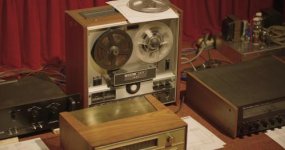
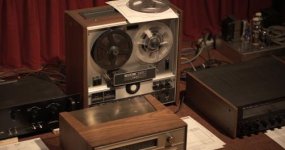
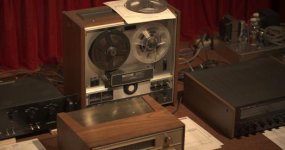
I have uploaded 3 images to show the comparisons. I've given them descriptive file names, so hopefully that will show up when viewing and the results should be self-explanatory.
The things to look for are the shade of burgundy in the curtains, the level of black on the faceplate at left, the hue of the wood cabinet in the foreground and the highlight handling on the aluminum surface above the meters on the reel deck. Each file handles these differently.
I'm hoping we have clear weather for the next full moon, because I am anxious to see if RAW eliminates the false color banding that I was seeing with HDMI to Prores recordings.
It looks like they appear in reverse order. So it's
HDMI
RAW Prores
RAW CDNG as appeared below:
The things to look for are the shade of burgundy in the curtains, the level of black on the faceplate at left, the hue of the wood cabinet in the foreground and the highlight handling on the aluminum surface above the meters on the reel deck. Each file handles these differently.
I'm hoping we have clear weather for the next full moon, because I am anxious to see if RAW eliminates the false color banding that I was seeing with HDMI to Prores recordings.
It looks like they appear in reverse order. So it's
HDMI
RAW Prores
RAW CDNG as appeared below:
Attachments

jasonbrooks
Well-known member
I have uploaded 3 images to show the comparisons. I've given them descriptive file names, so hopefully that will show up when viewing and the results should be self-explanatory.
The things to look for are the shade of burgundy in the curtains, the level of black on the faceplate at left, the hue of the wood cabinet in the foreground and the highlight handling on the aluminum surface above the meters on the reel deck. Each file handles these differently.
I'm hoping we have clear weather for the next full moon, because I am anxious to see if RAW eliminates the false color banding that I was seeing with HDMI to Prores recordings.
It looks like they appear in reverse order. So it's
HDMI
RAW Prores
RAW CDNG as appeared below:
Thanks for sharing. Can you re-share via a 3rd-party image service at source res. These attachments seem to be about 1/4 res courtesy of DVX's attachment protocol - d'oh!
Cheers,
jason
basspig
Veteran
The yellow cast is courtesy of $3 Feit Electric LED PAR floodlights from Costco. The CDNG is actually the closest to what the naked eye sees. The middle image is lacking color just a bit.
I'll upload these three to my Dropbox account and publish the URL here.
https://www.dropbox.com/sh/8yaxdswiua2mgj8/AAAC49_hHCNUaOLMzr1Lx3Bsa?dl=0
I'll upload these three to my Dropbox account and publish the URL here.
https://www.dropbox.com/sh/8yaxdswiua2mgj8/AAAC49_hHCNUaOLMzr1Lx3Bsa?dl=0
SamEdwards
Well-known member
How did you convert the CDNG to PNG? I think you could get rid of the clip/highlight cast in resolve...
broughtonfilm
Well-known member
I can see them better now. The RAW CDNG handles the highlights the best.
I'm always curious how a statement like this can be made based on very badly chosen, badly shot and badly documented test shots.

 )
)
 I also bought the Inferno not so long ago; what's funny I also spent some $650 on the Resolve Studio dongle which is now officially cheaper by some $700, as well...