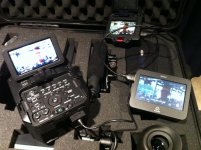
Initial tests with the FS100 & Atomos Ninja

A follow up: I was able today to test new Zacuto EVF (with new firmware loaded/released yesterday, though I am not sure this had anything to do with it) with the FS100 passing through to the Atomos Ninja. I ran HDMI out to Zacuto, turned camera on, then Zacuto, then Ninja. Worked great, 24p reverse telecine worked fine going through the EVF (tested with compressor... with the right frame rate this time haha).

Nice to see this finally working.

IMG_1620.jpg
 
So since you have to record at 1080i, aren't you losing a lot of resolution? (1440x1080 compared to 1920x1080)? I've yet to understand why it has to be this way...to cut cost on the recorder?
 
You are not losing any resolution. The full 24p signal is packed into the 60i signal. The ninja records it as 29.97p and you use compressor (or other software) to remove the interlacing and convert it to 24P. Its a pain in @ss but it works.
 
You are not losing any resolution. The full 24p signal is packed into the 60i signal. The ninja records it as 29.97p and you use compressor (or other software) to remove the interlacing and convert it to 24P. Its a pain in @ss but it works.

yes as Alpern said. 1080i 60i is 60 interlaced frames of 1920X1080. (Only HDV records 1440 wide AFAIK). All the full progressed frames are present in the 60i stream, flagged as such. The 60i stream is just a wrapper. I've compared the internal 24p and the reverse telecine from the Ninja via the flagged 60i output... they are the exactly same after the RT process (there are color and detail advantages to the Ninja's prores recording of the uncompressed output of course).

From Atomos - they explain it better:

Many cameras output their video signals differently through HDMI than they do to their own internal storage. Cameras “wrap” their progressive internal signals as an interlaced video output for transmission over HDMI.

This is simply to ensure compatibility with all displays new and old even though HDMI supports 24, 25 and 30p natively.
The Ninja can and does record and store your 24, 25 and 30p images perfectly, “wrapped” in an interlaced signal. You will see some different frame-rates reported by your Ninja compared to the settings on your camera. This is normal.

For example, if your camera is set to 25p (in Europe) you may see 1080i50 on your Ninja. Or (in America and former NTSC countries) you may see 1080i59.94 on your Ninja instead of 23.98p.

It’s worth repeating this.You will probably find that the framerate you have your camera set to record to is not the same as the video signal coming out of the HDMI connection.
In NTSC regions (eg the USA and Japan) it can be more complicated, because a 24p signal is turned into a 60i one using a process called 3:2 pulldown, which maps the 24 fames in the progressive footage into a 60i stream using a 3:2 pattern (or “cadence”).

You can use the interlaced signal produced by your camera as it is, or you can remove the pulldown using a “reverse telecine” program ...

You can confirm whether your images have been subject to 3:2 pulldown by stepping through frames sequentially. The forth frame into the sequence will look like a double frame. It’s the result of two fields added together. The fifth frame will have the same properties as the forth, and then the sixth frame, which is the start of the next sequence, will look “normal”.

Running the process in reverse through software on your computer can remove the pulldown completely, leaving you with clean, progressive footage. We wanted to keep the cost of the Ninja as low as possible, so, rather add the cost of building this into hardware, we chose to leave you with the option to remove pulldown in our software.
Please test the Ninja with the camera and format that you intend to use to ensure that the combination will work. Remember standard formats like 50i, 60i, 720p are all supported natively and are recommended with the Ninja.
 
You are not losing any resolution. The full 24p signal is packed into the 60i signal. The ninja records it as 29.97p and you use compressor (or other software) to remove the interlacing and convert it to 24P. Its a pain in @ss but it works.

yes as Alpern said. 1080i 60i is 60 interlaced frames of 1920X1080. (Only HDV records 1440 wide AFAIK). All the full progressed frames are present in the 60i stream, flagged as such. The 60i stream is just a wrapper. I've compared the internal 24p and the reverse telecine from the Ninja via the flagged 60i output... they are the exactly same after the RT process (there are color and detail advantages to the Ninja's prores recording of the uncompressed output of course).

From Atomos - they explain it better:

Many cameras output their video signals differently through HDMI than they do to their own internal storage. Cameras “wrap” their progressive internal signals as an interlaced video output for transmission over HDMI.

This is simply to ensure compatibility with all displays new and old even though HDMI supports 24, 25 and 30p natively.
The Ninja can and does record and store your 24, 25 and 30p images perfectly, “wrapped” in an interlaced signal. You will see some different frame-rates reported by your Ninja compared to the settings on your camera. This is normal.

For example, if your camera is set to 25p (in Europe) you may see 1080i50 on your Ninja. Or (in America and former NTSC countries) you may see 1080i59.94 on your Ninja instead of 23.98p.

It’s worth repeating this.You will probably find that the framerate you have your camera set to record to is not the same as the video signal coming out of the HDMI connection.
In NTSC regions (eg the USA and Japan) it can be more complicated, because a 24p signal is turned into a 60i one using a process called 3:2 pulldown, which maps the 24 fames in the progressive footage into a 60i stream using a 3:2 pattern (or “cadence”).

You can use the interlaced signal produced by your camera as it is, or you can remove the pulldown using a “reverse telecine” program ...

You can confirm whether your images have been subject to 3:2 pulldown by stepping through frames sequentially. The forth frame into the sequence will look like a double frame. It’s the result of two fields added together. The fifth frame will have the same properties as the forth, and then the sixth frame, which is the start of the next sequence, will look “normal”.

Running the process in reverse through software on your computer can remove the pulldown completely, leaving you with clean, progressive footage. We wanted to keep the cost of the Ninja as low as possible, so, rather add the cost of building this into hardware, we chose to leave you with the option to remove pulldown in our software.
Please test the Ninja with the camera and format that you intend to use to ensure that the combination will work. Remember standard formats like 50i, 60i, 720p are all supported natively and are recommended with the Ninja.
 
BTW today Atomos released a major firmware update - 2.01. I haven't been able to test yet but adds great new stuff inlcuding full speed/quality playback, timecode (TOD) and from LANC, file naming incl TOD and sequential, and bug fixes.
 
Back
Top