Initial tests with the FS100 & Atomos Ninja

I will be doing more tests over the next couple of days, but though I would share what I was briefly testing yesterday.


FS100 AVCHD PRORES LT and HQ Verses Ninja Prores HQ - Uncompressed PNG Frame grabs. Download from here: (43.2Mb zip file, 12 files)
http://dl.dropbox.com/u/29586086/ATOMOSvAVCHD_Framegrabs.zip


400% blow up. The jaggies present are not interlaced artefacts, just from PS blowup with hard edges.
Native AVCHD (via clipwrap) Verses Ninja Prores HQ:
http://dl.dropbox.com/u/29586086/avchd_native_v_ninja.jpg

Any ideas how to get rid of the interlacing flag on the files from the Ninja for use in FCP? without a generation loss? Wonder when the Stripper add from Atomos is coming?

Thanks to Guy at Hireacamera for the use of the Ninja over the weekend.
 
Last edited:
Hi Alpern, I used compressor but its time consuming and I don't like the results compared to say opening in photoshop cs5 where it sees the file as progressive, straight out. I want something that does not re transcode the data just the container/flagging.
 
Let me add to this. The output file from the Atomos Ninja when recording 1080/25p (UK) on the FS100 is progressive, its just FCP thinks its interlaced as its in the 50i wrapper so to speak.

If you view import into FCP you see the the smooth stair stepping, it like you have de-interlaced a clip that didn't need de-interlacing and indeed it doesn't. If you view the clip in Photoshop the the file is crystal clear, pixel x pixel. The only way you get to see this in FCP is if you change the sequence setting to something like Animation or H.264. It then views perfect, but not much use.

You can just ignore the jaggies in FCP and edit as normal (seems slower, more process intensive?) and transcode for destination as normal keeping compressor set to progressive.

Will have to wait for the ATOMOS STRIPPER application I suppose.
 
First thanks for doing this, this is something i have to do next week myself for the film i am prepping for, i need to show the graded final test on a 40 foot screen in a few weeks, or i have to go back to RED or Alexa

i use Avid DS for finishing, in an uncompressed 444 DCi 2K project i could link to your Qt's, and us DS's native pulldown removal node built in to get a clean output from the file, then export a directly from the linked/pulldown removed Qt.

Contact me for my FTP co-ordnates if you wish

d
 
Last edited:
The only way you get to see this in FCP is if you change the sequence setting to something like Animation or H.264. It then views perfect, but not much use.

PMJI - and I may be barking up an entirely random tree, let alone the wrong one, but...

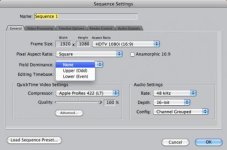
FCP7, Command-0 Sequence settings: set the field dominance from the 'erroneously' set upper/lower fields to 'none'

This allows me to mix old interlaced DV stuff (which gets deinterlaced) with PsF DV which is stored as interlaced but is progressive. The output is, of course, progressive. If your Ninja stuff is coming in flagged as interlaced - but isn't - it would set the sequence up to interlaced, but just forcing it off should be the same as my workaround for mixing progressive, PsF and interlaced footage together - no pre-import rendering required (BTW, Nattress de-interlacer is lovely should anyone need a nice in-app deinterlacer these days).

psfsettings.jpg
 
You have to use compressor to remove pulldown. Fortunately the Fs100 flags the 24p (or 25p) frames in a 60i (or 50i) stream so getting true 24p is much easier than cameras that do not flag the frames.

Here is a tutorial. Its says for HV20 but can be used with any camera. And since you are already Prores you can disregard some of the steps and also make the necessary changes if you are a 25per.

http://support.apple.com/kb/HT2410
 
Last edited:
By the way if you're renting a recorder and don't want to go through this the Nanoflash as well as the upcoming Sound devices px220 and 240 do pulldown automatically in the recorder.

The sound devices does this in Prores and avid DnxHD. The nanoflash does this in the sony xdcam codec in a quicktime wrapper as well as mxf.

The nanoflash material will need a render to Prores if that is the codec you decide for output to since it will be placed in a xdcam sequence setting. The sound devices will not since its prores already.

Unless the nanoflash drops in price considerably I will wait for the sound devices as they are the same price, with a cheaper HDMI only version by sound devices, with more features and record in 10 bit as opposed to nanoflashes 8bit.

I was up on the ninja because of price but without hdmi loop through for an evf (I don't want to loop through the evf to the recorder and can't get confirmation if thats even possible with the zacuto or SmallHD dp4 evf's) and no auto pulldown removal it seems too much effort and trouble to get higher bit rate footage. Even without loop through I would consider it again if their upcoming firmware for it has a way to make the low res screen usable as an evf, but I have my doubts.
 
Last edited:
Hi Matt, yeah I've tried this both ways and it makes no change. It's not like normal interlacing its soft like you have taken it out or added it in wrong.
 
@Millerandmiller

Not sure why you're seeing this effect. Lots of people are using FS100 footage from a Ninja in FCP. There should be no interlace artifacts because even though it's output from the camera as 50i, the two fields are derived from the same progressive frame: there is no time difference in the images contained in the fields. Everyone I've spoken to has said that it's indistinguishable from 25p. Are you sure that you're not seeing a single field preview, which would only have 540 lines instead of 1080, and would therefore look jagged (relative to full-res) if you look closely enough - especially on diagonals?

Dave Shapton
Atomos
 
You do have the interlacing settings set to "none" in FCP? FCP is very bad in setting the interlace settings, you basically have to set them clip by clip and before you drag them into the timeline. RECHECK that ALL of your clips (new and old) are actually set as progressive in a progressive sequence, otherwise FCP will deinterlace those it deems as interlaced even if they are not.
 
I was baffled, at first, about interlaced artifacts in my footage. After re-reading the owner's manual, I noticed that the record format can be set differently from the external output format. Check your "video out" settings. Have you selected progressive or interlaced?
 
I was baffled, at first, about interlaced artifacts in my footage. After re-reading the owner's manual, I noticed that the record format can be set differently from the external output format. Check your "video out" settings. Have you selected progressive or interlaced?

Here's an article from our online Knowledge Base about how to set the HDMI output with the Ninja:

To get the best results when using a Ninja with the FS100, you need to set the “HDMI Output” menu to “Interlaced” - even if you want to record progressive footage. In this mode, if you set your camera to record 25 or 30p, the HDMI signal will be at 50i or 60i - but this interlaced signal actually “contains” the progressive image in full, and it looks exactly the same, because each of the two interlaced fields that make up a complete frame actually come from the same, single, progressive frame. When you put the two fields back together (as will always happen on a modern screen) what you get is the orignal progressive frame.

Note that if you set the HDMI output to 50p or 60p, the Ninja will not “see” this signal. This is because the data rate is double that of 50i and 60i, and the Ninja is not designed to handle this type of signal. 50p and 60p are not broadcast standards, and very few devices can actually play them.

Dave Shapton
Atomos
 
@Millerandmiller

Not sure why you're seeing this effect. Lots of people are using FS100 footage from a Ninja in FCP. There should be no interlace artifacts because even though it's output from the camera as 50i, the two fields are derived from the same progressive frame: there is no time difference in the images contained in the fields. Everyone I've spoken to has said that it's indistinguishable from 25p. Are you sure that you're not seeing a single field preview, which would only have 540 lines instead of 1080, and would therefore look jagged (relative to full-res) if you look closely enough - especially on diagonals?

Dave Shapton
Atomos

Hi Dave thanks for the message.

I know it was just the preview as the file previewed in others viewers is clean with a 200% viewing enlargement, just could not get FCP to play nice with it.
Last night I spent along time trying to remember a bit of software I used 5 years ago that you could change the meta data / identifier. Found it thanks to internet forums. It's called 'Dumpster' (OSX) and you open the file from the Atomos and change "Fields = 2
Details = 1" to "Fields = 1 Details = 0" click save (instant) import in to FCP, FCP see the file as progressive and drops into a progressive sequence.

No transcoding or even saving of the entire file. I'm happy now :)

P.S. I assume this is what your stripper app will do?

dumpster_grab.jpg
 
I just got the Ninja and I for the life of me can't get it to deinterlace correctly either coming from the FS100. I have the FS100 set for 24p and the HDMI output set to 60i. When I try looking at the clips in anything (Magic Bullet Grinder, Quicktime, Cinematools) it shows the native fps of the footage is 30fps, which it is not. When I attempt a conform to 24p and progressive, the output still has interlacing artifacts. I feel like an idiot; haven't dealt with interlaced footage in a long time. What am I missing?
 
I just got the Ninja and I for the life of me can't get it to deinterlace correctly either coming from the FS100. I have the FS100 set for 24p and the HDMI output set to 60i. When I try looking at the clips in anything (Magic Bullet Grinder, Quicktime, Cinematools) it shows the native fps of the footage is 30fps, which it is not. When I attempt a conform to 24p and progressive, the output still has interlacing artifacts. I feel like an idiot; haven't dealt with interlaced footage in a long time. What am I missing?

+1 with Sony Vegas.
 
Back
Top