I recently started using the Ikan VH8 8" LCD field monitor and am happy to report it offers a very good image and features at a great price. First, let me preface my comments with the observation that my 'target' is the semi-professional (or advanced enthusiast) level of video making, and so I'm always heavily balancing cost against reliabiltiy and performance to try and hit a sweet-spot. If you need SDI and lots of advanced features and your budget is $1,500-$2,500 then your options are pretty wide open, but I was aiming at $500 or less, and a more restricted range of monitor features. Anyway, I've been looking around for about a year and could not find the balance that made me want to push the "order now" button. But that changed about a month ago when I came across the VH8 from Ikan.
During a few indoor projects I've sometimes been able to put a LCD monitor into use to help with monitoring production and its been a joy to use. And everytime that happened it made me wish that I had that option for field work also...so periodically I would get keen and go 'shopping' to see what has been happening in "Field Monitor" land. Well, during the last walkabout, I happened across the VH8 from Ikan and it 'caught my eye'.
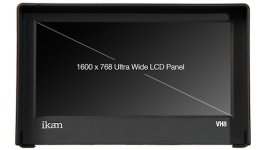
The first hurdle for me has always been resolution. I've been pretty used to seeing high-end 1280x800, mid-range 1024x768 and entry-level 800x480 specificatons. So, the VH8's 1600x768 definitely caught my eye. And I was very happy to see the supported video formats through the HDMI port up to 1920x1080p --- including frame rates of 23.97 up to 60. A very good match for my AC90 (and 130/160 I believe).
The second hurdle was price. With the Ikan VH8 priced at $399 retail, and cheaper through various vendors it easily met my under $500 goal.
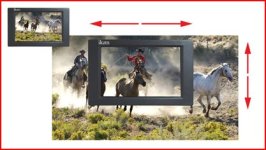
Third hurdle covered features. The VH8 has a modest feature list: Aspect ratio of 4:3 & 16:9, AV and HDMI signal input (and HDMI output also so you can passthrough the signal to an additional display), headphone jack, brightness/contrac/colour temp settings, monochrome peaking (for focus assist), false colour and clip guide (shot exposure assist), shot guide and crosshair (composition aids), and finally Pixel to Pixel mode. I was not familiar with this final feature, where an incoming image is not scaled to the monitor resolution, rather you can view a 'one to one' pixel rendition of your 1920x1080 signal (with the VH8 giving you a 1600x768 'window' of your full incoming image), and the window can be moved around to the area that you are most interested in watching/monitoring. The VH8 is wide enough that in addition to your image being displayed, there is a small section, on the right side of the screen that displays information about your incoming signal and monitor settings. I haven't found that overly useful, but who knows, it might grow on me.
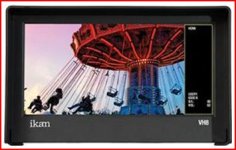
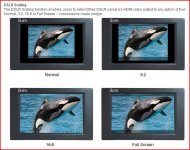
There are a few other features (DSLR scaling) that may be of interest to you so check them out. But this hit all the high points for me, and with four user configurable "function keys" on the back of the monitor, you can set the features that you use the most to be turned on and off with a touch of these buttons. Very convienent.
Fourth hurdle is power. The VH8 offers a range of power options---AC & Battery (Sony "L", "BP-U", Canon "900", "E6", and Panasonic D54 and G6). Well, my eyes lit up when I saw the D54 in there. Perfect match with my AC90, allowing me to invest in additional D54 batteries and use them with the AC90 or the monitor...no need to start carrying around another set of batteries.
You are not getting a tank of a monitor here. It is lightweight plastic and will not take a lot of abuse. It does not have a ton of buttons (as the more expensive monitors offer), you have to go through a menu system to access options (other than those features than can be assigned to the function buttons). But for me it hit a sweet spot and so I'm putting it to good use. Will report back after I've logged more working hours with this 'gem' of a reasonably priced LCD field monitor.
During a few indoor projects I've sometimes been able to put a LCD monitor into use to help with monitoring production and its been a joy to use. And everytime that happened it made me wish that I had that option for field work also...so periodically I would get keen and go 'shopping' to see what has been happening in "Field Monitor" land. Well, during the last walkabout, I happened across the VH8 from Ikan and it 'caught my eye'.
The first hurdle for me has always been resolution. I've been pretty used to seeing high-end 1280x800, mid-range 1024x768 and entry-level 800x480 specificatons. So, the VH8's 1600x768 definitely caught my eye. And I was very happy to see the supported video formats through the HDMI port up to 1920x1080p --- including frame rates of 23.97 up to 60. A very good match for my AC90 (and 130/160 I believe).
The second hurdle was price. With the Ikan VH8 priced at $399 retail, and cheaper through various vendors it easily met my under $500 goal.
Third hurdle covered features. The VH8 has a modest feature list: Aspect ratio of 4:3 & 16:9, AV and HDMI signal input (and HDMI output also so you can passthrough the signal to an additional display), headphone jack, brightness/contrac/colour temp settings, monochrome peaking (for focus assist), false colour and clip guide (shot exposure assist), shot guide and crosshair (composition aids), and finally Pixel to Pixel mode. I was not familiar with this final feature, where an incoming image is not scaled to the monitor resolution, rather you can view a 'one to one' pixel rendition of your 1920x1080 signal (with the VH8 giving you a 1600x768 'window' of your full incoming image), and the window can be moved around to the area that you are most interested in watching/monitoring. The VH8 is wide enough that in addition to your image being displayed, there is a small section, on the right side of the screen that displays information about your incoming signal and monitor settings. I haven't found that overly useful, but who knows, it might grow on me.
There are a few other features (DSLR scaling) that may be of interest to you so check them out. But this hit all the high points for me, and with four user configurable "function keys" on the back of the monitor, you can set the features that you use the most to be turned on and off with a touch of these buttons. Very convienent.
Fourth hurdle is power. The VH8 offers a range of power options---AC & Battery (Sony "L", "BP-U", Canon "900", "E6", and Panasonic D54 and G6). Well, my eyes lit up when I saw the D54 in there. Perfect match with my AC90, allowing me to invest in additional D54 batteries and use them with the AC90 or the monitor...no need to start carrying around another set of batteries.
You are not getting a tank of a monitor here. It is lightweight plastic and will not take a lot of abuse. It does not have a ton of buttons (as the more expensive monitors offer), you have to go through a menu system to access options (other than those features than can be assigned to the function buttons). But for me it hit a sweet spot and so I'm putting it to good use. Will report back after I've logged more working hours with this 'gem' of a reasonably priced LCD field monitor.