FS7: idiots guide

The two really aren't very similar at all in appearance or function. That box you are referring to on the EX1 was only a few pixels wide so you could have pinpoint accuracy for measuring brightness wherever you aimed it. The box on the FS7 is many times bigger and represents the limited part of the image that the camera looks at when it judges focus.
 
Yes, I do.

Turn off:
VF > Display On/Off > Focus Assist Indicator
VF > Display On/Off > Focus Area Marker
 
Thank you.

And their function (which might be useful!) is that when stuff in th box is 'sharp' then the white line grows

I will try them, but probably switch them off :)

S
 
Yes, just turn them off. It's just silly consumer-oriented nonsense that doesn't really help with focusing and only lowers the professionalism of the camera . . . if you want my opinion.
 
Morgan that still isn't possible right now.

Also, would be great if you could update the OP with all the tips and things you uncover in this thread. Then it could become the default resource for all these questions :)


EDIT: Turns out I might be wrong again! :)
 
Can someone go through getting a LUT on HDMI while not recording it?

Yup.

Just turn off MLUT for SDI1 + Internal and
on for HDMI/SDI2 (and viewfinder if you like).
It works...
But you can't seperate SDI2 + HDMI.

You'll loose WFM anyway.

As I don't use tally, can't speak for that...
 
Yup.

Just turn off MLUT for SDI1 + Internal and
on for HDMI/SDI2 (and viewfinder if you like).
It works...
But you can't seperate SDI2 + HDMI.

You'll loose WFM anyway.

As I don't use tally, can't speak for that...

By tally light I mean a red blob when you are rolling - maybe the wrong phrase.

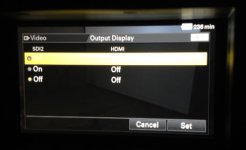
Anyway. Thank you. Ive now got a LUT on the external HDMI monitor but not 'displays' - (by 'displays' I mean sound levels, batt life and all the other stuff showing in the EVF - and ideally zebras*)

I think I should be able to turn (at least some of this stuff) using this screen in the menu which does not seem to work - or I am too 'analogue' to get which buttons to press..

confused


display.jpg

S


*On my F3 I could get most of this stuff up on my HDMI monitor but not stuff relating to exposure level (histo, zebra, handy % counter in the middle)
 
If noticed my zebras go off on really bright stuff (they are set at 90)

Zebra Aperture?

Im guess ZA at 10 with Zebras at 95 would strip between 90 and 100?

S
 
By tally light I mean a red blob when you are rolling - maybe the wrong phrase.

Anyway. Thank you. Ive now got a LUT on the external HDMI monitor but not 'displays' - (by 'displays' I mean sound levels, batt life and all the other stuff showing in the EVF - and ideally zebras*)

I think I should be able to turn (at least some of this stuff) using this screen in the menu which does not seem to work - or I am too 'analogue' to get which buttons to press..

confused


View attachment 94328

S

Anyone else wondering..?

To get stuff on the HDMI monitor

Video->output setting->hdmi target->monitor.
 
Zebra and Focus mag are not passed to HDMI monitor :(Somewhat as expected. But as a real shame becuase your own monitor cannot take advantage of the Focus mag on the handgrip.. or the FS7 exposure tools.S
 
Last edited:
If someone uses words like "best" or "smoke and mirrors" it semes to really ruffles some folks feathers and they get bent all out of shape about.

Not really Doug. It's just that sometimes people think you're talking bollocks and then you go and lose your temper. I like you though:-)

@Morgan and Ben. It's worth spending some time on the Display on/off menu. There's a lot of useful stuff there and quite a bit of junk.
 
hahaha...

Yep there does appear to be a crazy amount of info on the screen. Would be nice if the display button cycled through different info rather than just all on or all off.
 
So Im going shooting in the DARK tonight - for it is the Festive Season!

Just did a quick Test Slog vs Custom mode (which ever one the camera has when you buy it!!)

An unlit corner of my shed with ND,

Both Custom and Cine were rated at 5000 to get a picture (yes Iknow that cineEI does not affect the core file but I had to see!)

Anyway Im giving custom a big win here, is that in cam NR or is it something else like custom enabling analogue amplification of some nature??

Has anyone tested got anything to add.

JPG 12 at https://dl.dropboxusercontent.com/u/33167160/dark.jpg

dark.jpg


S
 
Back
Top