FS7: idiots guide

morgan_moore

Major Contributor
EDIT>
Thanks to all on the board that provided footy, tips and info that helped me move to this camera. The finest solo op camera on the planet today!
/EDIT

So I got the camera. Spent most of the day decinding that the control grip should be in the left hand. But Ill have to put that design error on the shelf for now!

So Ive turned it on. Man - the menu at a Chinese restaurant in china is more comprehensible!

So..

I think it is still FW 1.00 Camera set right now to 25p 1080. Slog3.

-How do I turn Monitor Lut on (do I need to load somefrom a card - I just want the normal Slog3 LUT)
-Where is the WFM
-CineEI - I guess this effects monitor brightness once the above LUT is on.

Im sure Ill have a bunch more silly questions in a moment!


S
 
Last edited:
Custom or CineEI mode?

In custom mode, there are no monitor LUTs.

In CineEI mode Monitor LUTs are in the Video menu.
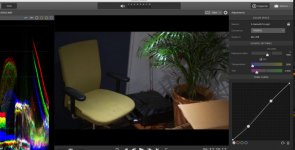
Waveform is in VF/Display(On/Off)/Video Signal Monitor

Monitor brightness remains the same whatever you display on it. What will change is the gamma curve on the image.
 
If the grip was on the left, how would you focus? With your right hand?
i think most shooters would find that extremely annoying, having to re learn that with the "wrong" hand
 
Custom or CineEI mode?

In custom mode, there are no monitor LUTs.

In CineEI mode Monitor LUTs are in the Video menu.
Waveform is in VF/Display(On/Off)/Video Signal Monitor

Monitor brightness remains the same whatever you display on it. What will change is the gamma curve on the image.

Thank you.

Slog mode, LUT now on and CineEi changes brightess of display.

Found 'video signal monitor' but it is not working (with a LUT on) but Zebras do work with LUT on.

BTW Ive put ISO/EI on the 'iris wheel' which is great for lenses that are dark at the long end!

S
 
If the grip was on the left, how would you focus? With your right hand?
i think most shooters would find that extremely annoying, having to re learn that with the "wrong" hand

Yep I relearned and it paid huge dividends to my handheld operating.

Try touching your thumbs against your right cheekbone (which is where the lens almost sits) - effortless with the right hand and with the left hand you must make a big stretch and also crush your lungs.

S
 
Sam, the LUTSs and Waveform work in mysterious ways. They only work properly in certain configurations. For example, you can't have a waveform and mLUT without recording it internally - major PITA.

I'm sure you're aware that changing EI/ISO in CineEI mode only moves the mid-gray data point. It still records in ISO2000.
 
Sam, the LUTSs and Waveform work in mysterious ways. They only work properly in certain configurations. For example, you can't have a waveform and mLUT without recording it internally - major PITA.

I'm sure you're aware that changing EI/ISO in CineEI mode only moves the mid-gray data point. It still records in ISO2000.

I am very aware of that - and IMO that is how it should be - perfect.

As I understand it..

LUT on will take a 60value up to about 90, the top 40 being 'reserved' for super higlight roll off.

Now for noise free we want to ETTR - but not too much - so using EI at 500 and zebras at 90 will give one the cleanest most ETTR file that does not go wonky in post.

So I will use 500 where possible, but when it actually gets too dark I wont actually be able to see the monitor with EI set at 500, Ill then ramp it up.

Exactly how Ive used Red.

BTW if you bring a clip into catalyst browse you will see the 500 is retained in the Exposure slider.

SLog, Mlut, EI and CatBrowse give a very raw like experience to the ex stills man.

S
 
I really like the catalyst browser. Seems like a good way to start with the footage especially for someone like me who isn't a colourist just adding the 709A lut gives me a great starting spot. I just wish it wasn't so grey outside or I'd shoot something. I did a highspeed test and played with some underexposed footage and was able to bring it to a commercial look just goofing around.
 
IMO it is basically beta! But what we see is Sony starting to put slog back where it belongs - "under the hood" and Sony making good use of the meta data
 
BTW:

WFM in CineEI works if:

VIDEO
- Monitor LUT: all OFF or all ON
- Output Format: 1920x1080 on both (HDMi+SDi)

SYSTEM
- Lens: Distortion Compensation: Off!!!
 
No!

This is the issue, we are discussing since day 1...

Sony is currently working on the new F5/55 V5 firmware.
FS7 will come after this. I was told, that Sony is working
on several issues, but they aren't sure if the processing
power will deliver this function.
Need to wait till january at least...
 
No!

This is the issue, we are discussing since day 1...

Sony is currently working on the new F5/55 V5 firmware.
FS7 will come after this. I was told, that Sony is working
on several issues, but they aren't sure if the processing
power will deliver this function.
Need to wait till january at least...

This is a huge source of frustration. What we really need is NR in CineEI (coming to V5 FW in Dec for F5/55 so there's hope), and the ability to turn on Wfm no matter what you're shooting. Especially if not burning in the LUT.

Right now shooting slog 3 in custom but it's hard to get critical focus without an external monitor with a LUT.

ive heard the "processing limitation" a few times now. I hope that's not the case here.
 
As silly as it may seem, I put in a preorder for the Gratical HD... Might change it to LT depending on price. But I absolutely love the resolution of the Odyssey7Q for focusing, and the Gratical HD is the same resolution packed into an EVF with a ton of features (LUTs, vectorscope, waveform, etc.)

As it stands, the FS7 has way too many bugs/gotchas with LUTs and waveform to use them reliably. I'll just fall on 3rd party accessories to provide these features reliably. Gratical on the go and 7Q in the studio.
 
Back
Top