GH4 i.Dynamic

bruceallen

Well-known member
...I'm becoming rather convinced that i.Dynamic is a good thing.

It doesn't appear to be a stupid HDR mode.

It doesn't mess with the highlights or add to the weird color banding issue.

It seems to be just a better tone curve.

Anyway, when you guys test stuff, try it out!

Don't just do Cine-D with contrast all the way down and highlights -5 shadows +5.

Bruce Allen
www.boacinema.com
 
I will have source footage uploaded to my Google Drive at some point.
https://drive.google.com/folderview?id=0Bx36eGbmhPWuMHhfUlpIODJwT1U&usp=sharing

Some files are already there but they are not all up yet. I also have JPEG and RAW stills from the camera there.

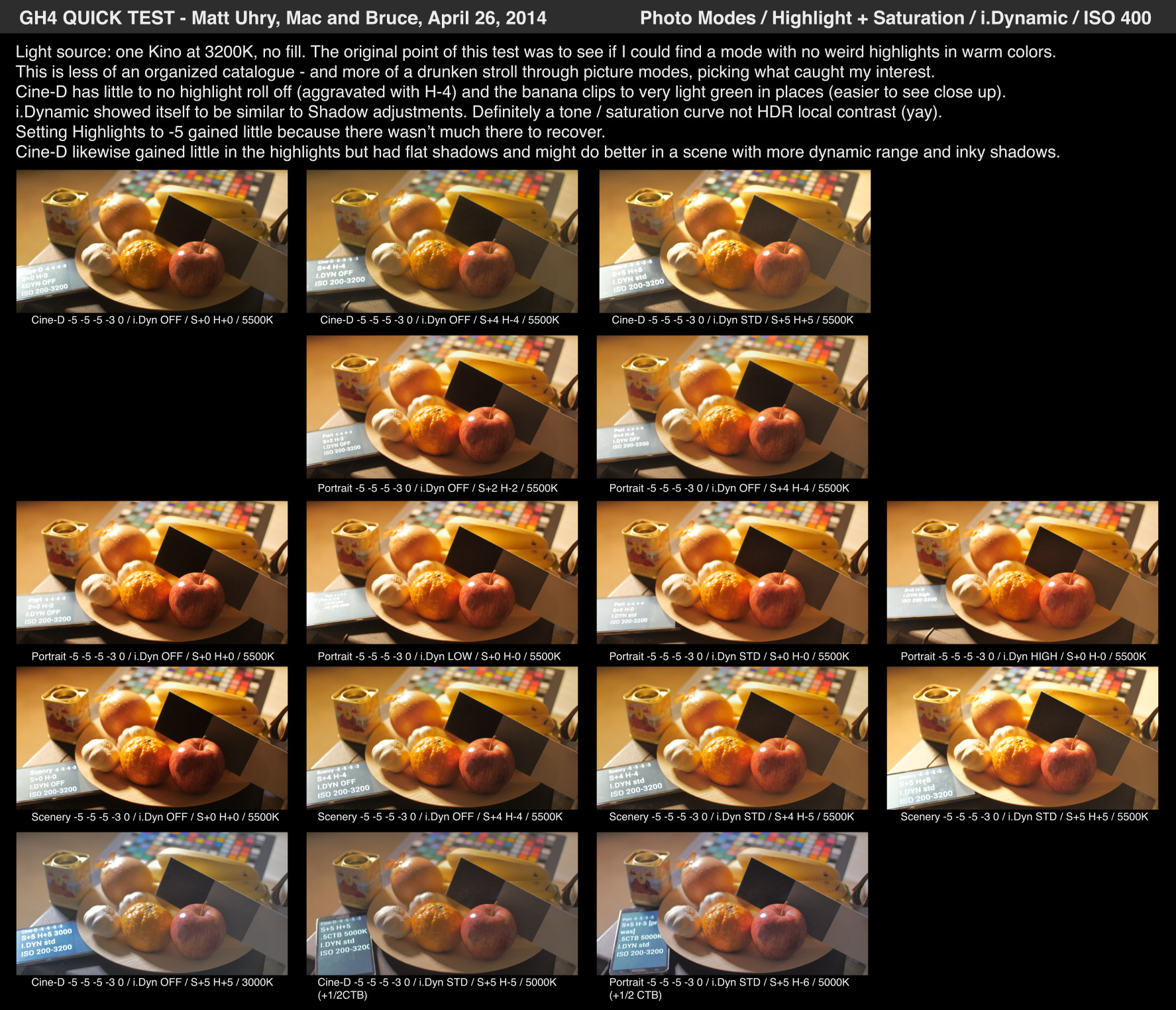
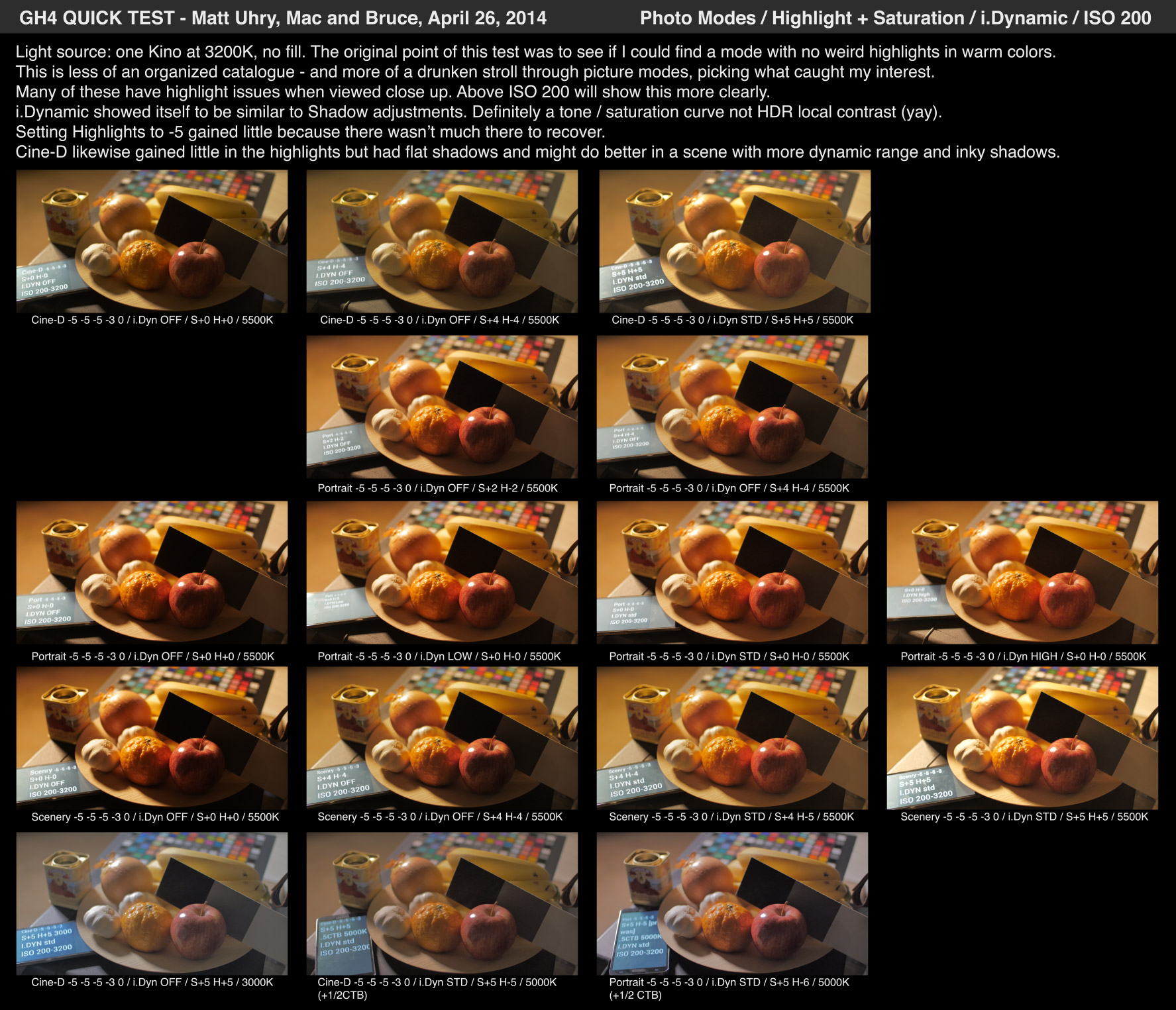
Again, these are personal tests - mainly to look at if I could fix the odd highlights with warm source material.

But then I realized that they might be useful to just compare what i.Dynamic does vs changing picture mode settings or Highlight / Shadow.

For that reason, it is not a high dynamic range scene.

Anyone complaining about fruit can get stuffed in advance, thanks.

Bruce Allen
www.boacinema.com

GH4_photomodes_200_ba_v01.jpg


GH4_photomodes_400_ba_v01.jpg


GH4_photomodes_800_ba_v01.jpg


GH4_photomodes_1600_ba_v01.jpg


GH4_photomodes_3200_ba_v01.jpg
 
Last edited:
aren't these results going to be skewed without covering the whole fruit spectrum? perhaps a green pear or even a kiwifruit for balance...
 
aren't these results going to be skewed without covering the whole fruit spectrum? perhaps a green pear or even a kiwifruit for balance...

Since humans do not have green skin, I am less interested in banding and clipping issues in those colors :)

Definitely it is worthy of another test though - but as I said, for this test I wanted to test color rendition for warm colors. Also to see how it handled large warm gradients. Eg the background. You'll see some significant issues there such as the greenish oddness at 3200 with Cine-D.

Also, note how ISO 200 does have more detail in highlights than ISO 400. It's not just ISO 400 with gain turned down after the fact. More and more I'm inclined to use the GH4 set to ISO 200...

Bruce Allen
www.boacinema.com
 
Last edited:
So, Bruce, any cliff notes from your tests? Based on those screenshots, it seems like i.Dynamic HIGH should replace Shadows +5, Highlights +5? You also kept -5 -5 -5 -3 0 as standard. Was that considered optimum?
 
So, Bruce, any cliff notes from your tests? Based on those screenshots, it seems like i.Dynamic HIGH should replace Shadows +5, Highlights +5? You also kept -5 -5 -5 -3 0 as standard. Was that considered optimum?

My current compromise:
ISO 200, Highlights 0, Shadows +5, i.Dynamic STD, Portrait -5 -5 -5 -5 0 (eg turn Saturation all the way down).
Expose a bit more to the left than you usually would.

The main problem with that mode is that even at -5, saturation is still a bit high. Especially in the reds. I filmed a bunch of stuff last night with WB at 3200K... with WB Adjust set to all the way green to fight the red clipping! Maybe I should delve into that picture mode color adjust setting.

Cine-D could fix the Saturation issues but I don't like its highlight color processing. If I give up on the highlights and expose more to the left, this is workable and may turn out to be the best.

I'm giving up on Highlights -5 for now. Unless I can somehow find a mode with no highlight color issues. It seems to waste bits on stuff with bad color.

I need to really experiment with i.Dynamic vs Highlight changes in detail.

To really sure, what I'd need to do is shoot a scene with high dynamic range, with different settings, try to correct the images to look the same, then look for noise in the shadows, overall banding, color issues, etc and pick the best-looking.

Bruce Allen
www.boacinema.com
 
Interesting. IDynamic works great on the GH2 but is uncontrollable. It's great to see we have control over it on the GH4.
 
Dude, you convinced me. I did some more testing and i.Dynamic STANDARD performed better than Shadows +5, Highlights -5.
I ended up running running CineD, Shadows +3, Highlights 0 and -5, -3, -5, -2, 0 as I found Sat -5 to mess with the skin tones too much. Thanks again for the test!
 
Hi Bruce,

Quote: My current compromise:
ISO 200, Highlights 0, Shadows +5, i.Dynamic STD, Portrait -5 -5 -5 -5 0 (eg turn Saturation all the way down).
Expose a bit more to the left than you usually would.

Is this in Portrait mode?

Thanks,


Wayne Mann
www.HeliCamHDmedia.com
 
Dude, you convinced me. I did some more testing and i.Dynamic STANDARD performed better than Shadows +5, Highlights -5.
I ended up running running CineD, Shadows +3, Highlights 0 and -5, -3, -5, -2, 0 as I found Sat -5 to mess with the skin tones too much. Thanks again for the test!

Yay! Glad to be useful. And I agree wholeheartedly with your priorities - eg getting skin tones to look good for your scene and lighting conditions. The rest can be fixed in post :)

ISO 200, Highlights 0, Shadows +5, i.Dynamic STD, Portrait -5 -5 -5 -5 0 (eg turn Saturation all the way down).
Expose a bit more to the left than you usually would.

Is this in Portrait mode?

Yes, Portrait customized with -5 Contrast, -5 Sharpness, -5 NR, -5 Sat, 0 Color shift.

Although (See above), Saturation setting depends... actually everything depends on your scene!

Also I need to test NR settings more. I do however, know that Sharpening at 0 or higher really sucks.

Bruce Allen
www.boacinema.com
 
Last edited:
I noticed a lot of noise in the shadows of the sunset time lapse that I recorded last weekend (http://www.vimeo.com/93036676) which I thought was odd since I was at 200 ISO. I wondered if it was a limitation of the 1080 60p 200Mbps All-I mode. So just after sunset today I went out to test two other modes: the 4K 24p 100Mbps mode and the 1080 24p 100Mbps mode. I was surprised to see more noise in the shadows of the 1080 image than in the 4K image.

Here are my camera settings:

lens: Tokina 11-16mm w/ Metabones Speedbooster
f-stop: 2
shutter: 1/25th
ISO: 200
Picture Profile: Cine-D -5, -3, -5, -2, +0
Curve: +5 Shadows, +0 Highlights
i.Dynamic: Standard

Here's the video comparison:


Is anyone else getting such noisy results?
 
I'm seeing very similar results when cranking up the shadows and/or idynamic. Played with many of your suggestions today.

Shot on a job all day today, probably 50% 4k, 40% overcranked extended tele, and 10% 1080. The 1080 mode, I hate to say it, just looks BAD next to 4kto1080. I was on sticks most of the day and the 4k rolling shutter didn't wreck any shots. Very, very pleased with the look of that mode. Also, loving having 200 mbps with ext tele. This is raw power and cleans up really nicely with neat.

But I'm going to say now what some others are no doubt thinking (and some maybe saying). GH2 with Moon 7 looks better than this thing at 1080. Yes, yes, yes, there are a ton of things the GH4 does the GH2 can't and I'm loving having such flexibility, but 1080 vs 1080, it's still the GH2, I'm afraid.
 
Theres also the i.noise reduction. You guys tried that?

That´s a very good question since we have to deal with a heavily compressed picture. Maybe it´s better to surpress as much noise as possible before it gets mushed up by the codec.
 
but 1080 vs 1080, it's still the GH2, I'm afraid.

This is an in-camera down-scaling issue that potentially could get fixed via a future firmware upgrade.

I plan on mostly shooting 4K with the GH4 and doing the 1080 down-scale in post. From the samples I've played with, down-scaling in post looked gorgeous. ( Vegas Pro down-scaling to 1080 Cineform CODEC. No idea if Vegas or Cineform is doing the down-scale, but optical test-chart images remained flawless when in 1080 )
 
Back
Top