HPX Audio Hack

In my case for "Finding Amelia" I wanted to have the use of 2 channels of slot in audio fed by my sennheisers. I have a decent mic kit for those radios, Countryman B6's, Sanken Cub 1's , Sanken COS-11 among others. I did not want to dedicate some mics to a Lectro Slot in dual channel receiver and others to the Sennheisers and lose the flexibility of what mics could be used with one of 3 camera systems.
 
I got my 25 pin D connector yesterday and I am going to do the same thing with a flying lead.

I have a lead with a locking 3.5mm jack on it already and it is longer than the one shown so I can just leave the receiver connected all the time and pop it in the portabrace body armour pouch.

Can I ask why you didn't connect the 3.5mm ring?
 
Hi Mark the output from the G2 receiver is balanced with three connectors: Tip, ring and sleeve or hot, cold and earth.

On your post you say that you have connected the + (tip-hot) - (sleeve-earth) but did not connect the ring and my question is why you did not connect this.

Sorry if I am not explaining very well but hope this makes more sense of my question. I have looked at the panasonic 25 wiring diagram and it shows it as a balanced connection and I am just wondering why you have not connected the ring to pin 3?

from your post:

Audio hookup as follows:
3.5mm Tip: DB-25 Pin #2 (+ Signal)
3.5mm Ring: Not connected
3.5mm Sleeve: DB-25 Pin #1 (Ground) and Pin #3 (- Signal)
 
Last edited:
That was my post I believe...

I simply took a multimeter to the 3.5mm to XLR-3 cable that came with our G2 receiver and matched the pinout. On that cable, "tip" is hot, the "ring" is left open, and "sleeve" is connected to both ground and cold; so I used the same hookup into the camera. It works fine, so no complaints.

If the G2 can output balanced on that connector, then it could be wired balanced also; but over such a short cable, you aren't going to see many benefits of balanced over unbalanced anyway.

- Mikko
 
I agree such a short cable shouldn't matter and thanks for the clarification.

I have done my hack tonight and wired up all three pins and it all seems to work great, thanks for posting it as it was a good idea to use the cable ties to allow easy removal and to act as a cable strain.

I am pleased I have done this as I can now have the G2 receiver hooked up all the time which is ideal for most presentation and news work but leaves ch3+4 free for other mic's and gives me the camera mic on ch1 all the time.
 
The zip-tie thing is all Mark's idea. Works great for pulling the connector out. (I just used a flat screwdriver to gently push it into place.)

- Mikko
 
I'm happy you guys are getting the benefits of the hack. Its soooo worth while and so cheap to make, while unlocking many options for audio inputs.
 
HPX Audio Hack

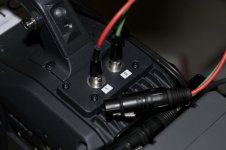
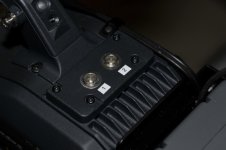
I read through this thread and I thought I'd add something I did about a year ago when I bought my 300. I mounted two male mini xlr panel mount connectors to the unislot cover wired to the db25. With the use of two mini to full size xlr cables I've been able to route feeds to channels 3&4.

_WSR1842_Small.jpg_WSR1841_Small.jpg
 
Back
Top