
Navigation
Install the app
How to install the app on iOS
Follow along with the video below to see how to install our site as a web app on your home screen.
Note: This feature may not be available in some browsers.
More options
You are using an out of date browser. It may not display this or other websites correctly.
You should upgrade or use an alternative browser.
You should upgrade or use an alternative browser.
how to get rid of a sound
- Thread starter Zim
- Start date
Bruce Watson
Veteran
I interviewed a 97 year old Marine Iwo Jima vet. Sometimes when he talked he would like make a "smacking sound" Maybe his mouth was dry or something. Is the an audio filter or a why to get rid of that? Thanks
Probably right around 9 kHz. You can reduce it using a parametric equalizer. Set a high Q spike of around 3-4 dB, loop some problematic speech, while it plays and you listen drag it back and forth across the frequencies until you find the "right spot". Then tweak the curve by playing with Q (higher -> tighter spike, lower -> broader), and playing with level. What you want is to minimize artifacts you can hear. What you don't want, is to completely eliminate the lip sounds. The "sweet spot" is to have the lip sounds loud enough to support the dialog, but not loud enough to call so much attention to themselves. So... be subtle. Reduce, don't eliminate.
If it makes you feel any better, this is a fairly common problem, especially with choir recording.
Alternatively, if you have the bucks, or just have access somehow, iZotope RX 7's "de-ess" tool is supposed to be quite good at this -- sorta like I described above, but it only applies the PEQ where the problems occur and leave it off the rest of the dialog. At 9 kHz I'm not convinced this matters that much, but clearly YMMV.
Post an excerpt here. Some people may have a go and you'd be surprised. I posted some crappy sound I recorded and learned a lot from what people did with it to improve it.
You can see the thread here. http://www.dvxuser.com/V6/showthread.php?365136-Help-with-boxy-muddy-sounding-voice&highlight=
Your issue is different but I bet some of the same people will pop up!
You can see the thread here. http://www.dvxuser.com/V6/showthread.php?365136-Help-with-boxy-muddy-sounding-voice&highlight=
Your issue is different but I bet some of the same people will pop up!


cyvideo
Veteran
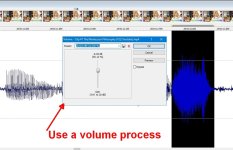
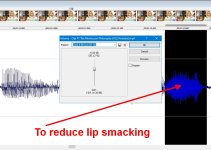
How many lip smacks have you got? If it's not an insurmountable number I just use a volume process tool to greatly reduce not eliminate the sound otherwise as someone else says it can end up sounding unnatural. It's just a process of finding them in the audio track and applying the process. Many decent audio editors, DAWs etc will allow you do accomplish this quickly and very easily and leave a natural sounding results. It really doesn't require any over complex manipulation. Doing it manually will will give you far better results than most automated processes as the volume and character of each 'smack' may be quite different due to thew words associated with any given 'smack.' Below is an example of a 6dB reduction of a sound. The benefit of doing it manually allows you to tailor the reduction smack by smack.
Chris Young
Chris Young
cyvideo
Veteran
That's the problem erasing it. The result often doesn't sound natural. I find if you really want to deliver the best result there is no magical one click short cut, it requires work. The closest I have found in a tool is Spectral View as mentioned earlier. I've used this but I have not yet found any solution better than doing it properly on a sound by sound basis. The CTRL U 'Heal' tool in Adobe Edition is probably the quickest way of repairing these problems and you will notice I am saying repairing as there is no 'real fix' other than trying to minimize the issue at the recording time.
Chris Young
https://filmsoundhub.vsonicarts.com/2019/02/13/dialog-editing-clicks-and-lip-smack-removal/
Chris Young
https://filmsoundhub.vsonicarts.com/2019/02/13/dialog-editing-clicks-and-lip-smack-removal/
I have quite the opposite experience with coughs, sneezes, walks, squeaking parquet flooring, inhales etc. in live recordings of classical music, where you can't minimize the issue.
It erases them with one click without consequences.
Just mark all affected regions and apply, one at the time.
It's not one click for all appearances of unwanted noises in the length of the recorded piece.
It erases them with one click without consequences.
Just mark all affected regions and apply, one at the time.
It's not one click for all appearances of unwanted noises in the length of the recorded piece.

Zim
Veteran
I see there is an Isotope Elements that is free offer now. Not sure if this fix is in there. Right now were there are lip smacking or he is clearing his throat and I can I just clip it and then add a picture of other video at that spot. It works pretty good because he stops talking. We are talking about a 97 year old man talking about Iwo Jima and the Battle of Guam.
+1
Two years ago I shot a 20 minute interview where one of the interviewees kept hitting his knee on the underside of the table in front of him. I tried to get him to stop doing this, but I think it was a bit of a nervous twitch so I kept doing it from time to time. At the end of the interview I asked him to remain completely quiet but to give me a few knee bumps on the table. I then used RX6 to sample these knee bumps as the noise I did not want and had it go through my audio track to remove them. RX6 removed the knee bumps without effecting anything else, which was very surprising. I knew that the RX6 machine-learning was good, but I had no idea about how good it could be. If you can isolate a good lip-smack sample without any voice, you might try doing the same thing to see if RX7 can get rid of them for you.
Zim
Veteran
+1
Two years ago I shot a 20 minute interview where one of the interviewees kept hitting his knee on the underside of the table in front of him. I tried to get him to stop doing this, but I think it was a bit of a nervous twitch so I kept doing it from time to time. At the end of the interview I asked him to remain completely quiet but to give me a few knee bumps on the table. I then used RX6 to sample these knee bumps as the noise I did not want and had it go through my audio track to remove them. RX6 removed the knee bumps without effecting anything else, which was very surprising. I knew that the RX6 machine-learning was good, but I had no idea about how good it could be. If you can isolate a good lip-smack sample without any voice, you might try doing the same thing to see if RX7 can get rid of them for you.
Thanks Dingo, I don't know a thing about isotope. I saw where they are offering the elements as a free download. Is this RX6 or 7 in elements? It would be worth a try.
Thanks Dingo, I don't know a thing about isotope. I saw where they are offering the elements as a free download. Is this RX6 or 7 in elements? It would be worth a try.
I have no experience with the elements version of the RX editor, but you can download a working trial of the RX software to test with. This might convince you to spend the money if the solution is good enough. ( I originally bought RX6 to save me from a re-shoot at a hospital where the HVAC system was so noisy it was ruining the audio for a 5 person group discussion, so out of desperation I tried the RX6 trial to see if it could make a difference and it worked, so I bought it on the spot to save my original shoot )

scorsesefan
Veteran
How distracting is it? If the audience accepts it as a subject's tick/mannerism maybe just let it be?