analog_addict
Well-known member
Hello,
Shot an event for a client on my C300 and C100, I delivered around 100GB of footage. He is now asking if I can compress it all and upload it for him.
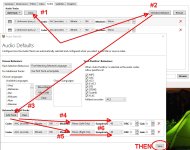
I can do this easily using Handbrake but I can't seem to maintain both audio channels. I either get no audio using auto passthru or a mixed mono track. The mixdown selection box does not allow anything other than mono.
Has anyone compressed C300 footage using Handbrake before or does anyone have an alternative method of batch compressing. I have around 200 files to compress.
Thanks!
Shot an event for a client on my C300 and C100, I delivered around 100GB of footage. He is now asking if I can compress it all and upload it for him.
I can do this easily using Handbrake but I can't seem to maintain both audio channels. I either get no audio using auto passthru or a mixed mono track. The mixdown selection box does not allow anything other than mono.
Has anyone compressed C300 footage using Handbrake before or does anyone have an alternative method of batch compressing. I have around 200 files to compress.
Thanks!