GH2 How good is the GH2's Photo Side?

Let's all stay clear about one big factor - the GH2's JPEG encoder is remarkably bad. I've never seen anyone dispute that.
But RAW is becoming a format of choice now anyway, and the GH2's RAW performance is amazing. Once you switch to RAW - then it's up to your lens choice and your own skill...but the look is there.

What are you talking about? GH2's JPEG is amazing!

I kid....it's almost perfect.

:)
 
In comparing the two, I'm not so sure I'd jump right to the word "sucks" or "blows monkey balls" I would say there are differences....

+1 to this. A sensible response to the OP, given the wording of his post, would be to say that while the GH2 cannot fully match the Canon, it can nevertheless produce excellent photographs and would be worth trying out before reaching a decision. "Sucks" is just hyperbole, and the other post that claimed the GH2 was "only marginally better than a point and shoot" is straight out misleading.
 
I have personally always felt that the GH2 images lacked some oomf compared to my Canons (especially if comparing unprocessed jpegs). But I initially blamed it things like sensor size, until I got my hands on some Olympus Micro 4/3rds bodies.

Olympus just sent me an E-PL3 body to play with (along with a 17mm F/2.8 lens), and I've got to admit, I'm loving the images out of the camera with the same m4/3 lenses compared to my GH2. So, now I'm comparing apples to apples- same lenses, same size sensor, etc., and the images out of the camera are more pleasing to me. Admittedly, this is all subjective- and by no means is the GH2 a bad camera! But personally, I will stuck to using it for video, where it truly shines.

With all the interesting M4/3 lenses and Canon FD glass I've been investing in lately, I really wish I could be more positive about using the GH2 for stills. But you can pick up an E-PL1 body for between $100-$200 these days, and keep it around just for m4/3 stills if you wanted. If I have to send this E-PL3 back (which I think I'm supposed to do when done reviewing it), I might just do that!

But man, I'm going to miss this thing- I love how it is as small as a compact point & shoot unless you attach a GIANT lens like this:
https://twitter.com/theRombus/status/224689733794664449/photo/1
 
It is really annoying to switch over to photo mode and take stills, then switch back to video mode and set everything back to what you need. Also the same way with the Canons. That's why even though I technically can take videos/photos on the same shoot, I charge a ton more to do that.
 
Hi all! I am from Croatia, Solin a little town near Split.
Videography and photography are my ocupations. I own Lumix GH2. One revolutionary phot/video camera!
I take many stills and I can say for sure that this camera produce some fine detailed photos considering for her video features, smallnes, senzor... etc... so one.

Here are few pieces.. Of course, if i can post it here?? :)

Lumix GH2 + Lumix 100-300, f4, iso 160, 100mm


Lumix GH2 + Lumix 100-300, f7.1, iso 160, 140mm


Lumix GH2 + Lumix 100-300, f7.1, iso 160, 140mm


Lumix GH2 + Lumix 100-300, f6.3, iso 200, 125mm


Lumix GH2 + Lumix 100-300, f5.6, iso 800, 100mm


Lumix GH2 + Lumix 100-300, f4, iso 160, 100mm


Lumix GH2 + Lumix 100-300, f5.6, iso 160, 300mm


Lumix GH2 + Lumix 100-300, f5.5, iso 200, 269mm


Lumix GH2 + Lumix 100-300, f4.6, iso 160, 162mm


Lumix GH2 + Lumix 100-300, f6.3, iso 320, 300mm


Lumix GH2 + Lumix 100-300, f5.2, iso 320, 234mm


Lumix GH2 + Lumix 100-300, f5.3, iso 320, 246mm


Lumix GH2 + Lumix 100-300, f5.6, iso 400, 300mm


Lumix GH2 + Lumix 100-300, f5.6, iso160, 300mm
 
http://vimeo.com/47831131

Got my Olympus 75mm 1.8 last week, shot a ton of pics at the Ragnar Relay in Minnesota/Wisconsin this weekend. I love this lens! Lots are over exposed, have poor composition, missed focus, etc, but I was always shooting on the move :D These are all original JPGs that I uploaded. ( Original files are on my flickr) Almost every pic was with the Olympus 75mm at 1.8, except a few that were taken with my Panasonic 14-42. These are all the Oly 75mm:
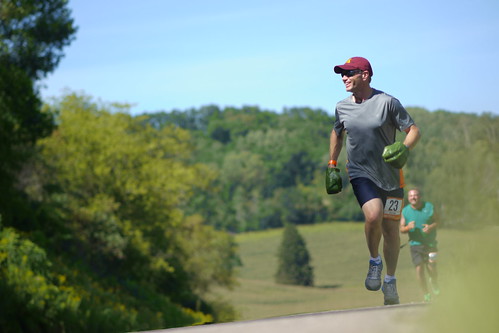
Ragnar 2012 - a set on Flickr


P1090440 by Erik Tande, on Flickr


P1090484 by Erik Tande, on Flickr


P1090837 by Erik Tande, on Flickr


P1090613 by Erik Tande, on Flickr


P1090859 by Erik Tande, on Flickr


P1090832 by Erik Tande, on Flickr


Me!

P1090493 by Erik Tande, on Flickr
 
Quick question how do I shoot photos in full manual? When I put it to the M mode it still is auto exposes for me?
 
Are you sure the exposure of the captured image is changing? In M mode the viewfinder image will adjust as the light changes, but the captured image exposure should be fixed.
 
Are you sure the exposure of the captured image is changing? In M mode the viewfinder image will adjust as the light changes, but the captured image exposure should be fixed.

??? In what mode can I shoot in where I can judge the image by the lcd and not have it change like this? What is the full manual mode on the GH2?
 
In what mode can I shoot in where I can judge the image by the lcd and not have it change like this? What is the full manual mode on the GH2?
Use the "M" still photo mode and in the setup menu, select CONTINUOUS PREVIEW on. This will make the viewfinder and LCD display your exposure levels just as in video modes.
 
Can anyone who uses the GH2 for photo share their settings and RAW workflow? I've never been pleased with the photos I get out of the GH2 compared to my Nikon DSLRs, but I've been shooting jpeg.
 
Look, start with shooting RAW in Aperture or Manual mode. Then start using programs like Lightroom and Aperture.
These programs streamline the way you ingest your photos as well as provide tools that immediately take advantage of your camera's RAW files.
Both these programs comes with simple presets that already will make your photos shine. Then once you start using/learning the program, you can really start to push the limits of your camera's photos.
My workflow:
1. Shoot in RAW
2. Ingest my cards into Lightroom (Copy)
3. Enter "Developer" mode, and start to play with exposure, whites, shadows, clarity, vibrancy, saturation... sometimes "Auto Tone/Auto White Balance" can help speed things up.
4. Tweak your Noise and sharpness as well as vignetting.
5. If happy, then export as JPEG (100% quality), if not, then right click on photo and open in Photoshop. Start applying more professional level effects and adjustments as needed.

You also have a nice option to save your adjustments from a photo that you had just adjusted, then BATCH apply those settings to all your photos. Great for simplifying your workflow and making the most out of your RAW photos with ease.
There are also professional presets available freely for both programs that can really give your photos some great results. Just needs a little searching online... hint* [Onone]

My wife shoots with a D700 Nikon, but we also use a D7000 as well as the GH2. Here are some examples of your results with lightroom and photoshop.
Esküvői fotózás – NEM az unalmas sablon követőinek! _ Weiss K. Krisztina FotoStudio

My apologies, we only have the Hungarian site up... but the photos are all thats needed anyhow.
Also, it can really be the difference between a good photographer and a novice... but luckily its a learned talent.
The camera just allows you to "amplify" that talent. And the GH2 is perfectly capable of helping you out with it's RAW 12bit abilities.
 
Last edited:
??? In what mode can I shoot in where I can judge the image by the lcd and not have it change like this? What is the full manual mode on the GH2?

As an alternative to lpowell's permanent menu setting, you can press trash can button (then follow the on screen prompt) - this will temporarily show you the current exposure level
 
Use the "M" still photo mode and in the setup menu, select CONTINUOUS PREVIEW on. This will make the viewfinder and LCD display your exposure levels just as in video modes.

Thanks for the tip, it worked great. Quick question regarding the Hack. I am looking for the best possible one regarding low light shooting. Or should I say very poor light. It is inside of a nightclub where I cannot bring any additional lights outside of an on camera led. Would your hack be the best for this kind of situation or can you recommend one?

Thanks a lot

Sorry for the off topic
 
I am looking for the best possible one regarding low light shooting. Or should I say very poor light. It is inside of a nightclub where I cannot bring any additional lights outside of an on camera led. Would your hack be the best for this kind of situation or can you recommend one?
In low light underexposed scenes, the encoder's bitrate will naturally decrease as image details fade into black. Even in those conditions, Flow Motion v2 will maintain its maximum image quality in all 100Mbps video modes. For more details check out the link in my signature below.
 
Back
Top