C100: How do you like the C100?

I'm using the C100 on a show for the Outdoor Channel.
In a controlled interview environment the camera performs very well, but I'm struggling with it on mixed lighting exteriors.

I have to deliver a baked in REC709 image. Right now I'm using Matrix: Normal 1 and Gamma: Normal 1 and I've gone into Gamma settings and dialed in roughly an additional stop in the highlights.

I really do not like how this camera handles skin tones as they transition from normal exposure to highlight. The settings I have dialed in, look fine when properly exposed but look terrible when they get a little hot. My F3 does not have this problem at all.

I'm open to suggestions.

Also, the LCD out of the box is useless, I've made adjustments but I'm not quite there. Any suggestions?
Thanks.
 
The 'Normal' Gammas, IMHO, is what's hurting the skin tones as they push beyond 75IRE. Normal 3 is designed for Rec709, and is quite a contrasty look - it defines the monitor as having only 5 stops of dynamic range, and whilst we can choose to compress tonality with the Cine style gammas, a true Rec709 setup would mean that you just have to light flatter and work harder. After all, it *is* the video look.

Outdoors in strong sunlight, I'm still a fan of WDR even though some find it difficult under Tungsten. It has a gentler roll-off on the highlights and opens up the shadows enough, I find it very close to the CineGamma 3 on the EX1/3. Keep an eye on the WFM to stop our natural tendencies to over-expose, and it looks great 'out of the box'. Note the WDR setting in-camera has got a smidgen of sharpening in.

One more slightly outlandish thought, which did encourage another C100 user: you can turn the Custom Picture profiles OFF, leaving you with the sort of picture engineers would love, though somewhat oversharpened and oversaturated to my taste. That, in 50i/60i was the epitome of 'video'.

As for the internal LCD, I'm now using the Atomos Ninja Blade, which (based on only 'backyard' tests to date) appears to be a far more trustworthy image to work with and I'll probably end up with the Spyder calibrator too. There's currently an issue with its pulldown removal, but hopefully that gets fixed soon. It also has nicer audio metering and I find the combo of internal LCD panel set to mono+peaking whilst in magnify mode, plus the Ninja in clean mode to be great whilst on a tripod. Handheld? Just get a studly ball & socket joint (I'm re-using the one that came with a LitePanels MicroPro).
 
Switched to Cine 1 for exterior shooting, great resolution, not a fan of how it's handling hot spots on flesh tones.
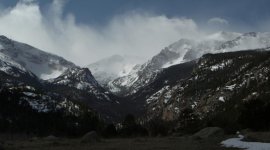
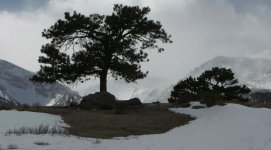
Here are some screen grabs of Estes Park in CO.
Estes 1.jpg

Estes 2.jpg
 
Last edited:
Bill, the great Paul Frederick (see post #54 in this thread) posted settings several months ago for a new custom profile he called Wide PF. I don't know who else is still using it, or even if Paul has tweaked it since. But since I starting using it, I have totally stopped the constant tweaking and searching for the best picture profile. I've used it 99% of the time since last November.

He started with a copy of the Wide DR profile and made these changes.

....I created a custom profile called WIDE PF, listing only the changes below- here are the settings:
Gamma curve is L:5, M:8, H:5
Gamma: Wide DR
Black-Master Ped: -1
Knee ON: Slope: -15 Point:109
COLOR MATRIX (This is the biggy) WIDE DR Gain:+30, Phase: +3, R-G: -20, R-B: +11, G-R:-23, G-B: -14, B-R: -10, B-G: +1

More here.

Side note, he also recommended turning the LCD setting to BRIGHT, and that has greatly helped my run and gun exposing.
 
...In a controlled interview environment the camera performs very well, but I'm struggling with it on mixed lighting exteriors... ...I really do not like how this camera handles skin tones as they transition from normal exposure to highlight. The settings I have dialed in, look fine when properly exposed but look terrible when they get a little hot. My F3 does not have this problem at all.

I'm open to suggestions.

I used wdr gamma at sunny days with hot highlights (NR2). In 25p is wdr ok with higher ISO at evening (wdr needs NR2-4), with 25i is better canon-log at evening. But in sunset may be better cine1 (normal4 or cine1 color matrix) because wdr or canon-log sometimes show visible banding. If you work with Ninja2 recording (I-frame only, 422 colors) then banding can be better, less visible.

I like LCD, in sunny days I used the LCD's menu setting for bigger brightness (backlight). External monitor (or Alphatron EVF) could be better.
 
Visible banding is unacceptable for this project. Not dissing anyone's profile.
I'm back to Natural 1 with a reduction in the highlight curve. Cine1 for snow.
 
Visible banding is unacceptable for this project. Not dissing anyone's profile.
I'm back to Natural 1 with a reduction in the highlight curve. Cine1 for snow.

I saw a wdr or c-log banding only on the sky (at evening - on the one color smooth gradient) or at sunset, cine1 or normal3 are ok.

WDR gamma doesn't like the small "overexposure" in middles, the faces have unsaturated parts in this case, it is better put the middles a little below the correct exposure. The best picture (DR) has canon-log, but it is limited with 8bit sampling and AVCHD long GOP compression artifacts - the second problem is easy to solve but the first not, there is some limitation in this case. The special problem is shooting at 50i when WDR has more noise (visibility depends on the amount of dark parts at images).

I like Canon-log (with exception for smooth one color gradients), wdr at 25p for quick jobs, cine1 or canon-log for 50i (normal3 col. matrix for day/cine1 col. matrix for evening, both are finetune with the saturation level - color gain). Canon log is excelent at dark evening, the best DR helps with nice black, but I like log also at a day because log has a very nice smooth gradation.
 
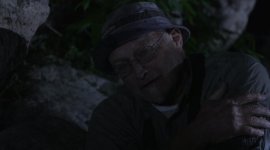
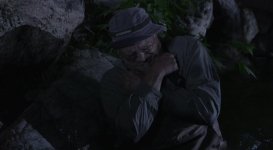
This is a rec709 show with no color grading in the budget.
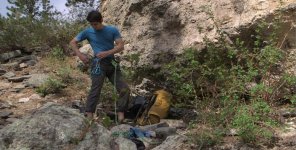
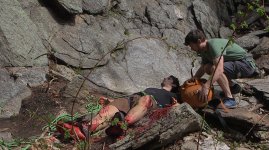
Here's a couple frame grabs from this week's shoot in CO.

What would you all tweak in camera?

Collin.jpg

FTS Collin on rock.jpg
 
This is a rec709 show with no color grading in the budget.
Here's a couple frame grabs from this week's shoot in CO. What would you all tweak in camera?

Try shooting in the sunny day some person with a white T-shirt or try to shoot some transparent material under sun light (with area of shadows) or try for example shooting direct to light source and you will see some differences :-) .

But I also like cine1 gamma (it is a very similar as normal3 + knee) for shot in 50i.
 
What would you all tweak in camera?

Is there really no budget for a little tweaking?

A little lifting here and there, a little vignetting (not the heavy mascara of some shows, mentioning no names, Top Gear),

We're all of us creating for Rec709. That governs TV, web, everything HD. How we get there is different. If you shoot Rec709 for 709 playback, you get a flattened response, high contrast, burned out highlights. The trick is to shoot beyond that and - in post admittedly - pipe that through a 709 hole. There's no budget to take it to a post house, but even a FCPX editor can lift and separate footage like a wonderbra. With my (offline) editor hat on, in 2002 I was 'poked with a spoon' in an online suite for daring to suggest that we use the colour correction tools. 10 years on, he's out of a job, I'm doing that all on my kitchen table. Editors are not colourists, but we can at least do a little lifting and separating.

You can choose a C100 setup that prevents you from going over 100%, and that's fine. If you're tethered to a truck, that's important. But a little swiffing to bring 109 to 100 isn't exactly disappearing into a grey cave full of Proto-Minority-Report controls for an afternoon, is it?

:-) (itching to bung a bit of FilmConvert or MagicBullet on it)
 
I'm very disappointed with how difficult it is to shoot outdoors with this camera. I'm talking about the camera without bringing external monitor and hood. The viewfinder and the LCD are "close" to useless if there's sunlight present.

Hello, you can try this :
http://www.bhphotovideo.com/c/searc...&N=0&InitialSearch=yes&sts=ma&Top+Nav-Search=

And this :

http://shop.texasmediasystems.com/C-CUP-Custom-Eyecup-for-the-Canon-C100_p_5688.html

and the viewfinder will be "close" to be perfect ;-)
 
Just got the C100 a few days ago. My initial thoughts compared to the Scarlet (which I sold to buy it):


Having only just held the Scarlet the other day when I boxed it up, taking the C100 out of the box felt "cheap" in comparison. But that soon went away after using it for an hour or so, mainly because my arms didn't feel like they were going to fall off.


Holy smokes is the image amazing on this thing. Razor sharp images. The look is so much different compared to the Scarlet and I much prefer it. Skin tones are gorgeous. And I'm using cheap Rokinon primes too. Looking forward to see how they look on some more expensive glass.


I can finally play back clips in Premiere in full resolution. Yay! (on my computer without a RED Rocket card could only play back real time at 1/4 quality).


Having difficulty getting used to shooting C-Log so have been shooting WDR for now. My difficulty comes from understanding where exactly to expose the highlights. I get the whole expose for 18% grey using a grey card but for times when you don't have a grey card, what do you do?


Battery battery battery battery life. Went out and shot for a few hours the other night and battery still showed full charge! I'd be on my 4th Redvolt by now. And they are $200/ea.


Love the one push AF and Auto Iris feature (on my Canon lenses anyway).


Almost 6 hrs record time across my 2 32gb SD cards that only cost $15/each. Say what?! My one 64gb RED card cost me over $1000 and lasted 30 mins. Say what again!?


Grip is fantastic. Very comfy. Side handle sucked on the Scarlet. Could never really go handheld or "stealth" with that thing.


EVF. Man what a joke. Can't believe they put that on a $5000 camera. Added the Z-Finder Pro and now all is good again.


ND Filters. What a joy. Worth getting the camera just for that feature.


Ninja2, some new "lighter" sticks, and a Zacuto Gorilla grip arriving today. Looking forward to trying those out.


Oh, and the C100 fits snuggly next to my 5D2 body and all my lenses in my backpack. Perfect for small gigs when I don't need my large Pelican case, shoulder rig etc. Added the Zacuto Target Shooter and that definitely gives you a great run and gun solution that is ligtht weight and compact.


Overall very happy right now. After seeing the IQ I totally forgot about the Scarlet altogether! Sure I've lost 4K when 4K is beginning to pick up steam, but we're talking another 2-3 years out before 4K becomes mainstream. Right now this is a perfect camera for both personal and professional projects.

Love it :)
 
Last edited:
Just got the C100 a few days ago. My initial thoughts compared to the Scarlet (which I sold to buy it):

Having used a Scarlet (not my own - on several freelance gigs) I understand your happiness. The C100 is a very underrated camera especially in the opinions of some professionals.

Looking back at some of the videos I shot with the scarlet, the only thing I can say I miss is the final image - it was simply amazing, but as you outlined it came at a cost in financial terms and practicality (battery life, storage, computer hardware, etc).

Happy shooting!
 
I would say the C100 image is on par with the Scarlet, or slightly below, but to most people they wouldn't know the difference. The C100 has a different looking image to me. It's crisper and more cinematic. The Scarlet took so much more tweaking of the RAW image to get what the C100 delivers out of the box. And lets not forget that the Scarlet was always light hungry. Anything above 850 ISO needed a ton of light to avoid noise in the blacks. The C100 smokes the Scarlet in this regard.

The only downside is the C100 is definitely not looked upon as a "pro" camera, nor does it really look like a pro camera. And I contemplated going to the C300 instead as this does look a little more pro, just like the Scarlet did. For some clients this won't be a big deal but I can see other clients having issue with this. Sometimes it's more about perception than the actual results the camera delivers unfortunately.
 
Last edited:
The C100 is definitely a champ in low light! Regarding looking like a "pro" camera, you can always dress it up in a baseplate and rails, follow focus and matte box, though this can take away from its run-and-gun prowess a little. And use a ninja to get 220 prores HQ so the picky clients can't moan about 24mbps bitrates!!
 
Hows it going guys, my love affair with the c100 lives on !
I just upgraded to dual pixel auto focus on the c100. Loving it! can glide one handed with an umbrella in the other hand now when it rains :p

But seriously, if you use the center focus area well, it can have pretty cool results! It works well on the 50 1.4, the sigma 18-35 only at f1.8 unfortunately but could be worse
and the 50 1.2 was awesome too!! the 85 1.2 was a bit slow, I guess its all that glass it has to move.

Also just tried the letus anamorphic adapter with the c100 courtesy of sun studios here in sydney. Oh man is it heavy!!! I'd go without matte box for c100 then for weight reasons alone. Yes you need rails, which makes the whole kit not hand held friendly any more. Rig only imo with the letus. I don't own any cine lenses with it so I needed to use the step up rings for then lenses I do have. Internal zoom sigma works, but 24-105 doesnt due to external zoom. So its a prime lens thing only.
 
Back
Top