how do you adjust exposure when you shoot and post-production

deleuze3

Well-known member
Hi, some say i should not underexpose (because i would have more noise in the picture), that i should rather EXPOSURE much (brighter) and dark the image in post.

If i use manual lenses, i should always over expose a bit in order to avoid noises ?

Here is a footage i did :
https://www.youtube.com/watch?v=rMbzo3fCQDI&feature=youtu.be
I recorded the video a bit overexposed, then at 35sec, i adjust the exposure in post to be darker. What do you think about the result ?

Did i use the appropriate method ? Can someone helps ?

Thanks in advance,
 
Your video is "private" so I could not watch it.

With cameras of this type you are using there is "some" reason to expose hotter, or more "to the right" sometimes.
2 of my cameras are GH2's and this method sometimes produces results that work better for the scene in question.

Let me explain - the idea of exposing to the right is generally sound FOR SOME THINGS. If you expose your darker areas more and then turn them down in post - YES - you will almost always get less noise overall in your image, especially in the darker areas. BUT on most cameras that are shooting 8-bit (like almost all DSLR's) this also results in less dynamic range. Sometimes this is ok, sometimes it's not, it depends on what you want that scene to look like.

You MUST do a couple test shots to get to know exactly how your camera responds to exposing this way so that you can get to know what to expect and how to make use of it.

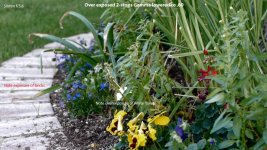
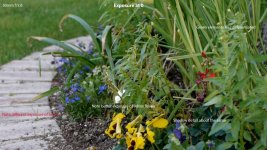
Just last week I was shooting a piece on gardening, and accidentally did one shot over-exposed by about 2-whole stops, but not peaked out. We re-shot with the exposure right on and in editing I tossed both shots on the timeline. I needed to turn the over-exposed shot gamma down to about .60 to get a general match with the "correctly" exposed shot and I was surprised to find that they looked quite different, and in many ways I preferred the "over-exposed" version.

I'll try to make the time to grab a frame from each one and post it here so you can see the difference.
 
Last edited:
If you overexpose you lose dynamic range in the highlights. Your video shows some clipping in the sky and on skin highlights. If you underexpose you lose dynamic range in the shadows, more noise, but you get nicer highlights. "Correct" exposure will preserve the maximum dynamic range for post manipulation. But outdoor daylight scenes like your shot are going to exceed the dynamic range your camera can capture. So you have to make a choice of what to sacrifice, highlights or shadows. This is a creative choice that depends on what you want the scene to look like.
 
OK, here are the examples from the Gardening shoot I mentioned.

I feel there are elements of the over-exposed version I prefer - like the definition between plants, things seem to pop out better.

The "0" exposure version has its strengths too.

Ultimately I switched to a different focal length lens from the same series (Nikkor 50mm and 85mm AI-s) and stopped down to f/11 and got an image that seems to have the best of the other 2.

It's all a matter of taste - what do you want it to look like. But if you're familiar with what your equipment will give you in different settings, then you simply make an artistic decision.

Garden 1 gamma 60.jpgGarden 2 gamma 0.jpgGarden 3 f11.jpg

EDIT: Upon seeing all 3 together like this - I still really like the pop and differentiation of the first one. The subject was the plants, and I just think you can see each of them a little more clearly in the first one.
* These are slightly cropped to give an equivalent frame.

ALSO: All 3 shots have Premiere Pro contrast to +8. Top shot has Gamma down to .60 but NO OTHER processing or color correction has been applied to any of them.
 
Last edited:
The stills are a handy reference, but in motion, are you seeing more noise?

When you have good control of your lighting, it's sometimes best to watch the highlights first, and make sure nothing is clipping unless you want it to. (If you have some tiny white pings in, say, a reflection off a glass that's not a huge part of the scene, that's usually OK vs. dimming the whole scene down). I generally light for the main subject and work "outwards" from there, and check the histogram through the process.

It's often a good idea to try to just lift your shadows with reflectors or lights. Punching them back down in post can give you some nice contrast. If you want a contrasty shot.

With 8 bit footage, I really try to get the exposure and color how I want it in-camera - I don't usually use "flat" profiles (though the Nikon "Flatt" works pretty well for many shots).

Like most questions on this forum, your best answer is to test, and then do some tests, and some more tests. You'll learn a lot of things that way.
 
Back
Top