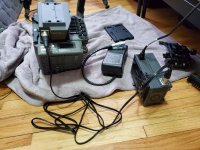
F35: Holy smokes, I bought a F35 too

keisersoze

Active member
Hello everyone, my first post, but I have been here forever drooling over your F35 talks. I can talk now too. Lol

It arrived last week. Body, gold mount battery plate with the lemo connector that goes to the camera main power port. Remote thingy and its cable, and riser plate. It came without a IF box but Bobby from KP Pro Video, New York just sent me one completely free. I attempted to power it today. WOW It's Alive. Holly smokes I have f35 too now! Boom!

Question: I'm powering straight to the camera
Will the IF box work, will it get power from the dock? Or power must go through it from the XLR cable(Which I don't have). I only have one SDI cable here right now, so I connected it from A port (IF box) to A port (Odyssey 7q). I get a pink screen. If move it to the B (If box) I think its blue or green. So I think it will only show an image if 2 cables are connected? I have no experiences with Dual Link. If I am getting these pink screens is it safe to assume the if box is getting power?Thanks guys for any reply.
 
If you power the camera throught the lemo port it will provide power for everything including the DC out that doen't get powered if you go through the IF box so nothing to worry about there. As for the second issue to use dual link with the Odyssey you do need to have 2 cables. You can use the monitor port to test things out on the back of the camera, it is only single link.
 
Thanks dhessel. When you say everything, that includes the IF box too?So I can run the odyssey 7q once I get the SDI cables? Why the IF box has power inputs? When would I want run power through there? Thanks again.
 
It works now, I got video coming from the IF Box. Yesss!!!
Can someone point me to a tutorial thread of how to setup the camera and odyssey to record 12 bit. So far I chose 444 DPx on the Odyssey and its showing an image. I'm happy! Any good thread specific to odyssey?
 
It works now, I got video coming from the IF Box. Yesss!!!
Can someone point me to a tutorial thread of how to setup the camera and odyssey to record 12 bit. So far I chose 444 DPx on the Odyssey and its showing an image. I'm happy! Any good thread specific to odyssey?

Just got your name reference.
 
Hey guys, if own a Odyssey 7q is there any advantage in buying Sony SRW-1? There is one cheap on ebay right now. I just bought my f35 and I have not shot or recorded anything on the odyssey yet because I'm waiting for SSDs.
 
Hey guys, if own a Odyssey 7q is there any advantage in buying Sony SRW-1? There is one cheap on ebay right now. I just bought my f35 and I have not shot or recorded anything on the odyssey yet because I'm waiting for SSDs.

From reading the great F35 “got a new camera” thread, seems most prefer the Odyssey.

Even the Sr-R1 was too big for me. F35 can be nearly as compact as the LT or mini if you go 10bit
 
Thank you. So though the odyssey 7q is preferred, the srw-1 will not add anything to the camera that the odyssey doesn't?
 
Thank you. So though the odyssey 7q is preferred, the srw-1 will not add anything to the camera that the odyssey doesn't?

It gives you 12bit to tape, and a very big counter balance to the camera. Other than that, it is all 1’s and 0’s, so, i’d imagine they are quite the same, based on reading in the threads.

However, i never went 12bit. I purchased the SR-R1 digital back and some mags, but had a fan max issue on my f35, and just didn’t bother. Then after i sold the SR recorder. My F35 experience was short lived but very romantic. I love the camera dearly. Xoxo
 
Last edited:
Thank you. So though the odyssey 7q is preferred, the srw-1 will not add anything to the camera that the odyssey doesn't?

The SR-R1 records 444 10 bit. Not 12 bit from what I know. It also gives you speed ramping, which only the Codex was able to do. It uses tapes, so you need a way to import the footage into your workstation via a capture card with SDI inputs. It also gives you much more audio control. And it sits really nice at the back of the camera. It gives you active record buttons with tally in the camera as well as playback via the viewfinder.

The problem is, weight and battery consumption will be increased. The camera was built to work with the SRW-1. It is the best solution. Odyssey 7Q is also great, but makes your camera a little more spidery. You need 2 wires for 12bit 444... I think 10 bit ProResHQ is great, and if you couple that with a little lightweight recorder with low power consumption, you will get a ton of mileage out of the camera.

Enjoy exploring the options. It's part of the fun.
 
There seems to be some naming confusion going on here.

SRW1 is the original tape based, developed for the F23 and later also used with the F35. This does not support 12-bit. Only up to 10-bit. HDCAM tape was never 12-bit. The 12-bit upgrade was done late in the F35's life. The Genesis also does not support 12-bit.
Advantages of a SWR1 at this point is only the speed ramping features plus the variable frame rates. The variable frame rates can be useful, depending on what you are shooting. But the speed ramping is a gimmick at best. Because the F35 tops at 50fps. The ramping from 50fps to 25 or 24fps is not very noticeable in most applications. Given the size, weight, power consumption, tape workflow and capture awkwardness for most modern systems, a SWR1 is hardly worth it as a main unit today. If found cheap, it could be used as a second recorder or sort of effects recorder for those single shots.

SR-R1 is a digital recorder and absolutely supports 12-bit. Looks basically exactly like the F65 recorder, which is called SR-R4. Main difference is the SR-R1 is HD only and the SR-R4 does 4K. Totally different animal to a SRW1.

The SR-R1 is in my opinion the best recorder for the F35, since Sony never delivered the version which would dock with the F35, called SR-R3. So the SR-R1 is the best compromise in my opinion. It's only disadvantage is if you are worried about size. But in a camera such as the F35 worrying about size is like worrying about calories, if you are already eating a hamburger. It is a full fledged production camera and works best that way. If the project calls for a light weight camera I will just use that. But trying to use the F35 as a DSLR handicaps the camera and makes it harder to work with.

I remember complains of the camera being unbalanced for shoulder work, right here on the forums. But the camera was being used with a monitor recorder. In that configuration it will of course be unbalanced. It was never designed to be used that way. With a recorder at the back. Be it the SR-R1, Codex or S-two, it balances like an ARRICAM. Even somebody with back problems, no seasoned camera op would say an ARRICAM is unbalanced on the shoulder. It's not light. But neither it is unbalanced. But if using the camera as a cube and then towering gear on top and raising the center of gravity, of course it will end up being unbalanced.

If the project is DSLR budgeted, then I would rather use that than try to make the F35 into something it is not and waste the camera. This is my opinion of course. Now it is a different thing to have multiple bodies and set them up for different applications. I have rigged a cube with basically just a pancake lens and nothing else. Recorder, monitoring, power all off board. I still got the F35 image and didn't have to go to a DSLR to get the shots. But I would not want to shoot with a bare minimal F35 as a main camera.

So back to the SR-R1, best recorder for the F35 in my opinion. Completes the camera, balances it all out, records the full quality the F35 outputs, has one of, if not the the most reliable media and can be powered by a single onboard brick along with the F35. Mine live on the rear dock and can easily come off to the top dock or off all together to change shooting modes.

I tried several options, including monitor recorders and even the Codex. They all sound good on paper but didn't really work as well in practice, for me. The SR-R1 is a breeze. With the SR-R1, the F35 is basically no different to shoot than an Alexa Classic. Press record, get your shot, pop the card out, pop it in the reader and start editing.
 
Last edited:
To be fair, the SRW1 was around well before the F23 or even the Panavision Genesis. Michael Mann used the SRW1 with the Viper and F900 on Collateral. The Genesis, F23, F35 were built with using the SRW1 not the other way around.
 
There seems to be some naming confusion going on here.

SRW1 is the original tape based, developed for the F23 and later also used with the F35. This does not support 12-bit. Only up to 10-bit. HDCAM tape was never 12-bit. The 12-bit upgrade was done late in the F35's life. The Genesis also does not support 12-bit.
Advantages of a SWR1 at this point is only the speed ramping features plus the variable frame rates. The variable frame rates can be useful, depending on what you are shooting. But the speed ramping is a gimmick at best. Because the F35 tops at 50fps. The ramping from 50fps to 25 or 24fps is not very noticeable in most applications. Given the size, weight, power consumption, tape workflow and capture awkwardness for most modern systems, a SWR1 is hardly worth it as a main unit today. If found cheap, it could be used as a second recorder or sort of effects recorder for those single shots.

SR-R1 is a digital recorder and absolutely supports 12-bit. Looks basically exactly like the F65 recorder, which is called SR-R4. Main difference is the SR-R1 is HD only and the SR-R4 is 4K only. Totally different animal to a SRW1.

The SR-R1 is in my opinion the best recorder for the F35, since Sony never delivered the version which would dock with the F35, called SR-R3. So the SR-R1 is the best compromise in my opinion. It's only disadvantage is if you are worried about size. But in a camera such as the F35 worrying about size is like worrying about calories, if you are already eating a hamburger. It is a full fledged production camera and works best that way. If the project calls for a light weight camera I will just use that. But trying to use the F35 as a DSLR handicaps the camera and makes it harder to work with.

I remember complains of the camera being unbalanced for shoulder work, right here on the forums. But the camera was being used with a monitor recorder. In that configuration it will of course be unbalanced. It was never designed to be used that way. With a recorder at the back. Be it the SR-R1, Codex or S-two, it balances like an ARRICAM. Even somebody with back problems, no seasoned camera op would say an ARRICAM is unbalanced on the shoulder. It's not light. But neither it is unbalanced. But if using the camera as a cube and then towering gear on top and raising the center of gravity, of course it will end up being unbalanced.

If the project is DSLR budgeted, then I would rather use that than try to make the F35 into something it is not and waste the camera. This is my opinion of course. Now it is a different thing to have multiple bodies and set them up for different applications. I have rigged a cube with basically just a pancake lens and nothing else. Recorder, monitoring, power all off board. I still got the F35 image and didn't have to go to a DSLR to get the shots. But I would not want to shoot with a bare minimal F35 as a main camera.

So back to the SR-R1, best recorder for the F35 in my opinion. Completes the camera, balances it all out, records the full quality the F35 outputs, has one of, if not the the most reliable media and can be powered by a single onboard brick along with the F35. Mine live on the rear dock and can easily come off to the top dock or off all together to change shooting modes.

I tried several options, including monitor recorders and even the Codex. They all sound good on paper but didn't really work as well in practice, for me. The SR-R1 is a breeze. With the SR-R1, the F35 is basically no different to shoot than an Alexa Classic. Press record, get your shot, pop the card out, pop it in the reader and start editing.

Thanks for this. Fantastic amount of information. I read bits and pieces from other threads but it's awesome to see it all together in one answer.
 
20200204_135943.jpg

Hey guys my Sony AC-DN2B Power Supply arrived today. I connected it straight to the Interface Box via XLR cable, and Nothing. Camera does not power up. The Power supply is turned on and it does charge the Vmount Batttery, I hear the fan going as well. Did I make a wrong connection, or is it not supposed to be used like this?

Thanks. Camera does power fine from Gold Mount battery To Limo on the body. Am I doing this wrong?
 
Back
Top