HMC150 questions answered...

Don't know if he actually speaks for Mac or not, but I'll try and ask about AVCHD support and system requirements.

AVCHD requires FCP 6.0.4 and an Intel Mac.

It is converted about RT to pro res in the log and transfer window.

However, my testing with Barry's files derived from a pre production 150 with Toast 9 permits a RT batch transfer from (MTS) AVCHD to any codec you have in your system including DVCProHD.

That's a better approach and more efficient.
 
Why is DVCProHD preferred over Prores 422? The slightly smaller file sizes or you just prefer the toast 9 batch-style workflow? Also, since I don't recall it being mentioned before, is it a faster transcode than log & transfer gives?
 
Barry/Bobby, or anyone else who has seen the 150 up close- is the entire unit the same graphite like color, including the lcd door? Several photos online show the camera as being one uniform shade, but I have also seen some where the LCD door is much lighter, ala DVX100 and 100A
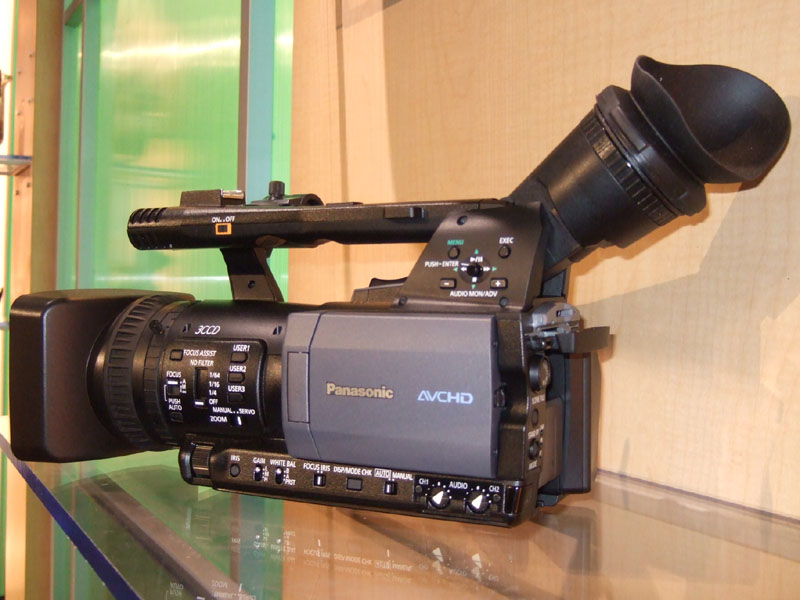
ez04.jpg


versus

panasonic4.jpg


my guess is that the top photo is a pre-production model for reviewers, and the bottom is the mockup. Although merely aesthetic, my hope is that its the same color throughout.

The photos I took at NAB showed the colors a bit different:

http://web.mac.com/bobdiaz/Site/HMC150.html

HOWEVER, what I saw was NOT the final model, but a pre-production unit.

My guess is that the colors will look more like the HMC-150 brochure.

HMC-150-3.png


Bob Diaz
 
yeah it looks like the lcd door is a dark grey and the rest of the body is black, which is cool. As long as its not the bright silver the original 100 was

514505.jpg


didnt too much care for that one, you know what they day once you go dark graphite ......
 
Last edited:
Premiere CS4 supports Panasonic AVCHD natively

Premiere CS4 supports Panasonic AVCHD natively

perhaps this belongs in the NLE forum, but I thought it applied here as well since AVCHD native editing is a concern of mine and other potential 150 owners...

Premiere CS4 supports Panasonic AVCHD natively
from adobe re: premiere cs4

"Native tapeless/file-based camera support

Take advantage of the efficiency of tapeless cameras. Edit files from the latest tapeless formats natively, including RED, P2, XDCAM, XDCAM EX and XDCAM HD, and AVCHD, without transcoding or rewrapping. With an integrated file browser, you can browse your drives and removable media from inside Adobe Premiere Pro to find and log footage, and then import the content directly into your Adobe Premiere Pro project. Native editing means you'll enjoy a faster workflow from capture to edit, while retaining the quality of your source material.

AVCHD editing with browsing and metadata support

Import and edit AVCHD content from Sony, Panasonic, and Canon cameras without waiting. Native editing means you can start editing content immediately without transcoding or rewrapping the content. Use the media browser to browse clips and view metadata."

http://www.adobe.com/products/premiere/supportedformats.html

nice to see ol faithful giving FCP something to shoot for
 
Last edited:
yeah it looks like the lcd door is a dark grey and the rest of the body is black, which is cool. As long as its not the bright silver the original 100 was

514505.jpg


didnt too much care for that one, you know what they day once you go dark graphite ......

No way! The original DVX color scheme was the best! Muscly in a Countach-like way...
 
Unless I see something that leads me to believe otherwise, it seems that Panasonic is using the higher level system.

Right - I'm not questioning that! Just whether ALL ACCHD cameras do, or if anyone else can/has chosen a different approach.

Also, I'm curious about where and how exactly these algorithms fit into the whole compression scheme.... but I'm too busy this week to try and track that down!
 
. . . However, the .mts files I downloaded from the site above are mpeg2 files, according to my transcoding app (videopier by aquafadas software, www.aquafadas.com). What's wrong with that workflow? Or am
I mistaken? Pe.

In reference this this question, here is some info that may help for some who were as confused as I was:

.MTS = (M)PEG (T)ransport (S)tream
.M2T = (M)PEG (2) (T)ransport

AVCHD is a (CO)pression (DEC)ompression mathematical process to handle high definition video data and then after CODEC'ing puts this data to an MPEG stream for file handling storability and recognition.

All this comes info from the following sources:

.MTS INFO

AVCHD Brochure (see the bottom part of the chart that is in the middle of page 4)

I have gads more that I've been reading for the last month to get "educated" but these were the clearest to follow for the most part and in all these discussions I was totally lost until I discussed this with an ENG at our local Pittsburgh television station, wherein he tried (I'm not up on all this) to explain it in technical terms wherein I was able to grasp enough that I could at least see, work with, and edit, the AVCHD in our software and player(s) so that we could determine if it was capable of accomplishing the HD work we seek.

Hope this helps some that were like me . . clueless of it all :eek:)
 
Last edited:
Why is DVCProHD preferred over Prores 422? The slightly smaller file sizes or you just prefer the toast 9 batch-style workflow? Also, since I don't recall it being mentioned before, is it a faster transcode than log & transfer gives?

It isn't preferred generally. We have a HVX200 and works with DVCProHD footage.

I haven't tested transcode times, but I generally recall them to be similar. The point being that you CANNOT elect a AVCHD to DVCProHD transcode in log/transfer but you can in Toast 9.
 
It isn't preferred generally. We have a HVX200 and works with DVCProHD footage.

I haven't tested transcode times, but I generally recall them to be similar. The point being that you CANNOT elect a AVCHD to DVCProHD transcode in log/transfer but you can in Toast 9.

Okay, so you would go DVCProHD just for compatibility with your HVX200 workflow. Gotcha. I'll probably just shoot 720p60 and transcode to ProRes 720p until the FCP native update hits. Later this week I hope to be (finally) shooting my HMC150!!!
 
UPDATE: My rep just called.... My HMC150 has shipped!! I'll let everyone know when it arrives!!

Edit: The two extra 5800mah batteries I ordered shipped with it, so those are available now too.
 
Last edited:
Barry,
I understand that AVCHD works with the H.264 codec. However, the .mts files
I downloaded from the site above are mpeg2 files, according to my transcoding
app (videopier by aquafadas software, www.aquafadas.com). What's wrong with that workflow? Or am
I mistaken?

Pe.
All AVC-HD files are MPEG-4 Part 10/H.264/AVC files.

I don't know what your software is reporting or why it thinks they're MPEG-2, but they're unquestionably AVC.
 
UPDATE: My rep just called.... My HMC150 has shipped!! I'll let everyone know when it arrives!!

Edit: The two extra 5800mah batteries I ordered shipped with it, so those are available now too.

Can't wait to hear how it works. Gotta find out where mine is at.
 
UPDATE: My rep just called.... My HMC150 has shipped!! I'll let everyone know when it arrives!!

Edit: The two extra 5800mah batteries I ordered shipped with it, so those are available now too.

WOW, it sounds like Christmas is coming early this year. :beer:

Bob Diaz
 
Especially for Premiere Pro users. I had a chance to see Premiere Pro CS4 with HMC150 footage. Realtime native editing. Saw the guy drag the clips right off the card and edit at full frame rate.

Anybody who's complaining about long unwrapping/transcoding times is just plain using the wrong software, my friends. It can be done right now, properly, on modern hardware!
 
Especially for Premiere Pro users. I had a chance to see Premiere Pro CS4 with HMC150 footage. Realtime native editing. Saw the guy drag the clips right off the card and edit at full frame rate.

Anybody who's complaining about long unwrapping/transcoding times is just plain using the wrong software, my friends. It can be done right now, properly, on modern hardware!

Awesome news Barry! Do you know how powerful a machine they were running it with? Was it a Mac or PC?
 
My DVX drowned on monday... If i didn't know better i would think it was coincidence...
(My phone and 2 other peoples stills cameras got wet also)
 
Back
Top