Help with boxy/muddy sounding voice

I have just checked and the track peaks at about -9dbs and is generally at about -12dbs when I am talking. I remember reading somewhere that for dialogue peaks at -6dbs were a pretty good level, so I did not feel like the recording was that quiet. I also recorded using 24 bits of resolution, which my understanding is that it allows pulling up quite a bit without too much trouble.

With lower cost consumer grade recorders ( tascam are consumer grade, but you can get good results with them ) the base noise-floor of the recorder is usually in the -50 to -75 dB RMS range, where professional gear usually has a noise-floor of -100 dB RMS or better. When you set a recording level of -12 you are using that top 12 dB to act as your digital "headroom" and anything below this -12 dB is the dynamic range of your recording. If you have to boost your recording in post because the mic was badly placed or the speaker is very quiet, then you are going to lose even more of your recording's dynamic range. When you've run out of dynamic range, all that is left is noise.

There's a simple test you can do with your recorder and lav, and a 3.5mm audio extension. ( assuming your lav has a 3.5mm plug on the end )

1- Place your lav in the spot you want it ( i.e. middle of sternum ), plug it into your recorder and then adjust your recorder's level until your normal speaking voice is peaking at -12 dB.

2- Unplug your lav mic and plug in the 3.5mm audio extension ( the extension should be less than 10 feet long, or it may cause it's own audio problems )

3- Start recording at the SAME level you had set for your lav mic. ( you are recording "silence", but you will soon find out how silent this is ) Record for 20 seconds.

4- Transfer your "silence" audio recording to your computer and using your audio editor's level meter ( I use the Sound Forge RMS level meter ) see what the audio level is for your "silence" recording. With a good recorder you should be seeing a noise-floor of -70 dB or better. ( pro gear is often around -100 dB RMS )

This will give you a clear idea of the noise-floor of your recorder when set to the recording level you would use with your lav mic. You can't make a noise-free recording if your recorder is already pretty noisy.

My old Canon 60D camera had a noise-floor of -52 dB when tested this way, and it sounded like there was a sand-storm in the background.

Where my Panasonic GH5 shows a noise-floor of -73 dB RMS and is very quiet when set up correctly.

I own five Tascam recorders, and all of them show a noise floor between -70 dB to -75 dB RMS.

Consumer recorders have pretty noisy pre-amps, so you want to match them with "hot" mics that put out a strong signal, so you end up using as little gain as possible.
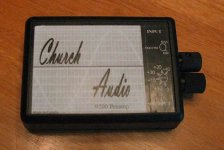
 
Used Voxengo SPAN to measure the noise floor of my DR-10 at the three possible levels of amplification:

High: -80dBs RMS
Mid: -85dBs RMS
Low: -88.1dBs RMS

Now, because I am paranoid I also used JS: Audio Statistics that comes with reaper and got pretty much the same results (0.3 dB louder was the biggest difference).

So the next question is: are OST 801 or 802 "hotter" than the rode?

I found these details about the Rode

Sensitivity -33.5dB re 1 Volt/Pascal (21.00mV @ 94 dB SPL) +/- 2 dB @ 1kHz
Equivalent Noise Level (A-weighted) 25dBA

Could not find anything similar for the OST.


Also, I guess, mistrust stats provider by the maker?
 
Does any company make preamps for lavs?

Sound Devices does. Or did. A used MixPre-D is an awesome pair of microphone preamps, with excellent metering and first class limiters. Hard to beat if you really just want to record directly to camera -- that's what the MixPre-D is made for it seems.

Using a MixPre-D directly with lavs requires an XLR (phantom power) to whatever plug your lavs uses (and plug-in power) converter. Most of the lav mic suppliers have such devices. For example, Oscar Soundtech has a nifty little one called "power supply-XLR" which works great powering their lavs.
 
-No more on the collar, if possible always sternum with the overcovers (I actually bought 12 after seeing you recommend them in some other thread. They should give you commission)

Right? I wish they would pay me a commission! It's rare that I so wholeheartedly embrace a piece of gear/solution but I am appreciative that the solution has really eliminated something I have wrestled with for decades, lav noise, at various times and using lots of different "traditional" methods, many of which work well but are such a time consuming PITA to implement. The best solution always is to just hire a pro sound mixer and let them worry about this stuff but on my own micro/no budgeted shoots for my projects, I have to do this stuff myself and I have so many other things to worry about and deal with than solving lav noise problems, that not having to solve lav noise problems is thrilling.
 
Most TVs, computers, and boardroom sound systems don't have easy accessible treble controls during playback. Users pretty much never adjust these controls, they will just think your audio sounds bad.
I meant turned up the treble in the studio.
 
So late to the discussion, a week vacation with no internet... Ahh what peace!.

Anyway, a general vocal correcting in post technique is to sweep the spectrum with a really tight (high Q) band pass at max gain. When you find a freq. that peaks, that is a place you will want to notch down. Even in the "old days" film mixers would use a Universal Audio "Little Dipper" (565 filter set) to do the same thing. "Boxy" is often resonating frequencies in the mid range. Once you knock those back in line then you can boost what you need with out the boxiness following.
 
So late to the discussion, a week vacation with no internet... Ahh what peace!.

Anyway, a general vocal correcting in post technique is to sweep the spectrum with a really tight (high Q) band pass at max gain. When you find a freq. that peaks, that is a place you will want to notch down.

I have seen tutorials about doing this several times and tried to do it myself with suboptimal results, so, once again, sincere questions:

-Sweep at max gain: The EQs that I use can provide pretty crazy high gain. If I go for max gain I can make the fundamental frequency and most of the of harmonics clip. Bearing this in mind: What is a reasonable amount of gain to apply when sweeping to check for frequencies that you should notch?

-Notching down: I understand that the closer to clipping before you do the sweep, the deeper your notch should be. I know I should check and listen for what sounds good, but my experience is that what "sounds good" when I do it, does not sound good a while later and then I fix and again when I check a while later I think the sound sucks and again and again and again... So any general guidance regarding what would be a reasonable amount to cut?

I remember seeing a dude cut the first harmonic by over 6dBs (he also cut others, of course, but not as deeply) and I thought that what he had done did not sound that much better than the original but that guy is a professional who gets paid to do this stuff and I am just an amateur who does not trust his ears so...
 
My filter gain only goes to +12dB so that is what I sweep with. I am not trying to "fix" the vocal so much as to remove or cut down on the resonant frequencies that tend to make dialog sound "boxy" and or muffled. These are peaks where they shouldn't be because of room acoustics and or mic placement. I notch by ear, though it's easy to over do it so I generally try to be conservative. For normal issues probably -3dB is ok, though I have gone deep when needed. Also generally it's a range hovering around the resonance so you will want to open up the curve a bit when you cut. I don't try to deal with harmonics because the system (room, mic placement, possible moving in the room, etc.) is so complex. I just sweep to fine more resonant frequencies. Generally if you are notching more than two or three spots you have bigger issues to deal with. EQing for tonal purposes I do after dealing with any resonances. In the notching part you are just trying to get rid of as much of the mud as possible. You can probably do OK with just EQing but that can make the resonances worse so I find it a lot easier to deal with them first.

Just like noise reduction the question is always "did that make it better, or just different?". When it starts out not sounding like you want it's easy to mistake different for better so it's good to A/B the before and after periodically.

One problem with trusting your ears with amatures is that often they are listening on consumer gear that is trying to make the sound "better". Many consumer sound playback systems do a bunch of stuff to the sound to make it bigger, louder, bassier, sexier, etc. So it's hard to tell what it actually sounds like. Headphones are if anything worse in that regard.
 
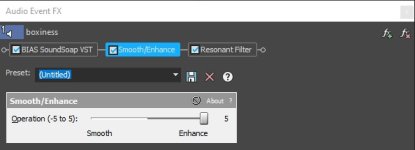
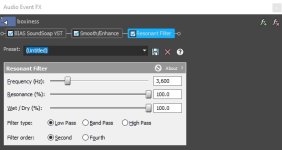
A quick work over for me was to tune out the base noise floor and kill the 60Hz hum and add a Smooth/Enhance Filter with +5 level and then finally a Low Pass Resonant filter with a Second Order Filter at 3,600Hz. I would be quite happy then to use the result in an edit.

https://www.sendspace.com/pro/dl/u6se1n

Chris Young
 
Unless I'm being thick - in the good old days, we'd have fixed this simply by turning up the treble - not faffing around with parametric or graphics - it's a bit dull, so turn the treble up - that would be fine for me!

Know what you mean :) A bit more "sparkle." If I heard this on a live desk that is just about what I would do. Bump the mids a bit and push the highs a bit more and maybe roll off the bottom end a bit. There is a nasty, and it sounds like a low 60Hz hum/buzz though down near the noise floor. All easily dealt with in post.
Chris Young
 
Know what you mean :) A bit more "sparkle." If I heard this on a live desk that is just about what I would do. Bump the mids a bit and push the highs a bit more and maybe roll off the bottom end a bit. There is a nasty, and it sounds like a low 60Hz hum/buzz though down near the noise floor. All easily dealt with in post.

Chris Young

Thanks for your version, Chris! I had a look and I was surprised by some of your choices, so I would like to ask you about them.

I had a look using RX and saw that most of the energy above 12KHz was gone. This matches what you said you had done, but I wonder what lead you to doing this. Other people have suggested increasing energy in those higher frequencies to compensate for the "chin shadow".

I can also see a high increase of energy at 3,5KHz, which also makes sense, since you used a resonant filter at 3.6KHz. Why that frequency?

Finally, what is a Smooth/Enhance Filter with +5 level ? Is this one of those AI filters like Soothe or Gullfoss?


Also, thank you Scott for your suggestions/guidance.

Note taken: Sweep at around + 12dB and notch as needed with -3dB and a slightly wider Q as a reasonable starting point.

I have Mackie CR5 for monitors. I know they are by no means professional but I did some sweeps with them and I would say they sound reasonably flat. Considering that my listening environment is a disaster, much better speakers would also not really make that much of a difference any way.
When I use headphones to check the sound, I change between AKG K702 and Sony MDR-V6. I selected all of these because they weren't supposed to do much in terms of applying a curve to "sexify" the sound.
 
Aram,

Your playback system seems OK. Good choices and not a "home stereo" set up. So you should practice a bit and learn to trust your ears a bit more maybe? Also you are probably working close enough that you are in the "near field" range (almost all you hear is direct from the speaker) so as long as the room is not supper bouncy or has some crazy resonances the room should not be too big a deterrent.

Not speaking for Chris, but I can take a stab at a couple of your questions.

Just about nothing of use in dialog happens above 12K. Hardly anyone hears much above that, except women who haven't listened to a lot of music with earbuds. In theory more folks under ~ 30 or so should hear closer to 15K to 20K but ear buds have wiped a lot of that group out. Either way voices don't generally go over 10K or so. So for dialog it's kind of a waste keeping much of the higher frequencies and it is also a place where a lot of noise likes to hang out.

3.6K or so is the upper midrange for voice and is a zone where you can enhance intelligibility, of english at least. It's a bit voice dependant bit that zone generally can have positive effects for clarity and understandability.
 
I had a look and I was surprised by some of your choices, so I would like to ask you about them.

aram ~ I guess I have to ask, does it sound a little better?

What leads me to do anything in audio is my ears. I really don't get too tied up with the 'tools' too much. Like in the old analogue days I just adjust until it sounds better or at least more acceptable. Most of it comes from instinct and years of just having a feel for what tools work for a number of scenarios. I do a lot of my basic audio work in Soundforge or Vegas. Primarily Vegas because for audio for video it is a very quick and comprehensive tool to use and will accept almost any video codec, frame rate, frame size etc. Vegas started out as an audio editor so it has a very strong audio heritage. Love its sub-frame audio editing capability.

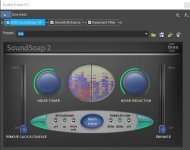
You say you notice that most of the energy above 12KHz is gone. The reason for that is that there was little up there and it was not contributing to the sound experience in any way so I just dialed it out. To clean up the 60Hz and buzz I used the original BIAS Soundsoap plugin followed by two of the standard plugins in Vegas. Smooth/Enhance and Resonant Filter. With the Smooth and Resonant Filters I just adjusted until it sounded the best I could get it. The settings on all of them are arrived at by "Ear." So three simple plugs in the chain as you can see by the JPGs below.

Chris Young

Boxiness Soundsoap.jpgBoxiness Smooth-Enhance.jpgBoxiness Resonant Filter.jpg
 
A quick work over for me was to tune out the base noise floor and kill the 60Hz hum and add a Smooth/Enhance Filter with +5 level and then finally a Low Pass Resonant filter with a Second Order Filter at 3,600Hz. I would be quite happy then to use the result in an edit.

I still find that this sounds flat and muddy in the mid to upper range. I know that most of this was probably caused by the mic placement, but I still find the recording missing clarity in Aram's voice.
 
Being critical I would agree. That was about three or four minutes of playing around. Could do better maybe. If the $$$s were there and it was mission critical one would spend more time trying to improve it. For most general purposes the result is quite serviceable and wouldn't draw too much comment once viewed in the context of an edited piece. People have given me far worse to work with for sure. Hard to beat getting it right on the day to avoid later dramas.

Chris Young
 
Thank you so much for all your help, guys.

Chris, when I listen to your version on speakers the boxiness is gone, but it sounds a bit harsh to me (more so when I change to headphones). This is the second time that someone (with way more experience than me) here suggests changes to sound that make it "harsh" to my ears. I am starting to wonder if it is just a matter of taste and I just do not like some of the more treble sounds that I can still hear when they are accentuated. Also, it is curious that I think it is harsh, because I thought harshness came from higher frequencies, but those are gone!

I used to use Vegas too and I think if I went back to it, it would probably still be the video editor where I can work fastest (the way cutting works just made sense to me), but from version 12 onwards it just crashed on my system all the time (three different systems over the years).

Also, I am quite confused by the name of that plug in "smooth/enhance". What does it do? I did a google around, but other than someone wanting it for use in another DAW, I found no information about it.

Thanks for the tips, Scott. I am a teacher and every now and then I do a test with my students to see what frequencies we can hear. Unless extremely loud, I cannot hear anything about 16K, but most of my kids (12-16 year-olds) can hear. I do try to use my ears, but I am not going to lie, I often depend onlooking at the RX spectrographic representation of sound to confirm (or discover) issues in sound.

Thank you again guys for all your help. I really appreciate this aspect of on line forums!
 
Back
Top