
Navigation
Install the app
How to install the app on iOS
Follow along with the video below to see how to install our site as a web app on your home screen.
Note: This feature may not be available in some browsers.
More options
You are using an out of date browser. It may not display this or other websites correctly.
You should upgrade or use an alternative browser.
You should upgrade or use an alternative browser.
Heads explode: GH2 film mode test charts! :-)
- Thread starter Peter J. DeCrescenzo
- Start date
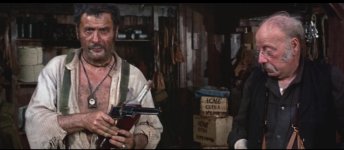

what's the best mode to get this ?
and more seriously - what's lens can get close to that? (i mean the look, not the anamorphic ratio)
Sergio Leone shot in what is called Techniscope, which did NOT use anamorphic lenses. It was 2-perf 35mm. So you'll be able to get the look without resorting to anamorphic lenses. He shot using deep DOF, so he used a LOT of light and stopped the aperture down to maybe f8 or more. Also, he used wide-angle lenses a lot, sometimes even for close-ups. Tonino Delli Colli's lighting style uses hard light, not a lot of bounce or diffusion. This is typical of 1960's lighting.
So my advice to get that look is to use old manual lenses like Nikon F or Canon FD lenses from the 70's and 80's that are lower contrast like old lenses. The tough thing with a GH2 is that the 2x crop makes it tough to find lenses that are wide-angle enough. I guess you could also use the kit lens and use an Ultra Con or some kind of Low Con filter in front of it to get that retro look. Normally I'd say the kit lens is too slow, but since you'll want deep DOF for that Leone look, a slow lens works to your advantage.
Then use lots of raw, hard light and stop down to get that Spaghetti Western deep focus. And use a lot of brown and beige in your costumes and sets.

Last edited:

roei z
Veteran
Sergio Leone shot in what is called Techniscope, which did NOT use anamorphic lenses. It was 2-perf 35mm. So you'll be able to get the look without resorting to anamorphic lenses. He shot using deep DOF, so he used a LOT of light and stopped the aperture down to maybe f8 or more. Also, he used wide-angle lenses a lot, sometimes even for close-ups. Tonino Delli Colli's lighting style uses hard light, not a lot of bounce or diffusion. This is typical of 1960's lighting.
So my advice to get that look is to use old manual lenses like Nikon F or Canon FD lenses from the 70's and 80's that are lower contrast like old lenses. The tough thing with a GH2 is that the 2x crop makes it tough to find lenses that are wide-angle enough. I guess you could also use the kit lens and use an Ultra Con or some kind of Low Con filter in front of it to get that retro look. Normally I'd say the kit lens is too slow, but since you'll want deep DOF for that Leone look, a slow lens works to your advantage.
Then use lots of raw, hard light and stop down to get that Spaghetti Western deep focus. And use a lot of brown and beige in your costumes and sets.
i need to try this ultra con filter on the lens i'm getting - Panny Leica 14-50 2.8mm.. (yea, with OIS !)
but how to get out the over sharpness? -2 is not enough, and post work will look a bit "posted" won't it?
couldn't let this gem i found pass without notice!

they just used the script for a note...
Last edited:


Peter J. DeCrescenzo
Veteran
i need to try this ultra con filter on the lens i'm getting - Panny Leica 14-50 2.8mm.. (yea, with OIS !) but how to get out the over sharpness? -2 is not enough, and post work will look a bit "posted" won't it? ...
Hi Roei: I posted this in another thread, but here's a quick & dirty example of a contrast-reducing filter (a white net) used with the Lumix 20mm pancake on a GH2 (details on the Vimeo page):
You can download the camera-original 1080p24 24H footage to see the effect more clearly.
Oh, and happy new year everyone!

tflak
Veteran
i shot some tests today and i think that smooth indeed uncovers more noise in the shadows..
it's a shame because smooth is more soft on the contrast and looks more filmic,
but i suppose you can tweak cinema afterwards and still have less noise.
Or shoot Smooth and then use Neat Video noise reduction on it. Maybe six of one and half-a-dozen of the other.
From my experience, you have to expose "Smooth" about 1/3 stop darker than "Cinema" to get about the same midtones. That way "Smooth" gives you improved detail in highlights as well as in shadows.Yes, I'd say so. I did some tests using a DSC Labs chart, which I will edit and upload this weekend (after I recover from my New Years Eve hangover). But here's a little preview of what I discovered: "Cinema Mode" does indeed provide a little more headroom in the highlights before clipping than "Smooth". But it's only 1/3 of a stop more. And, like I thought, the trade-off for that extra headroom is that midtones and shadows are darker. After I post these charts, I'll do some real-world tests to see which Film Mode on the GH2 looks best for clipped highlights.
The flipside is a bit more noise, because shadows and midtones are being lifted.
So "Cinema" seems to be preferable as long as the dynamic range it provides is enough. If you need more dynamic range, "Smooth" seems the way to go, IMO.
roei z
Veteran
From my experience, you have to expose "Smooth" about 1/3 stop darker than "Cinema" to get about the same midtones. That way "Smooth" gives you improved detail in highlights as well as in shadows.
The flipside is a bit more noise, because shadows and midtones are being lifted.
So "Cinema" seems to be preferable as long as the dynamic range it provides is enough. If you need more dynamic range, "Smooth" seems the way to go, IMO.
so it's either decent dynamic range with noise - smooth
or limited dynamic range but cleaner footage - cinema
so maybe an ultra con filter on cinema can solve this?
I would rather accept 200 ISO noise using "Smooth" at 160 ISO than using some kind of quality reducing filter in front of my good lenses. But that's just me.so it's either decent dynamic range with noise - smooth
or limited dynamic range but cleaner footage - cinema
so maybe an ultra con filter on cinema can solve this?
roei z
Veteran
I would rather accept 200 ISO noise using "Smooth" at 160 ISO than using some kind of quality reducing filter in front of my good lenses. But that's just me.
how do you know if a quality Tiffen filter, would reduce the quality? have you tried it? (it can also help when using those extra sharp and contrasty HD lens)

taubkin
Veteran
so it's either decent dynamic range with noise - smooth
or limited dynamic range but cleaner footage - cinema
so maybe an ultra con filter on cinema can solve this?
Isn't that pretty much alway the case when shooting digital?
