
Navigation
Install the app
How to install the app on iOS
Follow along with the video below to see how to install our site as a web app on your home screen.
Note: This feature may not be available in some browsers.
More options
You are using an out of date browser. It may not display this or other websites correctly.
You should upgrade or use an alternative browser.
You should upgrade or use an alternative browser.
Heads explode: GH2 film mode test charts! :-)
- Thread starter Peter J. DeCrescenzo
- Start date


Peter J. DeCrescenzo
Veteran
I'm glad folks find this footage useful. Cheers.

farfromsubtle
Well-known member
Smooooooth.

roei z
Veteran
Smooooooth.
oh, come on! they all said cinema !!
what's your excuse?

Danielvilliers
Veteran
I am not an expert in chart. I would like to know if it is testing dynamic range here. I have seen lots of chart testing dynamic range using back lite ones because reflective ones cannot go more than 5.5 stop I read.
Phil Rhodes
Well-known member
But... sob, wail... it doesn't go at 25fps.
The humanity!
The humanity!

Sage
Well-known member
oh, come on! they all said cinema !!
what's your excuse?
Smooth all the way.
The shadows and mids are lifted extensively to roll right into the highlights. The trick here is to lower exposure as compared to using another film mode. (same goes for nostalgic)
Cinema crushes a lot of shadow detail, and has a bad (sudden) roll off to clipping. When the exposure of smooth is lowered to be visually comparable to cinema, it should have more DR, and a fantastic roll off to clipping.
roei z
Veteran
Smooth all the way.
The shadows and mids are lifted extensively to roll right into the highlights. The trick here is to lower exposure as compared to using another film mode. (same goes for nostalgic)
Cinema crushes a lot of shadow detail, and has a bad (sudden) roll off to clipping. When the exposure of smooth is lowered to be visually comparable to cinema, it should have more DR, and a fantastic roll off to clipping.
i knew that smooth still hold something up his sleeve

Peter J. DeCrescenzo
Veteran
Peter.... you saw the chart and then the vids, were any of them "dead on" ??? If there weren't, is there any setting where it is "dead on" ???
Hi Chip: I don't have a precisely calibrated monitor (yet), so am not able to make a meaningful comparison between the physical charts & the GH2 representations, regrets.
Relative comparisons can be made. For example, it's interesting to observe how the colors in these clips rotate around a vectorscope display (I have FCP) when playing these Film Mode clips one after another. I'll be looking at that more closely over the next few days to see what I learn.
Note I uploaded camera-original versions of the clips, so everyone is welcome to "scope them out" as it were.
Here's waveforms of each of the clips. My process:
1. Download .mov files for 20-29 from Vimeo.
2. Drop them into a FCP timeline, letting FCP change sequence settings to match the clips.
3. Scale and distort the clips.
3. Open the waveform and snap a screen capture (shift-command-4) of the waveform for each clip.
I did not do any kind of color correction or changes to the clips at all. Personally, I still think Cinema is going to be the most accurate with a smoother dynamic range than smooth. B&W Standard is still my preferred B&W mode.
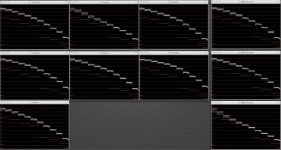
Standard..............................................................................Cinema..............................................................................Dynamic
View attachment 27600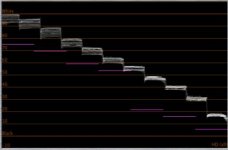
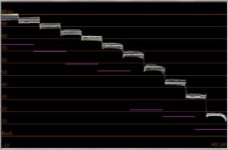
Smooth..............................................................................Nature..............................................................................Nostalgic
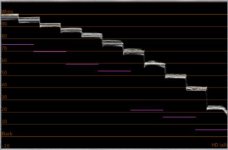
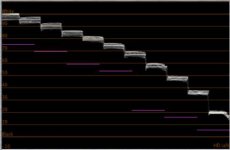
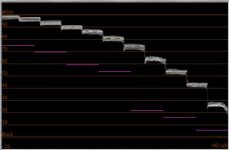
Vibrant
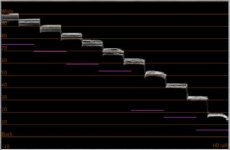
B&W Dynamic
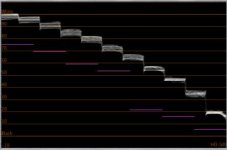
B&W Standard
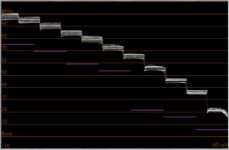
B&W Smooth
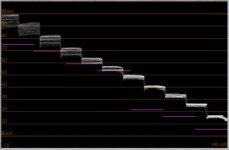
1. Download .mov files for 20-29 from Vimeo.
2. Drop them into a FCP timeline, letting FCP change sequence settings to match the clips.
3. Scale and distort the clips.
3. Open the waveform and snap a screen capture (shift-command-4) of the waveform for each clip.
I did not do any kind of color correction or changes to the clips at all. Personally, I still think Cinema is going to be the most accurate with a smoother dynamic range than smooth. B&W Standard is still my preferred B&W mode.
Standard..............................................................................Cinema..............................................................................Dynamic
View attachment 27600
Smooth..............................................................................Nature..............................................................................Nostalgic
Vibrant
B&W Dynamic
B&W Standard
B&W Smooth
Last edited:
Judging by the waveform images, I'd say the "Cinema" setting is very similar to the Cine-D setting on Panasonic HVX and HPX cameras. There's more dynamic range distributed to the highlights, but the trade off is that there's an ugly clip at the top instead of gently rolling off (like Smooth). Technically speaking, I think "Cinema" offers the most dynamic range, but it would best be used in controlled lighting scenarios where you can make sure nothing clips. I guess that's why they call it "Cinema", because it's for using movie lighting. I may use this when I shoot a short with lighting, but for everyday use, I'm still a fan of Smooth.
I may use this when I shoot a short with lighting, but for everyday use, I'm still a fan of Smooth.Judging by the waveform images, I'd say the "Cinema" setting is very similar to the Cine-D setting on Panasonic HVX and HPX cameras. There's more dynamic range distributed to the highlights, but the trade off is that there's an ugly clip at the top instead of gently rolling off (like Smooth). Technically speaking, I think "Cinema" offers the most dynamic range, but it would best be used in controlled lighting scenarios where you can make sure nothing clips. I guess that's why they call it "Cinema", because it's for using movie lighting.
I disagree. Look at the difference between the 100 and 90 IRE in Cinema and Smooth. The 90 IRE is actually lower on the Cinema than on Smooth. Same with 80, 70, 60... That's giving you more dynamic range in your highlights because Smooth will more quickly push mids and highs into clipping. When you don't have control of lighting is when you don't want all your highlights bunched together like they are in Smooth. Cinema FTW.
Mike,
I think we're saying the same thing, but coming to different conclusions. I DID say that "Cinema" gives you more Dynamic Range in the highlights. But I think the trade off is going to be a harder, uglier clip when things do overexpose. If you look at the top curve of "Smooth", you'll notice that, instead of looking linear like "Cinema" does, that it is curved, thus rolling off the highlights. So you trade off dynamic range for more pleasing roll-off of highlights. That's just a theory. I haven't tested it with the camera.
"When you don't have control of lighting is when you don't want all your highlights bunched together like they are in Smooth. "
That depends on what you're shooting. Actually, I think Smooth works better, because you just expose lower, and the Smooth curve keeps details in the shadows, where the "Cinema" curve would bury the same info into the blacks. The Smooth curve has a less contrasty look because it brightens the shadows and midtones.
This is all academic, though. The best thing to do is test and see what works for you.
I think we're saying the same thing, but coming to different conclusions. I DID say that "Cinema" gives you more Dynamic Range in the highlights. But I think the trade off is going to be a harder, uglier clip when things do overexpose. If you look at the top curve of "Smooth", you'll notice that, instead of looking linear like "Cinema" does, that it is curved, thus rolling off the highlights. So you trade off dynamic range for more pleasing roll-off of highlights. That's just a theory. I haven't tested it with the camera.
"When you don't have control of lighting is when you don't want all your highlights bunched together like they are in Smooth. "
That depends on what you're shooting. Actually, I think Smooth works better, because you just expose lower, and the Smooth curve keeps details in the shadows, where the "Cinema" curve would bury the same info into the blacks. The Smooth curve has a less contrasty look because it brightens the shadows and midtones.
This is all academic, though. The best thing to do is test and see what works for you.
You're highlights are going to be crushed together with loss of detail and you'll be at greater risk of clipping. What you're suggesting would be underexposing to prevent the clipping, which could introduce noise into your shadows and blacks when you color correct to bring those shadows back up to where they should be.
You're highlights are going to be crushed together with loss of detail and you'll be at greater risk of clipping. What you're suggesting would be underexposing to prevent the clipping, which could introduce noise into your shadows and blacks when you color correct to bring those shadows back up to where they should be.
No, again I think you're deriving the opposite conclusion. That's what will happen using "Cinema" in an uncontrolled (i.e. high contrast) lighting situation in order to avoid clipping. The "Cinema" curve, with it's lower shadow and midtone settings, are going to get noisy when you bring them back up in post. The "Smooth" setting, on the other hand, already has the midtones and shadows up higher. So they are either right where they need to be, or they can be crushed for contrast. But either way, "Smooth" setting doesn't cause noise or ugly clipping if properly exposed.
"Cinema" is great if you can control your contrast ratios, i.e. add lots of fill to the shadows, or you're shooting on a cloudy day where the world isn't very contrasty.
I'm not trying to be combative, and you may be right in that there's more range in the highlights. All I know is that the "Cinema" waveform looks similar to the Cinelike-D waveform on the HPX170 which has an ugly clip when things overexpose.
Part of the communication problem, too, is that the waveform images are a bit misleading because the charts are overexposed. Since the OP made the whitest chip clip at 255, everything is technically too bright. I understand he wanted to use that as a constant, but middle gray is consistently too high on all the examples, and the blacks are lifted.The middle gray chip should hit at 55 IRE or so.
And I guess it depends on what kind of shooting you do. If most of what you shoot are images with lots bright things, I guess you'd want all the detail in the highlights. But skin tones and many other things fall in a lower area, and that's what's important to me.
Last edited:
farfromsubtle
Well-known member
This is interesting. It looks like cinema might be the way to go if detail in the highlights are important to you. But if you need to sink into the blacks more gradually, smooth is safer. Is that an accurate summary?
This is interesting. It looks like cinema might be the way to go if detail in the highlights are important to you. But if you need to sink into the blacks more gradually, smooth is safer. Is that an accurate summary?
Yes, I'd say so. I did some tests using a DSC Labs chart, which I will edit and upload this weekend (after I recover from my New Years Eve hangover). But here's a little preview of what I discovered: "Cinema Mode" does indeed provide a little more headroom in the highlights before clipping than "Smooth". But it's only 1/3 of a stop more. And, like I thought, the trade-off for that extra headroom is that midtones and shadows are darker. After I post these charts, I'll do some real-world tests to see which Film Mode on the GH2 looks best for clipped highlights.