HDMI Capture Problem SOLVED - AviSynth RULES!

I think I've replicated your problem. I notice you're writing your script with periods between the arguments. That's not how I run my scripts. Try it this way:

AssumeTFF()
TFM()
FDecimate(threshold=2.0)
AssumeFPS(24000,1001)

This is the exact script I used to successfully decode Barry's 24P #1.

Download the result here:
http://www.sendspace.com/file/rma5bi

It's encoded with UT codec.

I know in theory these scripts should do the same thing, but they don't. When I tried it with the periods, I got the duplicates you describe.
As for the 30P clip, I used the same script, but had to change the target frame rate.
(fdecimate has a default target rate of 23.976)

AssumeTFF()
TFM()
FDecimate(rate=29.97, threshold=2.0)
assumefps(29.97)

You can also download the result:
http://www.sendspace.com/file/t0gdeg


Also, FWIW, here are the versions I am using:

avisynth.dll 2.6 - Modified: Saturday, September 19, 2009, 5:36:58 AM

fdecimate 1.0.1 - Modified: Saturday, June 19, 2004, 4:11:30 AM

TIVTC - version 1.0.5.0 - Modified Thursday, January 17, 2008, 1:01:48 PM

Windows XP SP2


It doesn't make a difference here with or without periods (and it shouldn't, that syntax is identical to avisynth).

Is there a typo in your versions? Is avisynth Sept 29? I cannot find Sept 19.

Is your fdecimate 1.1.0 or 1.0.2 ? (I tried both) . There is no 1.0.1 that I can find

What ffms2 version ? or are you using a different source filter?

Is there a reason you chose 29.97 instead of 30000/1001 ? for the "30p" clip ? (It works fine eitherway - the frames are the same, but the running time will be different causing gradual desync)

BTW, most .dll's that are in the avisynth/plugins folder will autoload, you don't need LoadPlugin. But if you're doing version testing, make sure they are not present in root directory of the plugins folder - so they don't autoload. This way you can use LoadPlugin to separate dll's in different folders


But your encoded clip looks perfect for clip1, I just can't replicate it with that script
 
Last edited:
It doesn't make a difference here with or without periods (and it shouldn't, that syntax is identical to avisynth).

If two people run the same script and get different results, we have a problem.
In an attempt to understand what's going on, I've uploaded the exact dll's that I used.

http://www.sendspace.com/file/bqmune

Try them and see whether it makes a difference.


Is there a reason you chose 29.97 instead of 30000/1001 ? for the "30p" clip ?

I wasn't sure what the 'long number' should be.
 
Ralph & PDR, I can post more clips if you'd like, just let me know what it is that you'd like different ... I can make one three minutes long if you like, but the file size would be enormous -- would the 18mbps recording mode be okay?
 
If two people run the same script and get different results, we have a problem.
In an attempt to understand what's going on, I've uploaded the exact dll's that I used.

http://www.sendspace.com/file/bqmune

Try them and see whether it makes a difference.


Not working here.

Is your plugins directory clear ? Do you have any other versions in there that might be autoloading ?

The avisynth .dll in the zip file isn't helpful, because it installs other things than just a .dll . Can you check with version() to see the date?

Maybe GrgurMG can have a shot as well. I can't think of anything else that would cause a discrepancy
 
Ralph & PDR, I can post more clips if you'd like, just let me know what it is that you'd like different ... I can make one three minutes long if you like, but the file size would be enormous -- would the 18mbps recording mode be okay?

I think we need to resolve this discrepancy we're having first. Another clip at this time would just confuse things even more.
 
Not working here.

Is your plugins directory clear ? Do you have any other versions in there that might be autoloading ?

All my plugins are in the plugins directory. That's the only place I run them from.

The avisynth .dll in the zip file isn't helpful, because it installs other things than just a .dll . Can you check with version() to see the date?

I originally installed Avisynth 2.5.8.4. The info on the 2.5.8.4 avisynth.dll is Modified: Friday, August 29, 2008, 9:51:12 PM. I later manualy replaced that avisynth.dll with the one in the zip file. The new dll is refered to as "Avisynth 2.6 by SEt".
 
I originally installed Avisynth 2.5.8.4. The info on the 2.5.8.4 avisynth.dll is Modified: Friday, August 29, 2008, 9:51:12 PM. I later manualy replaced that avisynth.dll with the one in the zip file. The new dll is refered to as "Avisynth 2.6 by SEt".


OK sET's build;

Just an FYI, there are several branches of avisynth, this is an MT branch, but it has been known instability with some plugins. Even SEt's 2.58 MT build is more stable than SEt's 2.6 build. The main branch for official releases is hosted on sourceforge. All 2.6.x builds are still "alpha" testing . The 2.58 main build is very stable and is the official release.

Anyways, I swapped that .dll out, and it didn't make a difference


Some more observations regarding clip1:

The version you uploaded is missing a frame at the beginning (0 to 215 = 216 frames)

The version I uploaded earlier using the different algorithm (0 to 216 = 217 frames) . If I trim off the 1st frame and compare them (you can use interleave() in avisynth), they are identical in terms of cadence

If I trim off a few frames before using your script to IVTC , it now works here with my setup without the issues (but missing the 1st 2 frames)


I doubt this will make a difference , but there is a tiny , tiny chance that FFMS2 might cause inconsistent results (even less chance if you use seekmode=0). The reason is, it uses container timestamps for it's frame accuracy. So if the container is corrupted or there is some other strange reason, maybe download was corrupted - you might get different results.

If you demux the elementary video , and index it with DGIndex , this makes it even more consistent. So instead of using FFVideoSource() as the source filter, you would use MPEG2Source() with the .d2v file

I demuxed Barry's clip1 and uploaded the .m2v file if anyone wants to try (I doubt it will make a difference)
http://www.mediafire.com/?576dbd12443md73
 
Last edited:
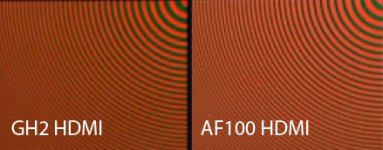
Okay, another file for you fine folks to play with. I just got a new chart that measures chroma resolution, called "The Wringer". It's excellent, showing up to 1,000 TVL, in concentric rings of color -- basically a kind of Zone Plate of color, with opposite colros blended together at varying resolutions -- the lower-left-center quadrant is green and red rings, the upper-right quadrant is green and purple... it's just perfect for this purpose. This would let us know for an absolute fact what the improvement in color resolution is, on the GH2.

Er, if there was one, that is... because from my experimentation with it, it looks like the chroma is permanently screwed up on the HDMI output.

It's substantially different than the recorded file, that's for sure, but it's not right.

Here's the GH2 NanoFlash file from "The Wringer" -- this is a 50mbps 4:2:2 file. I tried it also at the maximum rate of 180mbps, and it made no difference (as you'd expect, on a basically static shot).
http://www.mediafire.com/?45qdghl7cpvjd6j

So you know what it's supposed to look like, here's a section from the AF100's Nano recording (and yes, the Nano makes a substantial difference in the AF100's HDMI/HD-SDI recording as far as color res goes!)


GH2-vs-AF100-HDMI.jpg

I'm hoping that perhaps it's somehow using interlaced chroma in the 3:2 pulldown embedding process, even though I know it isn't -- you can tell that the jagginess is exactly an aliasing circle, it's pretty easy to see the pattern. Sure doesn't look good though. But hey, I figured I'd let you guys run it through your process and see what you come up with when it's appropriately IVTC'd.

Okay, and while we're at it -- notice something odd about the note I used on this file to slate it? Yeah, it's backwards. Why? Because the Nano recorded it that way! Looks like there's something else you have to be aware of if you're going to try to record GH2 HDMI output... we all kind of know that if you rotate the GH2's LCD screen, it'll flip around to look right from the other direction, right? Well, it looks like it'll flip the HDMI output too, so depending on how you have the LCD panel folded out, you may very well end up with backwards footage recorded on your HDMI recorder. The whole file was recorded backwards. I had to flip it in photoshop on the JPG above so they would look similar, but look at the recording -- it's all backwards.
 
Cool chart! Can we expect to see some tests on the GH2 and AF100 soon Barry?


2jb4cqw.png


Full size screenshot (BT.709) , using IVTC, FixBrokenChromaUpsampling, ConvertToYV12
http://www.mediafire.com/?gxu89i66cgmgksv


The IVTC doesn't "fix" the chroma issue for the HDMI output


I think by combining Ralph B's suggestion to use ConvertToYV12, coupled with GrgurMC's suggestion to use FixBrokenChromaUpsampling, produces the "most usable" results, and these findings are consistent with the other chroma testing on Ralph B's clips in post 106 (scroll down)

http://www.dvxuser.com/V6/showthread.php?237584-HDMI-Capture-Problem-SOLVED-AviSynth-RULES!/page11
http://www.dvxuser.com/V6/showthrea...Synth-RULES!&p=2243617&viewfull=1#post2243617


Unfortunately this converts to 4:2:0 , and essentially blurs the chroma.
 
Last edited:
Not at all. Very impressive work. There are so many good ones it makes choosing a winner difficult.

The first thing is that I would like to thank you Ralph B and all the others like PDR etc for the fantastic job and perseverance to get uncompressed HDMI output from the gh2. For me you are all at the forefront of what I would call second generation DSLR revolution. The first generation was plagued by some image issues and the base GH2 already solved.

I always thought that the next step in term of pure image quality would be the uncompressed hdmi out. I don't think we will get any form of raw output in the next 5 years and the hdmi makes perfect sense as an upgraded from the compressed codec we have now. Many people are questioning the fact that Canon has no plan to release any large chip video camera. But they don' t have to, they only need to get clean hdmi out to get the momentum going in the field of video. The 5d mark3 just need to get rid of moire and aliasing (sampling more pixel and using binding) and a clean hdmi 422 output to continue the Canon inroads in the video world.

I think that a GH2 with hdmi output would be the first second generation DSLR. The closest to a cine DSLR. Because it would be the first time we would get some really solid files to work out of a dslr . I guess many would say the same about the gh13, but it seems that Avchd even at very high bit rate will eat into the shadows and highlight, thus is the way it seems to have been conceived. While here we can clearly see that the dynamic range has been extended and the file can be massaged much more.

I am for narative filmmaking and a lot of technology like the bryte-view wirreless HDMI (future pro version also planned). These could help me built my dream Hdmi capture PC station with a intensity pro. It would be easy to build relatively small powerful battery powered pc acting as a directors station and compress on the fly or after take to cineform for example. There are also the more portable ninja for those who want really small form factor.
 
I am for narative filmmaking and a lot of technology like the bryte-view wirreless HDMI (future pro version also planned). These could help me built my dream Hdmi capture PC station with a intensity pro.

Wireless HDMI transmitters are an intriging possiblity, but every one I've seen to date requires AC power. Are you aware of any that can run off of a battery?
 
If you or anyone here has some time to shoot something like the man on the roof (It would be nice to have some human being to see skin tone etc) at base iso and post some screen grab in png or tiff. I would really be glad to do some post processing and see how much we can push it in post.
 
A DEEPER UNDERSTANDING

As I've worked with Barry's clips and my own footage, I've come to better understand how fdecimate works and the critical importance of the threshold setting.

The default setting for threshold is 1.0, and what that means, is if the difference between two adjacent frames is less than 1.0, they are considered duplicates, and are decimated. If the difference is greater than 1.0, they are considerd different, and are kept.

fdecimate gives you the option to see a visual readout of this number as it changes from frame to frame. In your script you write:

fdecimate(metrics=true)

This is for diagnostic purposes only. When you do this, fdecimate does not decimate any frames.

Now, when we turn on metrics and examine Barry's clips (24P #2 in this example), we find abnormally high numbers for some of the duplicate frames. And there's a reason for this. Look at these pictures.


Dup Clean


Dup Artifacts


These are two adjacent frames after they comes out of TFM(). Now, you and I know these are duplicates, but if the threshold is set at 1.0 (or even 2.0), fdecimate sees them as different and will keep them.

So, what is it about the second picture? To me, this looks like MPEG artifacts, the result of high compression that I assume Barry used when the picture was originally recorded into the nanoflash. And to tax the Nanoflash even more, remember, it was being fed an interlaced signal.

Now here's the important point - none of this is present on my footage which is recorded losslessly using UT codec. In fact, the metric for duplicate frames is 0.00, meaning an exact pixel for pixel match. As a result, I can leave threshold at 1.0 and fdecimate does it job perfectly (with the exception of a few glitches in the first second, that I wrote about earlier).

In this sense, Barry's clips, although marvelous as a motion test, were somewhat misleading because of their extreme compression artifacts. That being said, the script can in fact, properly decode them with an appropriate adjustment to the threshold. I already posted 24P #1 and 30P, which both required setting the threshold to 2.0.
24P #2 required upping the threshold to 3.2. You can download it here:

http://www.sendspace.com/file/bzua57
 
Last edited:
If you'd like I can re-record them in a much higher bitrate, but I think MediaFire only lets me upload like 200 megabytes max or something, so that would mean I could only put up a few seconds of footage... would that be useful?
 
Nice detective work Ralph!

Barry - If you want to upload larger footage, one option is to use split archives (e.g. 7-zip) and end users can reassemble the pieces. Or use other file hosts ; I think megaupload allows 1GB.
 
Back
Top